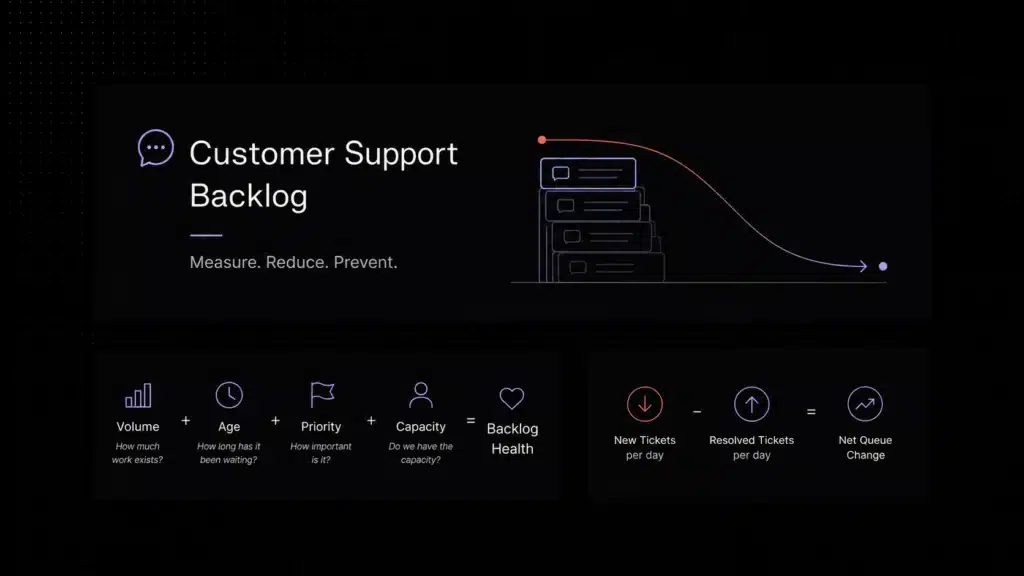
A practical founder playbook for SaaS teams that want more capacity without solving every support problem by hiring.
Scale customer support means handling more customers, conversations, and product complexity without letting response quality, resolution speed, or support cost fall apart. In practice, the teams that scale best reduce repetitive volume, improve routing, strengthen self-service, and add automation before they add headcount.
A lot of support teams hit the same moment at roughly the same stage of growth. Ticket volume rises, inboxes feel fuller every week, first response time gets harder to protect, and the instinctive answer becomes: we need to hire. Sometimes that is true. Often it is only partly true.
What founders and support leads usually discover a little later is that headcount alone does not fix support systems. If the same repetitive billing questions keep coming in, if onboarding confusion keeps generating avoidable tickets, if conversations sit in the wrong queue, or if agents have to search five places to answer one question, adding more people mostly increases the cost of an inefficient system.
That is why the strongest support teams do not think about scale as a hiring problem first. They think about it as a capacity-design problem. They ask which work should disappear through self-service, which work should move faster through better workflows, which work should be automated, and which work genuinely needs a human.
This guide breaks that down in plain language. It explains what it really means to scale customer support, why hiring alone is a weak strategy, which systems create more capacity before you add headcount, and how to tell when you truly do need more people.
What it really means to scale customer support
Scaling customer support does not simply mean handling more tickets. It means handling more customers, more edge cases, more channels, and more product complexity while keeping the support experience stable. That includes response speed, resolution quality, consistency, and overall cost per conversation.
In early-stage SaaS, support often feels manageable because volume is still low enough for smart people to cover rough edges manually. One person remembers product quirks. Another knows every billing workaround. A founder still jumps into tough threads. That works for a while, but it does not scale cleanly.
Real support scale starts when the team can absorb higher demand without becoming slower, more fragmented, or more expensive for every additional customer. That usually requires three things at once: lower repetitive volume, better operational flow, and clearer visibility into where work gets stuck.
Why hiring alone does not solve support scale
Hiring matters, but hiring is easiest to misuse when support gets busy. More agents can help with temporary overload, new coverage hours, or growing complexity. But if the underlying system is inefficient, hiring mostly masks the problem until the next wave of volume arrives.
This is why so many teams feel they are always adding people but never really catching up. The cost goes up, yet first response time still slips, queues still back up, and customers still ask the same predictable questions.
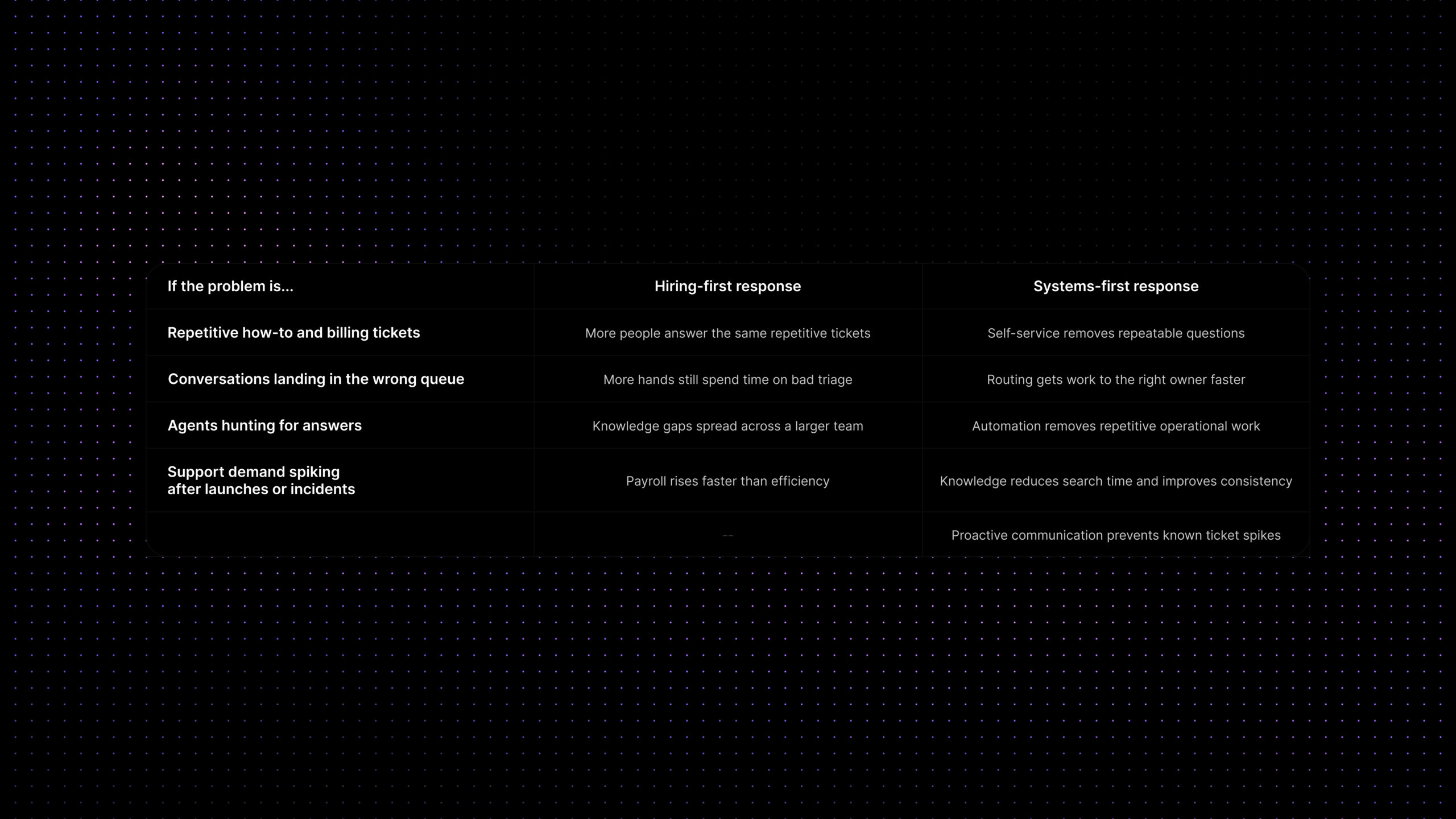
| If the problem is… | Hiring more agents does… | A systems-first fix does… |
|---|---|---|
| Repetitive how-to and billing tickets | Adds more people to answer the same questions | Moves repeatable questions into self-service, macros, and automation |
| Conversations landing in the wrong queue | Creates more hands, but still wastes time on triage | Improves routing rules, ownership, and escalation paths |
| Agents hunting for answers | Spreads knowledge gaps across a larger team | Centralizes knowledge and surfaces answers faster |
| Support demand spiking after launches or incidents | Helps temporarily if you hire early enough | Adds proactive comms, status updates, and deflection before tickets pile up |
| Costs rising faster than support quality | Raises payroll faster than efficiency | Increases capacity per agent before more headcount is added |
The pattern is simple: if the same avoidable work keeps entering the system, more agents just means more people processing avoidable work. Scale happens when you reduce the amount of work that should never have become a ticket in the first place.
Reduce support tickets before you add agents
The cleanest path to scale is usually ticket reduction, not faster ticket processing alone. That does not mean ignoring customers or making support harder to reach. It means removing the causes of repetitive tickets so the team can focus on work that actually needs attention.
In SaaS, repetitive volume usually clusters around a small set of themes: onboarding confusion, password or access issues, billing clarifications, simple product how-to questions, status-related uncertainty, and requests that should have been routed correctly the first time.
When founders say support is becoming expensive, what they often mean is that too much of the queue is predictable. Predictable work is exactly where systems beat staffing.
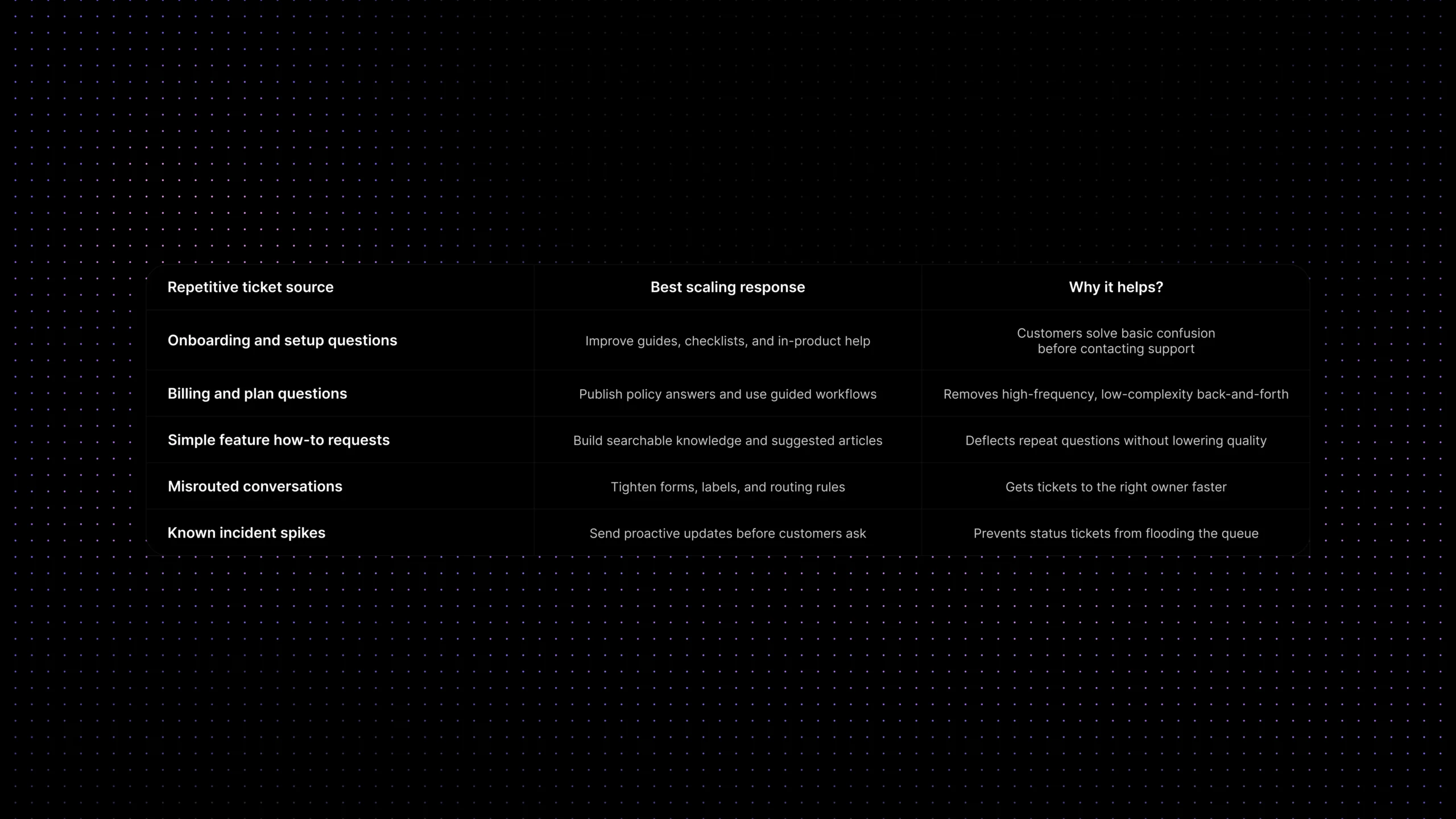
| Repetitive ticket source | Best scaling response | Why it helps |
|---|---|---|
| Onboarding and setup questions | Improve guides, checklists, and in-product help | Customers solve basic confusion before contacting support |
| Billing and plan questions | Publish policy answers and use guided workflows | Removes high-frequency, low-complexity back-and-forth |
| Simple feature how-to requests | Build searchable knowledge and suggested articles | Deflects repeat questions without lowering quality |
| Misrouted conversations | Tighten forms, labels, and routing rules | Gets tickets to the right owner faster |
| Known incident spikes | Send proactive updates before customers ask | Prevents status tickets from flooding the queue |
This is where our guides to AI customer support automation, support ticket automation, and customer self-service become part of the same scale conversation. They are not separate projects. Together, they determine how much work hits the queue and how fast the remaining work moves once it gets there.
The systems that let support scale without hiring faster
Most support teams do not need one giant transformation project. They need a cleaner stack of decisions. Which questions should customers solve themselves? Which tasks should workflows handle automatically? Which conversations need better routing? Which answers should be easier for agents to find? That is where scale starts to look practical instead of abstract.
1. Self-service that actually removes volume
A help center only helps scale support when it is built around real ticket patterns, not around what the company wishes customers asked. The best self-service content is written from inbox reality: the questions support sees every week, the points where onboarding breaks down, and the tasks customers want to complete without waiting for a reply.
2. Routing and queue ownership
Support does not scale well when conversations drift. Tickets bounce between teams, queues become holding areas, and response-time problems get blamed on staffing when the real issue is ownership. Clear routing, simple intake rules, and visible queue ownership are some of the highest-leverage scale fixes a team can make.
3. Automation for repetitive operational work
Automation is strongest when it removes work around the ticket, not just when it tries to replace the conversation. Tagging, assignment, SLA handling, escalation triggers, status updates, and repetitive follow-up tasks can all be automated in ways that create real capacity without making support feel robotic.
4. Knowledge that is easy for agents to use
Even when a ticket cannot be deflected, agents should not have to rebuild answers from memory. Strong internal and external knowledge reduces answer time, improves consistency, and makes new agents productive faster. That matters more as the team grows.
5. AI where it reduces effort instead of adding risk
AI can help scale support, but only when it is used in the right places. Good uses include article suggestions, response drafting, summarization, triage support, and customer-facing deflection for repetitive questions. Poor uses are the ones that create faster mistakes, ungrounded answers, or escalations with missing context.
Where support automation actually helps
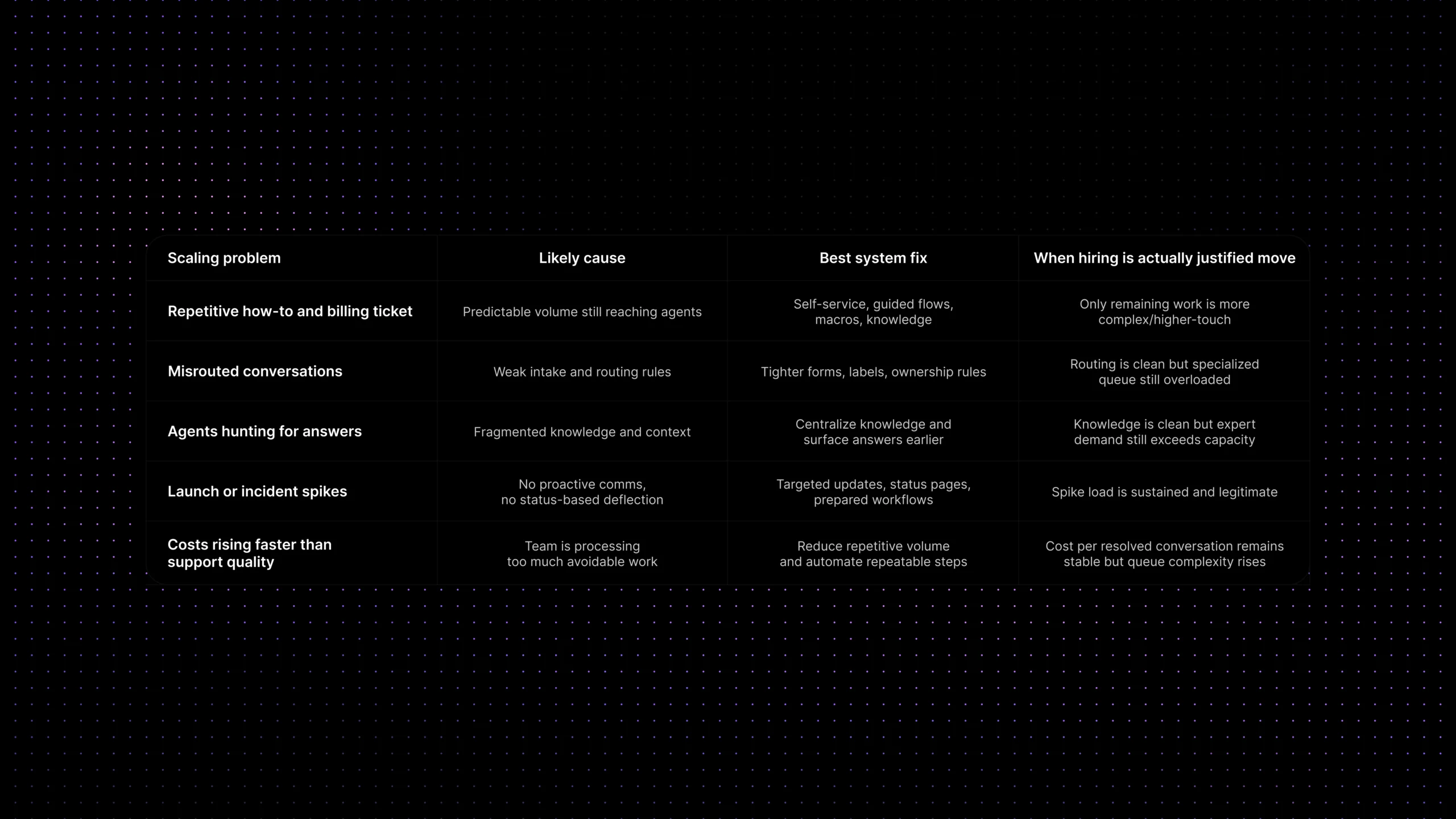
Support automation has become broad enough that teams sometimes expect it to solve every scale problem. It does not. What it does well is reduce the cost of repeatable coordination. It helps when the work follows a pattern: assign this type of conversation, trigger this SLA, suggest this article, escalate after this threshold, or notify the customer when this condition changes.
It helps much less when the issue depends on judgment, exception handling, negotiation, or product nuance that still lives mostly in human heads. That is why the strongest systems-first teams automate the obvious first. They do not try to automate complexity just because automation is available.
A useful rule is this: automate what is repeatable, guide what is risky, and keep humans close to anything that changes policy, trust, or customer confidence.
The role of self-service, routing, and workflow discipline
Support scale often breaks long before a team reaches its staffing limit. It breaks when the queue becomes unpredictable. Some tickets arrive with no context. Some go to the wrong person. Some could have been deflected. Some are answered correctly but too late. These are workflow problems disguised as capacity problems.
That is why self-service, routing, and workflow discipline matter so much together. Self-service removes avoidable demand. Routing shortens the path for the work that remains. Workflow discipline makes the system more predictable for agents and customers.
When those pieces work together, the support team gains room to absorb growth. When they do not, every new customer adds more chaos than capacity.
What to measure as support scales
If you want to know whether support is truly scaling, do not look only at ticket count or hiring pace. Watch whether the system is getting more efficient as volume grows. A few metrics tell that story clearly.
Start with repetitive-ticket share. If the queue is filling with the same categories week after week, scale will remain expensive until those categories are reduced. Then track first response time, time to resolution, self-service resolution, backlog growth, and cost per resolved conversation. These show whether the team is gaining capacity or just spreading work across more people.
Also watch quality signals, not only speed. A team can lower response time by rushing, but that is not scale. Real scale means customers still get clear answers, fewer repeats, and smoother resolutions while the system handles more demand.
When you really do need to hire
Systems-first support is not an anti-hiring philosophy. It is a sequencing philosophy. Sometimes the right answer really is more people. For example, you may need hiring when coverage hours are too thin, when product complexity has outgrown current expertise, when enterprise accounts need higher-touch support, or when the remaining queue is genuinely high-complexity work that cannot be simplified much further.
The key is knowing the difference between volume that should be removed and volume that should be staffed. If predictable work still dominates the queue, fix the system first. If the system is already disciplined and the remaining workload still exceeds capacity, hiring becomes much more rational — and much more effective.
Where Inquirly fits
For SaaS teams, support scale usually depends on how well five layers work together: conversations, ticketing, workflow automation, knowledge, and analytics. If those pieces live in separate tools and separate habits, every growth stage feels heavier than it should.
That is where Inquirly fits. Inquirly brings omnichannel conversations, ticketing, workflow automation, knowledge base content, and AI-assisted support into one connected workspace. That makes it easier to reduce repetitive demand, route work cleanly, keep context visible, and measure whether the support system is actually becoming more efficient.
The goal is not to turn support into a machine. The goal is to make the system strong enough that the team can spend more time on the conversations that genuinely need human judgment.
Conclusion
The support teams that scale best are not the ones that avoid hiring forever. They are the ones that refuse to treat hiring as the only strategy. They remove predictable work, improve how conversations flow, make answers easier to find, and use automation where it creates real capacity.
That is what lets support grow without tripling headcount every time volume rises.
See how Inquirly combines ticketing, workflow automation, self-service, knowledge, and AI-assisted support in one connected system built for SaaS teams that want to scale support with more discipline, not just more headcount.