A practical guide for SaaS teams that want faster support without colder support — and need automation, templates, and AI-assisted replies to sound clear, calm, and trustworthy.
Automation usually breaks trust in small ways before anyone notices it in a dashboard.
A customer opens a chat because something feels off. They get a reply that is technically correct, but it sounds like nobody actually read what they wrote. The answer is fast, but flat. The wording is polite, but sterile. The next step is there, but the customer still feels brushed aside.
That is the real problem with support automation. Most teams do not lose the human feel because they automate. They lose it because they automate badly.
When response templates, chatbot replies, macros, and AI-assisted drafts are written without clear communication rules, speed goes up while trust quietly goes down. Customers start reading your replies as procedural instead of reassuring. Agents copy and paste language they do not believe in. The brand sounds warm in marketing and cold in support. Over time, the experience feels fragmented.
Good customer support communication does not mean sounding overly emotional or pretending every reply was handcrafted from scratch. It means sounding clear, calm, and attentive even when the response is fast, templated, or AI-assisted.
In practice, the teams that do this well treat tone as an operational design choice. They define how support should acknowledge frustration, explain next steps, set expectations, and stay consistent across channels. Then they build those rules into their templates, workflows, and AI suggestions.
This guide breaks down how to do that.
What good customer support communication sounds like
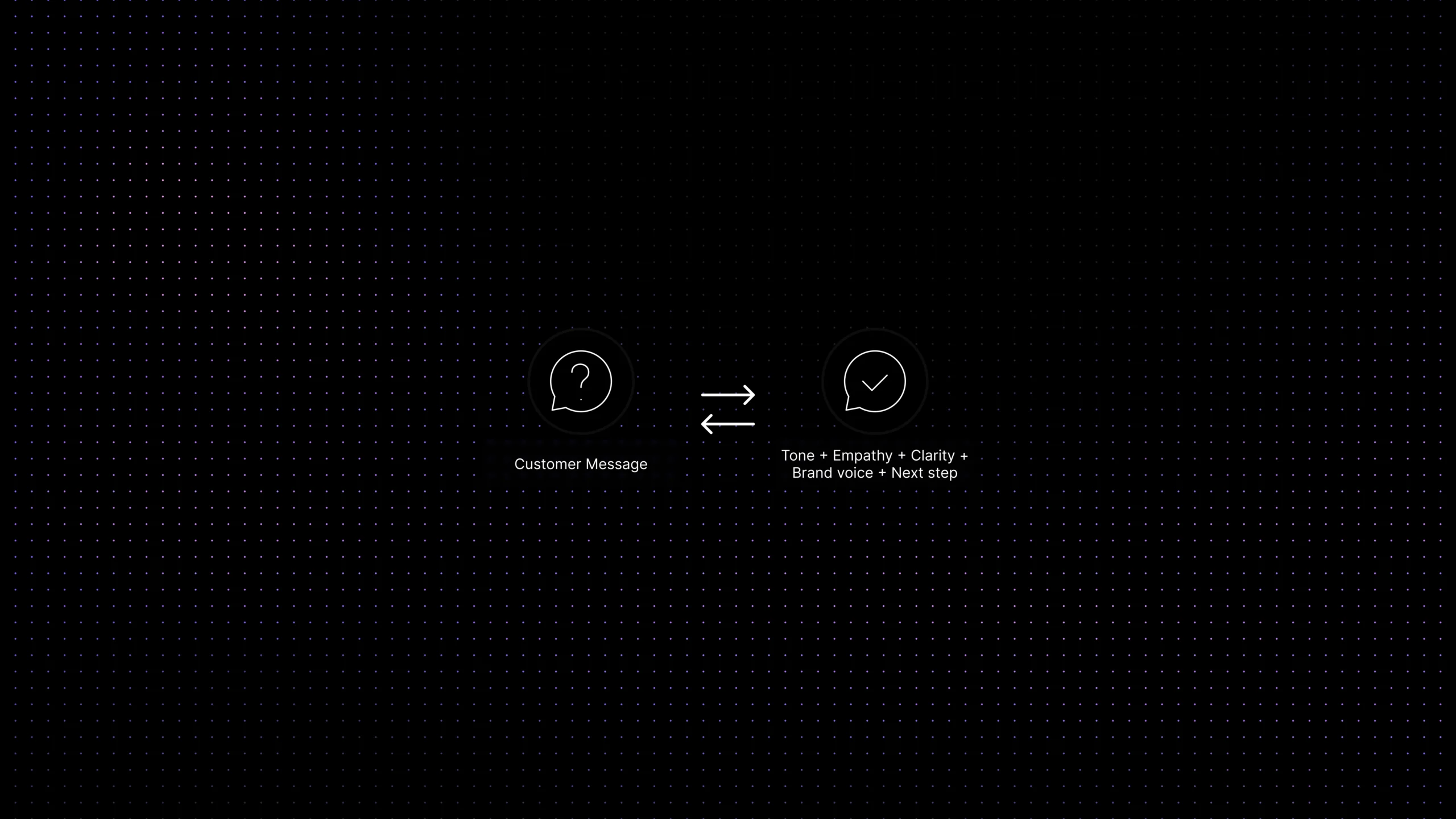
Good customer support communication is not just “nice language.” It is the combination of four things working together:
-
Clarity:
the customer understands what happened, what happens next, and what they need to do.
-
Empathy:
the reply shows that the team understands the customer’s situation, not just the ticket category.
-
Control:
the message lowers uncertainty instead of adding more of it.
-
Consistency:
the reply still sounds like your company, whether it came from a human, a macro, or an AI-assisted draft.
The easiest way to spot weak support communication is to compare two replies that contain the same information. One sounds procedural. The other sounds grounded and helpful.
Procedural support says: “Your request has been received. We will update you soon.”
Grounded support says: “Thanks for flagging this. I can see why this is disruptive. Our team is already looking into it, and I’ll update you again by 3 p.m. UTC even if I don’t have a full fix yet.”
Both replies acknowledge the ticket. Only one reduces uncertainty.
That difference matters even more when the message is automated. Customers are usually willing to accept that a first reply is templated. They are much less forgiving when the template sounds detached, vague, or canned.
Why customer support tone matters in automated responses
Tone is the emotional layer of a support message. It answers the question the customer never asks directly: what attitude is this company bringing into the conversation?
When teams talk about customer service tone, they often jump straight to adjectives like friendly, professional, warm, or calm. Those labels help, but they are not enough on their own. In support, tone needs to adapt to the moment.
A billing reminder, a bug acknowledgment, a shipping update, a denial of a refund request, and a security escalation should not all sound the same. The company voice may stay consistent, but the tone has to shift with context.
That is where automation usually goes wrong. Teams build one generic style of reply and reuse it everywhere. The result is not consistency. It is tone mismatch.
When tone mismatches the situation, customers notice immediately. A cheerful message in a serious moment feels careless. A formal message in a simple moment feels stiff. An empathetic sentence followed by vague next steps feels performative.
Automated customer service responses work best when tone is treated like a rule set, not a personality trick. The rule set is simple:
- Match the emotional weight of the situation.
- Name the issue in human language.
- Say what will happen next.
- Never use warmth as a substitute for clarity.
Fast support feels good. Fast support with the wrong tone feels dismissive.
Empathy without overdoing it: how support automation still feels human
Empathy is where many automated replies fall apart.
Some teams remove it almost completely because they are afraid it will sound fake. Others overcorrect and pack every response with dramatic phrases that feel unnatural in routine support. Neither approach works.
Real support empathy is usually smaller than people think. It is not a performance. It is a sign that the team understood the impact of the issue and adjusted the reply accordingly.
A useful rule is this: empathy should acknowledge the customer’s experience, not imitate their emotions.
So instead of saying:
- “We are deeply sorry for this terrible and incredibly frustrating situation.”
You might say:
- “I can see why this would be frustrating, especially if you were trying to finish this today.”
The second line is calmer, more believable, and more specific. It feels human because it sounds like someone actually understood the context.
In automated and AI-assisted support, empathy usually works best when it follows three rules:
- Acknowledge the disruption in plain language.
- Do not exaggerate the emotion.
- Move quickly from understanding to action.
That last point matters. Customers rarely want a long emotional paragraph from automation. They want to feel seen and then moved forward.
A good empathy line buys trust. A good next step keeps it.
Brand voice vs support tone: what should stay consistent
Support teams often blend brand voice and tone into one thing, but they are not the same.
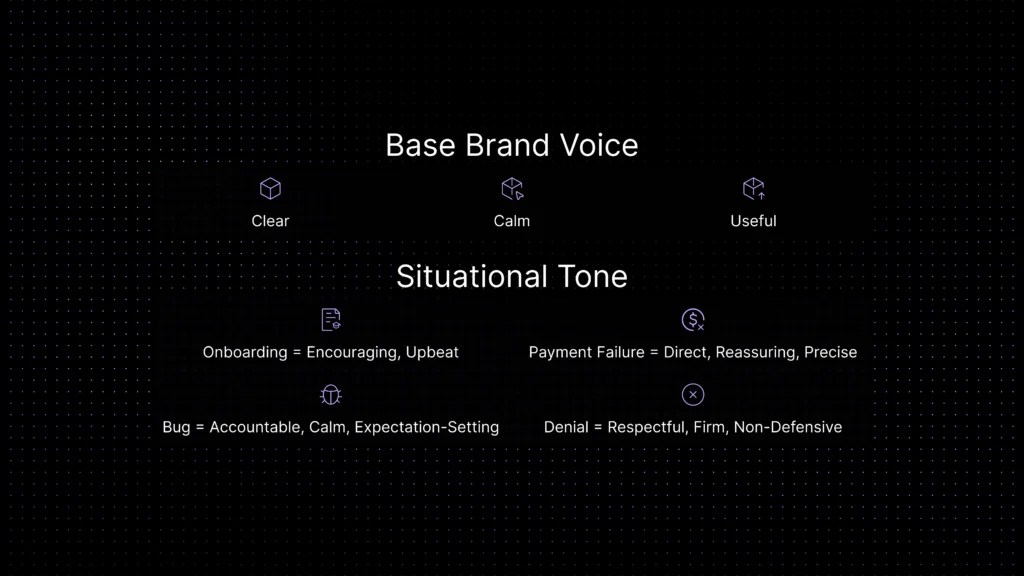
Brand voice is the stable personality of the company. Tone is how that voice flexes in different situations.
Think of it this way: if your brand voice is clear, calm, and useful, your support tone might still be different in these moments:
- An onboarding question: encouraging and upbeat.
- A payment failure: direct, reassuring, and precise.
- A product bug: calm, accountable, and expectation-setting.
- A denied request: respectful, firm, and non-defensive.
This distinction matters because a lot of teams try to force marketing voice into support. That usually creates one of two bad outcomes.
- Support sounds too polished and detached.
- Support sounds too playful for serious customer situations.
Customer support brand voice should keep the company recognizable. Support tone should keep the conversation appropriate.
When you document both, automation gets better fast. Templates become easier to write. AI suggestions become easier to review. Agents stop improvising the emotional style of every reply from scratch.
Where automated responses go wrong
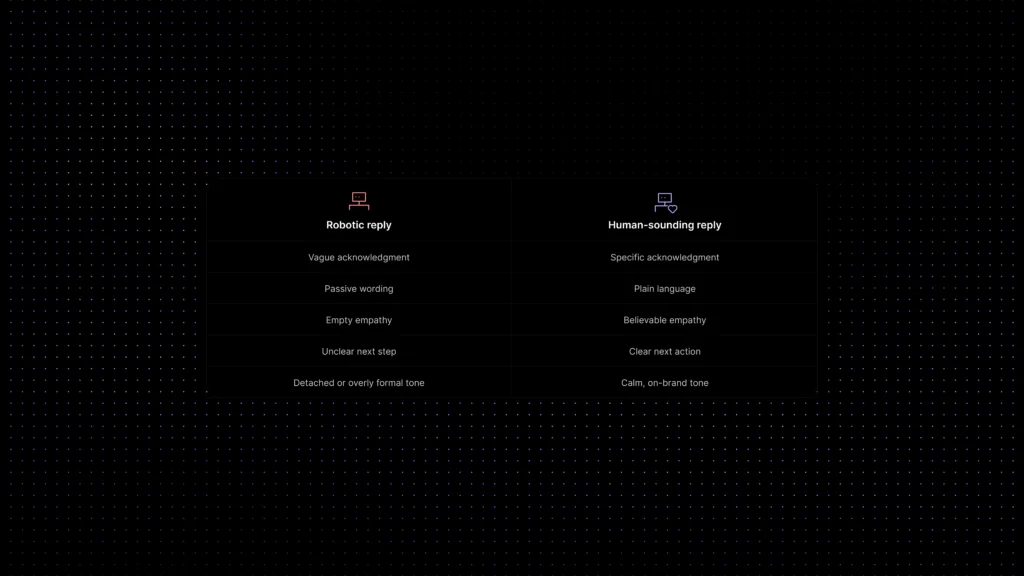
Most robotic support does not sound robotic because it uses AI. It sounds robotic because it falls into a few predictable communication habits:
- Overly generic acknowledgments
- Passive language with no ownership
- Empty empathy statements
- Vague next steps
- Formal wording where simple wording would do
- Template logic that ignores context
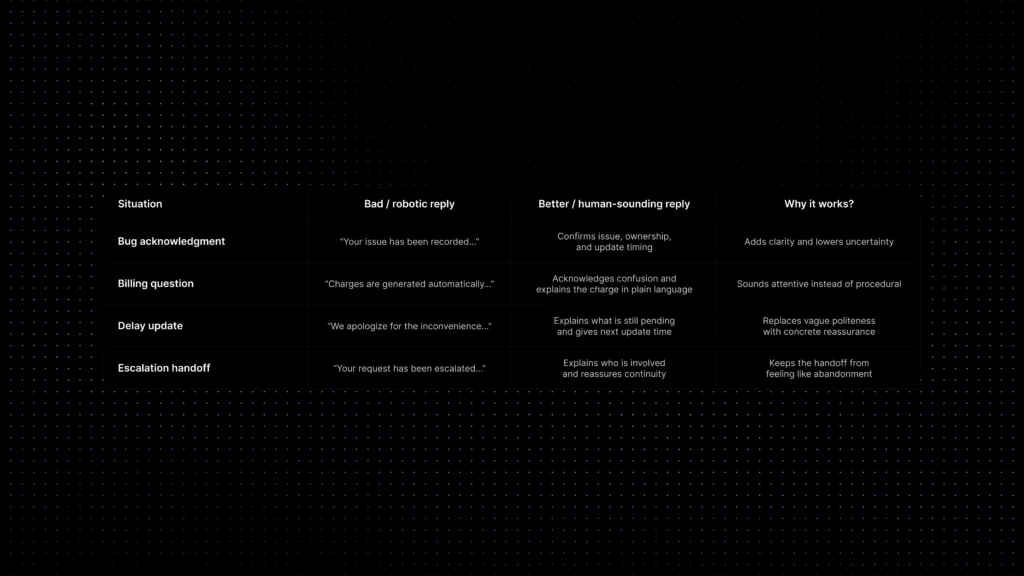
Here is what that usually looks like in practice:
| Situation | Robotic reply | Human-sounding reply |
|---|---|---|
| Bug acknowledgment | Your issue has been recorded. Our team will investigate and revert shortly. | Thanks for reporting this. I can confirm the issue is on our side, and our team is already investigating it. I’ll update you by 4 p.m. UTC, even if the fix is still in progress. |
| Billing question | Please review your invoice. Charges are generated automatically based on usage. | I checked the invoice and can see why it looks confusing. The extra charge came from usage above your plan limit last month. I’ve broken it down below so you can review it quickly. |
| Delay update | We apologize for the inconvenience and appreciate your patience. | Thanks for hanging in there. We’re still waiting on one part of the fix, so this is taking longer than expected. The next update will be in two hours. |
| Escalation handoff | Your request has been escalated to the relevant team. | I’ve handed this to our technical team because it needs a deeper review. I’m staying on the thread and will keep you updated so you don’t have to chase this. |
A practical framework for human-sounding support automation
If you want automation that still feels human, do not start by asking for a “friendlier tone.” Start by building a repeatable communication system.
The framework below works well for automated replies, saved macros, chatbot handoffs, and AI-assisted drafts.
- Start with the support moment, not the template. Write different rules for acknowledgment, reassurance, explanation, delay, escalation, and denial. Each support moment needs its own communication pattern.
- Separate voice rules from tone rules. Voice might stay clear, calm, and low-jargon across all channels. Tone should shift based on urgency, frustration, and complexity.
- Write for comprehension first. Customers forgive short replies. They do not forgive confusing ones. Prioritize plain language, direct verbs, and specific next steps.
- Design empathy as a lightweight move. Acknowledge the customer’s experience in one believable sentence, then move to action.
- Give every automated reply a ‘human door.’ Customers should always know how to continue, escalate, or reach a person when the automated path is not enough.
- Review your templates against real tickets. A template that looked good in a doc can sound awful in a live billing complaint. Use actual conversations to refine language.
- Use AI to draft, not to guess brand behavior alone. AI suggestions improve when they are grounded in your tone rules, knowledge base, previous replies, and workflow context.
This is also where connected tooling matters. If your reply templates live in one place, your knowledge in another, your AI prompts somewhere else, and your workflows somewhere else again, your communication style will drift. The customer hears that drift long before the team sees it in a report.
Example response patterns for common support situations
Below are simple patterns support teams can reuse without sounding canned. The goal is not to memorize lines. The goal is to keep the structure human.
| Situation | What the customer needs | Better response pattern | Why it works |
|---|---|---|---|
| First acknowledgment | Confirmation + orientation | ‘Thanks for flagging this. I’m checking it now and I’ll come back with an update in the next 30 minutes.’ | Short, specific, and calming. |
| Delay notice | Expectation reset | ‘This is taking longer than expected because we’re still verifying the root cause. I’ll update you again by 2 p.m. UTC.’ | Explains delay without hiding behind vague politeness. |
| Policy boundary | Respect + clarity | ‘I can see why you asked for that. We can’t change this part of the policy manually, but here are the two options that are available today.’ | Keeps firmness from sounding cold. |
| Escalation | Ownership + continuity | ‘I’m pulling in our technical team here. I’ll stay with the case and keep you posted so you don’t need to repeat the issue.’ | Prevents the handoff from feeling like abandonment. |
What tone and templates do not solve on their own
Better wording helps. It does not fix every support problem.
Teams sometimes expect tone work to compensate for deeper operational issues. It cannot.
Human-sounding automation will still fail if:
- Your knowledge is outdated.
- Your routing sends customers into the wrong queue.
- Your automation hides the path to a human.
- Your brand voice says one thing and your policies do another.
- Your AI drafts are not grounded in approved content.
In other words, communication design is not separate from support operations. Tone works best when it sits on top of solid context, clean workflows, and trustworthy knowledge.
That is why the strongest automated experiences do not just sound better. They are operationally better.
Where Inquirly fits
Inquirly is built for teams that want support automation to feel faster without feeling colder. On the product side, that matters because communication quality is hard to protect when conversations, workflows, knowledge, and AI suggestions are scattered across separate tools.
With a shared workspace for tickets, chat, and knowledge, teams have a much better chance of keeping tone consistent. The same is true when AI suggestions are grounded in the knowledge base, previous support patterns, and workflow context instead of generated in isolation.
In practical terms, that means teams can define how support should sound, then reinforce those rules across automated replies, agent-assist suggestions, self-service content, and follow-up workflows.
That is the real goal. Not fake humanity. Reliable communication quality at scale.
Internal guides worth pairing with this topic
- See our guide on AI Customer Support Automation for a broader view of where automation should and should not take over.
- Read Knowledge Base AI Chatbot for Customer Support if you want AI-generated replies to stay grounded in approved content.
- Read Support Ticket Automation for SaaS for routing and workflow logic that keeps communication timely.
- Read Customer Self-Service for SaaS to align help content tone with support tone.
- Read Unified Customer Context in Support to reduce tone mistakes caused by missing history.
- Read AI Copilots for Support Agents if your team uses AI-assisted drafts and reply suggestions.
Conclusion
Automation does not need to sound robotic. But it will by default if no one designs the language behind it.
The teams that get this right do not chase “human-like” support by stuffing replies with filler or friendliness. They build better customer support communication. They know what a good acknowledgment sounds like. They define how empathy should appear in writing. They separate brand voice from moment-specific tone. They connect templates, knowledge, AI drafts, and workflows to one communication standard.
When that happens, automated support gets faster and more trustworthy at the same time.
If your team is trying to scale without losing the human feel, that is the work that matters.
If you want automation, knowledge, and AI-assisted replies to follow the same communication rules, explore how Inquirly brings conversations, workflows, and support context into one place.