AI Live Chat Software
AI live chat software connects a chat widget on your website or product to an AI layer that answers questions, routes conversations, and assists human agents, without making customers wait for someone to finish their coffee. The best versions pull answers from your actual support documentation, not from guesswork.
Most live chat tools promise to transform your support. What they actually deliver is a blinking chat bubble and a queue of conversations that still need a human to answer every single one. That is not AI. That is a fancier email inbox.
Real AI live chat software does three things your current tool probably does not: it answers repetitive questions automatically from your own support content, it routes conversations to the right person without manual triage, and it gives agents the context they need to respond fast, without opening four other tabs first.
This page explains what that actually looks like in practice, who it is for, and why it matters more now than it did two years ago.
AI live chat matters because self service and automation only work when customers actually reach the right answer. Gartner found that only 14% of customer service issues are fully resolved in self service, which is why the best AI live chat tools combine automated answers with clean human escalation when the answer is not enough. Gartner’s self service research reinforces why resolution quality matters more than chatbot volume.
Want to see how much repetitive chat volume AI can handle from your own documentation?
The honest difference between AI live chat and regular live chat
Regular live chat software puts a box on your website and routes the message to a human. That is still useful, but calling it “AI” because it has a chatbot that says “Hi! How can I help?” before routing to an agent is like calling a microwave a chef.

Here is what separates AI live chat software that actually earns the name:
Regular live chat
- Routes repetitive questions to a human
- Uses manual or rule-based routing
- Agents type replies from scratch
- Shows offline forms after hours
- Usually sits apart from the knowledge base
- Does not improve much unless humans update workflows manually
AI live chat software
- Answers repetitive questions from your documentation
- Classifies intent and routes automatically
- Suggests replies and surfaces customer context
- Continues resolving common questions around the clock
- Uses your actual help content as the answer source
- Improves as your documentation improves
The gap between the two columns above is not a marketing distinction. It is an operational one. Teams using grounded AI live chat handle meaningfully more conversations per agent, without meaningfully more agents.
What Inquirly’s AI live chat software does
Inquirly is built for SaaS support teams that want AI assisted conversations without building a complicated enterprise support stack at 20 people. The live chat layer is one part of a connected system, not a bolt on.
Answers from your documentation, not from imagination
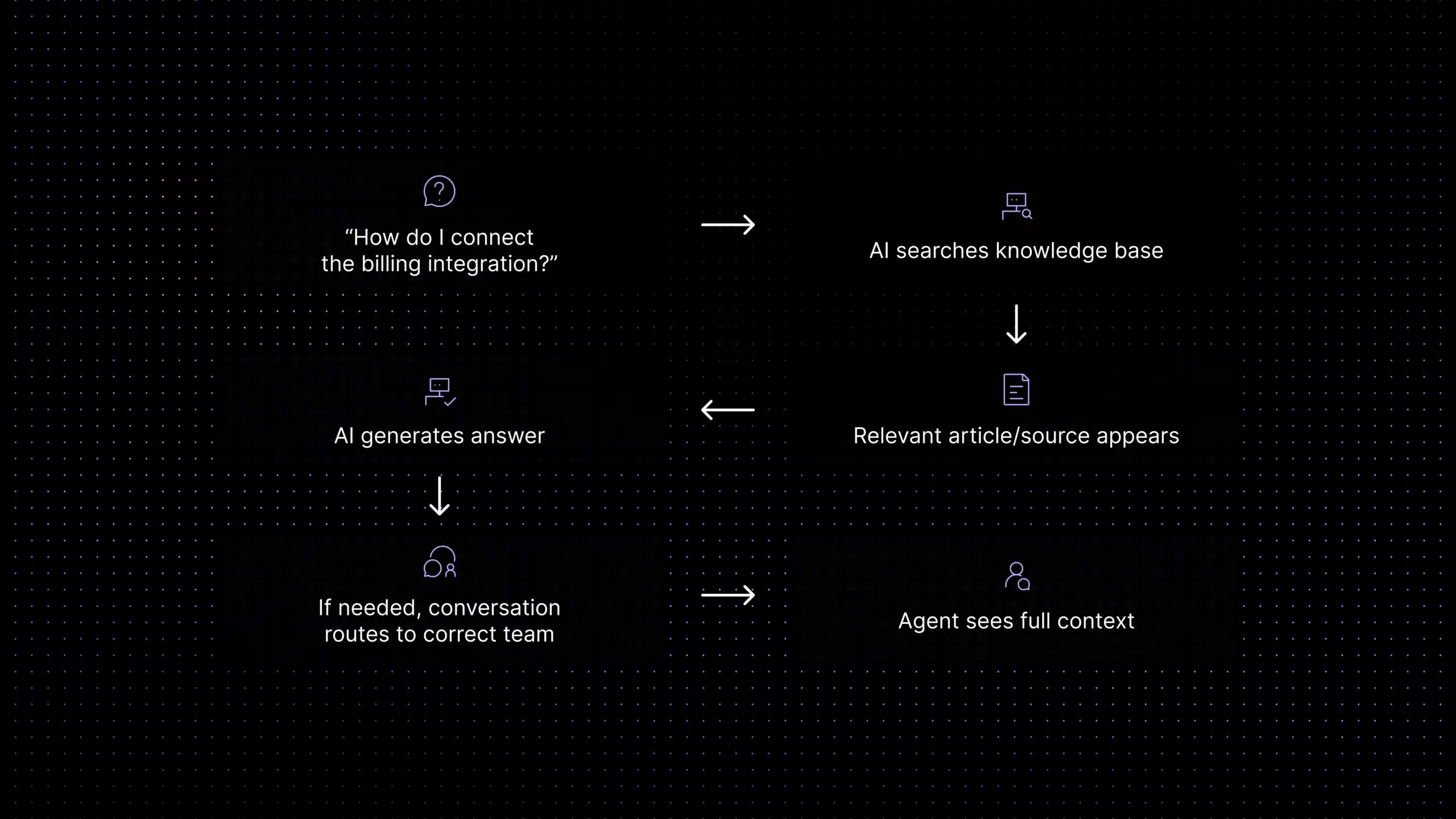
Aily, Inquirly’s AI layer, retrieves answers from your knowledge base before generating a response. That reduces the risk of made-up answers because responses are grounded in approved support content. If the answer is in your documentation, Aily finds it and delivers it with the source visible. If it is not, Aily says so and escalates cleanly instead of guessing.
Why this matters: a chatbot that answers from general AI knowledge sounds plausible but fails on product-specific details. Your customers are not asking generic questions. Grounding the AI in your actual content is what makes it useful instead of frustrating.
Routes conversations without a human playing traffic cop
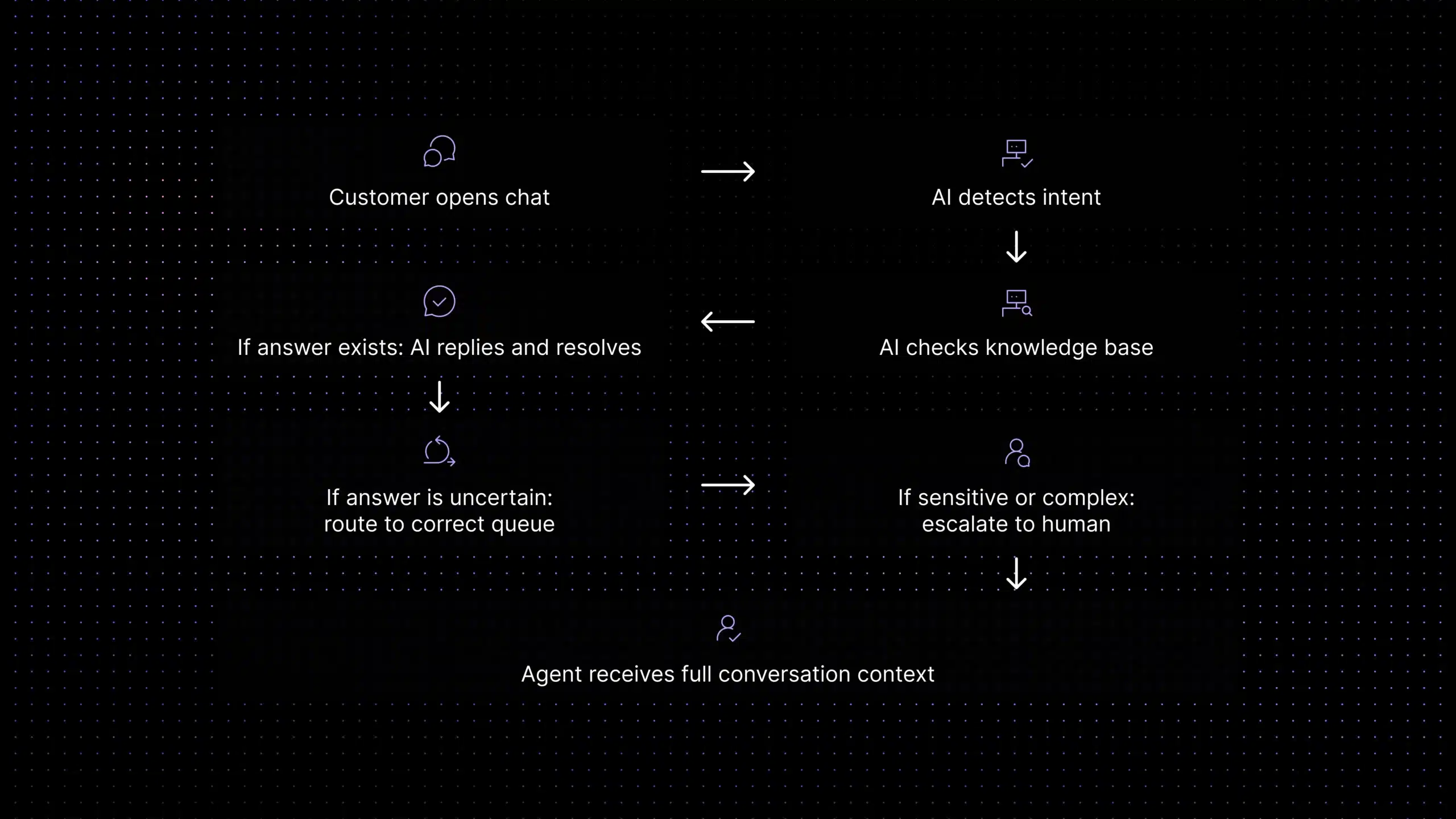
Every conversation that comes in gets classified by intent and routed to the right queue, team, or person, automatically. Billing questions go to the billing team. Technical bugs go to technical support. Onboarding questions stay in the AI layer for self resolution.
The routing logic is configurable without needing a developer or a full time admin. You set the rules, Aily applies them consistently.
For a deeper look at how routing reduces manual triage time, see the guide to support ticket automation.
Gives agents a head start, not a headache
When a conversation does reach a human, the agent sees the full context, what the customer asked, what the AI tried, what the customer’s account status is, and what similar issues were resolved before. No tab switching. No “could you remind me of your order number?”. Just a head start.
This is what makes first response time actually improve instead of just looking like it improved on a dashboard. The guide to first response time in support covers why that distinction matters.
Reduces repetitive tickets before they become tickets
A surprising amount of live chat volume is the same five questions in different fonts, password resets, billing questions, integration how-tos, plan comparison requests, onboarding guidance. Aily handles these at the chat layer before they ever reach a human agent or become a formal ticket. Teams that get this right typically see 20–40% of their repetitive volume handled by AI, which means agents spend their day on the conversations that actually require a human. The ticket deflection guide explains which categories deflect best and how to measure whether it is working.
Who this is for (and who it is not)
AI live chat software is not one size fits all. Here is an honest read on fit:
Strong fit
- SaaS team with growing ticket volume
- Support team of roughly 5–150 agents
- Wants AI grounded in its own documentation
- Needs predictable pricing
- Wants fast setup without a long enterprise implementation
Maybe not the best fit
- Large contact center needing deep ITIL compliance
- Ecommerce team needing Shopify-native order workflows
- Team that needs voice and phone support as the core channel
- Enterprise stack requiring many legacy CRM integrations
Quick signal: if your support team spends most of its day answering the same questions and manually triaging every conversation, the fix is not only more agents. It is better automation at the point where conversations start.
The five things that make AI live chat software worth paying for
Not all platforms are created equal. When you are evaluating tools, these are the five signals that separate real AI live chat from a chatbot in a trench coat.
1. The AI answers from your content, not from thin air
Ask any vendor: what is the source of each AI generated response? If the answer is “our model is trained on support data” without specifics, the responses are not grounded in your documentation. That means confident answers that are wrong for your product.
Inquirly’s Aily uses retrieval-augmented generation, it pulls from your knowledge base first, then generates a response. Every answer has a source you can trace. See how that works in the knowledge base AI chatbot guide.
2. Escalation is clean, not an afterthought
The moment AI live chat fails its customers hardest is when it cannot answer something and leaves them talking to a bot that keeps saying “I understand your frustration” instead of connecting them to a human.
Good AI live chat escalates with context, the agent receives the conversation history, what the AI tried, and the customer’s account details, without the customer having to repeat everything. Bad AI live chat just dumps the conversation into a queue with no context attached.
3. Pricing does not surprise you after month two
Per-resolution AI billing sounds affordable until you have a product launch and your support volume triples for two weeks. Some platforms charge per AI resolved conversation, which makes cost modelling genuinely difficult.
Flat monthly pricing, or per agent pricing that includes AI, makes budgeting predictable. Always model three scenarios before committing to a usage based plan: your current volume, your peak volume, and your expected volume in 18 months.
4. Routing works without a full-time admin to maintain it
Complex routing logic is great when you have someone to configure, test, and maintain it. For most SaaS teams under 50 agents, routing complexity becomes a liability rather than an asset.
The right signal: how much does routing degrade if nobody touches the configuration for three months? If it falls apart, the system is too brittle. If it still works cleanly, it is built for real operational use.
5. Agent assist actually saves time, not creates more work
Some “agent assist” features surface so much information that agents spend more time parsing suggestions than they would just typing a reply. Good agent assist shows the right information at the right moment, conversation history, relevant documentation, suggested reply, without burying the agent in noise.
What that looks like in practice: the customer support copilot guide covers the difference between AI that helps agents and AI that adds to their cognitive load.
What AI live chat replaces (and what it does not)
Let’s be direct about this, because some platforms oversell it.
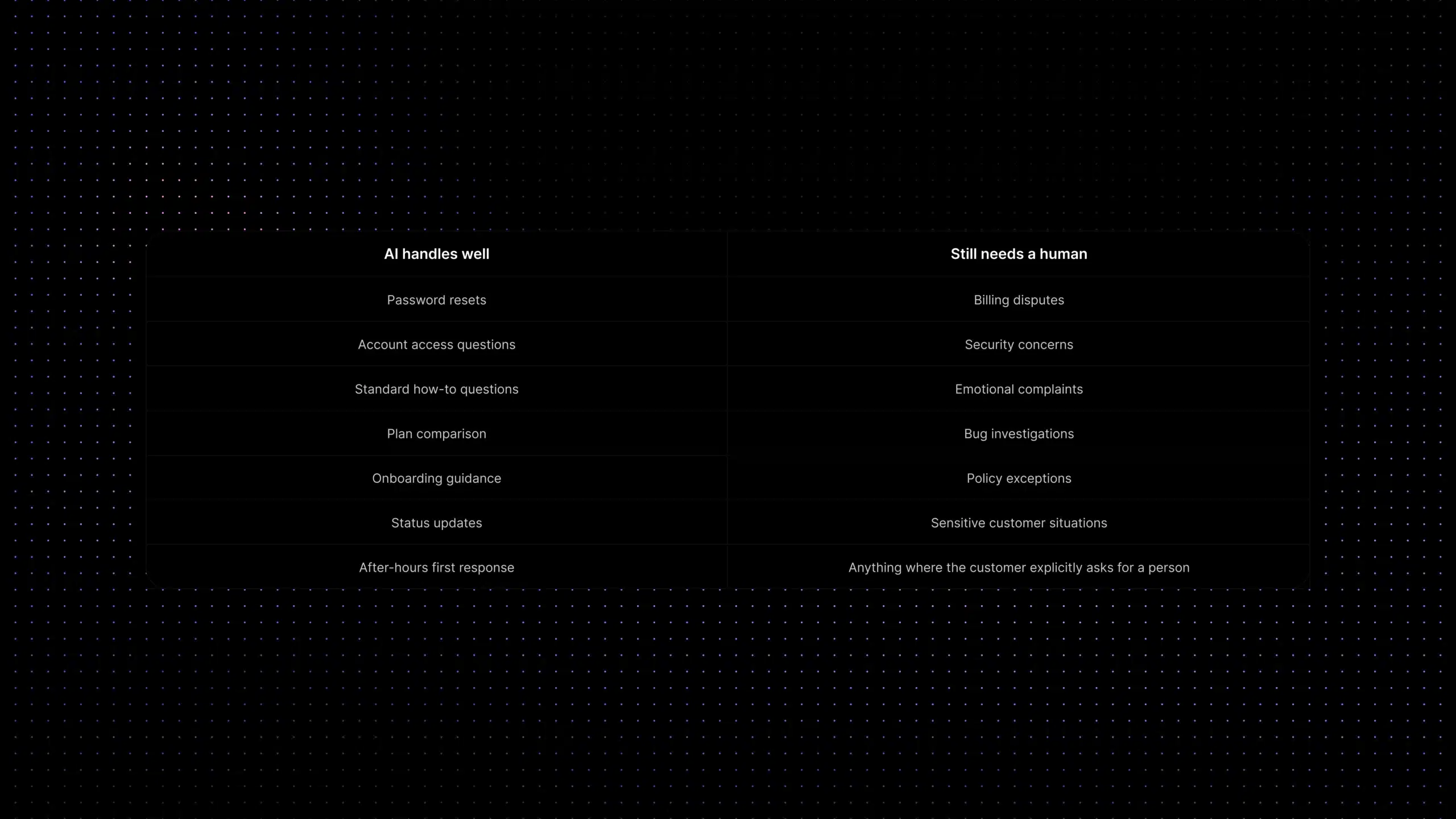
AI live chat handles well
- Password resets and account access questions
- Standard how-to and feature questions
- Plan comparison and pricing questions
- Onboarding guidance based on help content
- Status updates and progress checks
- After-hours first response and context gathering
Still needs a human
- Billing disputes with account-specific nuance
- Emotionally sensitive or escalated complaints
- Security incidents or data concerns
- Bug reports needing technical investigation
- Decisions requiring policy judgment or exceptions
- Anything the customer explicitly wants a human for
AI live chat does not replace human support. It reduces the volume of conversations that need human support, which is what gives agents time for the conversations where they actually make a difference.
For the full picture on how automation and human support fit together, the AI customer support automation guide covers implementation, use cases, and what not to automate.
What setup actually looks like
One of the more honest things to say about AI live chat software: the quality of your setup determines the quality of your AI. An AI that draws from a weak knowledge base produces weak answers. The platform does not fix bad content, it surfaces it faster.
The setup process that works:
- Audit your current support content. Before you connect anything to the AI, check whether your help articles are accurate, current, and written in the way customers actually phrase their questions. Gaps here become gaps in the AI.
- Identify your top 5 repetitive ticket categories. These are the first candidates for AI deflection. Not because they are the most important, but because they are the most predictable. The ticket deflection guide explains how to pick them.
- Set routing rules for everything else. What should go straight to a human? What should the AI attempt first? What triggers immediate escalation? These decisions are operational, not technical, you make them, the AI applies them.
- Go live on one channel first. Email or in-product chat. Not all channels at once. One clean deployment is better than three mediocre ones.
- Measure containment rate, not just deflection rate. Deflection tells you how many conversations AI handled. Containment tells you how many it actually resolved. Those are different numbers, and the second one is the one that matters.
Why the grounding question matters more than any feature comparison
Every AI live chat platform will show you a feature table. Every feature table will have checkmarks next to AI, automation, routing, knowledge base, and analytics.
The question those tables do not answer: what is the source of each AI generated response?
There are two architectures in this category right now:
- Grounded AI: retrieves from your documentation first, then generates a response. Accurate on product specific details. Traceable. Fails gracefully when the answer is not in the knowledge base.
- Ungrounded AI: generates from a broad language model with no connection to your content. Sounds confident. Frequently wrong on the specifics that matter in real support conversations.
The grounded approach requires more setup, you need to maintain the knowledge base it draws from. The ungrounded approach is faster to deploy and faster to embarrass you in front of customers.
Inquirly uses the grounded approach. Aily answers from your documentation, cites the source, and escalates cleanly when the content does not cover the question. That design decision is the most important thing to understand about the product.
Ready to see it?
If your support team is spending its day answering the same questions and manually triaging every conversation that arrives, that is a solvable problem. Not with more headcount, with better automation at the point where conversations start.
Inquirly’s AI live chat software is built for SaaS teams that want this working without a six month implementation or a dedicated support ops engineer to maintain it.
Start free, no card required
Try Inquirly with your team and see how much of your current ticket volume AI can handle from your own documentation.
Related reading
- Ticket Deflection for SaaS: How to Reduce Support Volume Without Hurting CX
- First Response Time: How SaaS Teams Respond Faster
- AI Customer Support Automation: Implementation Guide & Use Cases
- Knowledge Base AI Chatbot for SaaS Support
- Support Ticket Automation: How AI Routing Works
Frequently Asked Questions
What is AI live chat software?
AI live chat software puts a chat widget on your website or inside your product and uses AI, not just scripted chatbot flows, to answer questions, route conversations, and assist human agents in real time. The best versions retrieve answers from your own support documentation so responses are accurate to your product, not just generically plausible.
How is AI live chat different from a regular chatbot?
A regular chatbot follows a script. Ask something outside the script and it says “I did not understand that” or loops you back to the main menu. AI live chat understands natural language, classifies intent, retrieves relevant content, and either resolves the conversation or routes it to the right human with context. The difference in customer experience between the two is not subtle.
Can AI live chat software replace human support agents?
No, and any vendor who implies otherwise is overselling. AI live chat handles repetitive, predictable, documentation-based questions well. Billing disputes, emotionally charged conversations, security concerns, and anything requiring account-specific policy judgment still need human agents. The point is to reduce how much of agents’ time goes to the predictable stuff so they can focus on the conversations that actually need them.
What is a realistic deflection rate for AI live chat?
Teams with a well-maintained knowledge base and clear top-5 issue categories typically see 20–40% of repetitive conversation volume handled by AI without human involvement. The range is wide because it depends on documentation quality, issue category clarity, and how well escalation is designed. Deflection rate is the starting metric, containment rate (conversations AI fully resolved without follow-up) is the one that actually measures success.
How does AI live chat pricing work?
It varies a lot by platform. The main models are: per-agent-per-month (predictable, scales with headcount), per-AI-resolution (economical at low volume, risky at high volume or during traffic spikes), and flat monthly (simplest to budget). Always model your peak volume, not just your average, before committing to a usage-based plan. One product launch or viral moment can make a per-resolution model very expensive very fast.
How long does it take to set up AI live chat?
With Inquirly, a basic deployment, widget live, AI connected to your knowledge base, routing rules configured, can be done in a few hours. A more complete setup with routing logic, agent-assist configuration, and deflection measurement takes a few days. The longer part is usually auditing and improving your support documentation, which is the content the AI draws from. Good content = good AI. It is that direct.
What should I look for when evaluating AI live chat software?
Five questions worth asking any vendor: (1) What is the source of each AI-generated response, your documentation or a general language model? (2) What happens when the AI cannot find an answer? (3) How does escalation work, does the agent receive context from the conversation? (4) What does pricing look like at twice your current volume? (5) Can routing logic be configured without a developer? The answers will tell you more than any feature comparison table.