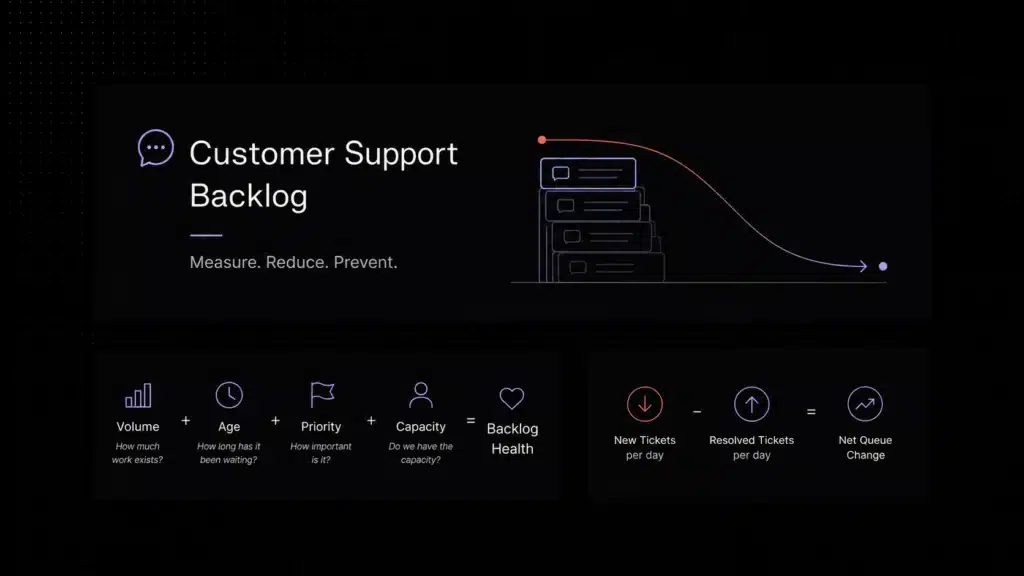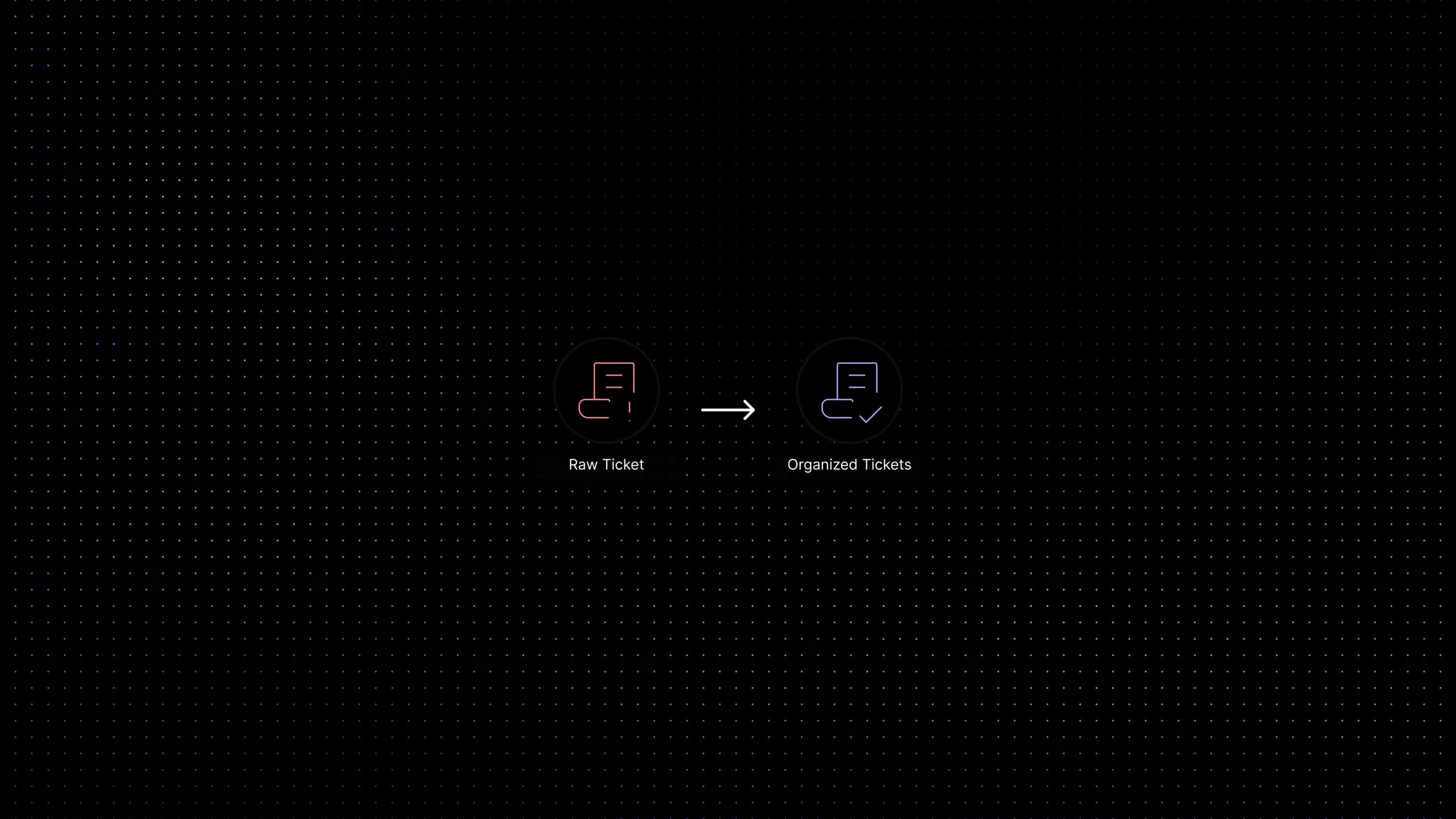
| What is a customer feedback loop in support? A customer feedback loop in support is the process of collecting, tagging, analyzing, and acting on recurring customer issues from tickets, chats, and support conversations. The goal is not only to resolve individual tickets, but to turn repeated support patterns into product, documentation, onboarding, and workflow improvements. |
Support teams hear the truth early. Customers do not usually wait for a quarterly survey to explain what is confusing, broken, slow, missing, or unexpectedly hard. They say it in billing complaints, onboarding questions, bug reports, cancellation threats, feature requests, and “how do I do this?” messages that show up all day in the queue.
The problem is not lack of feedback. The problem is that most of it disappears after the ticket is answered. A conversation gets resolved, the tag is messy or missing, the product team hears one anecdote in Slack, and a pattern that should have informed the roadmap gets lost in day to day support work.
That is why a good customer feedback loop matters in support. It turns support from a reactive function that closes tickets into a reliable source of product insight. When support tickets are tagged well, grouped into themes, reviewed consistently, and fed back to product and documentation owners, the same queue that once felt noisy starts showing you where customers are getting stuck and what the business should fix next.
This guide explains how to turn support tickets into product insights without building a heavy research program. We will look at what a customer feedback loop actually means in support, why ticket categorization matters so much, how to analyze support data for useful patterns, and how teams can close the loop so support feedback leads to real product decisions instead of one off complaints.
What a customer feedback loop actually means in support
In many companies, support feedback exists in two broken forms at the same time. At the queue level, there is too much of it. At the decision level, there is not enough of it. Agents read the same pain points every day, but product discussions still rely on scattered screenshots, memory, or whichever complaint happens to be loudest that week.
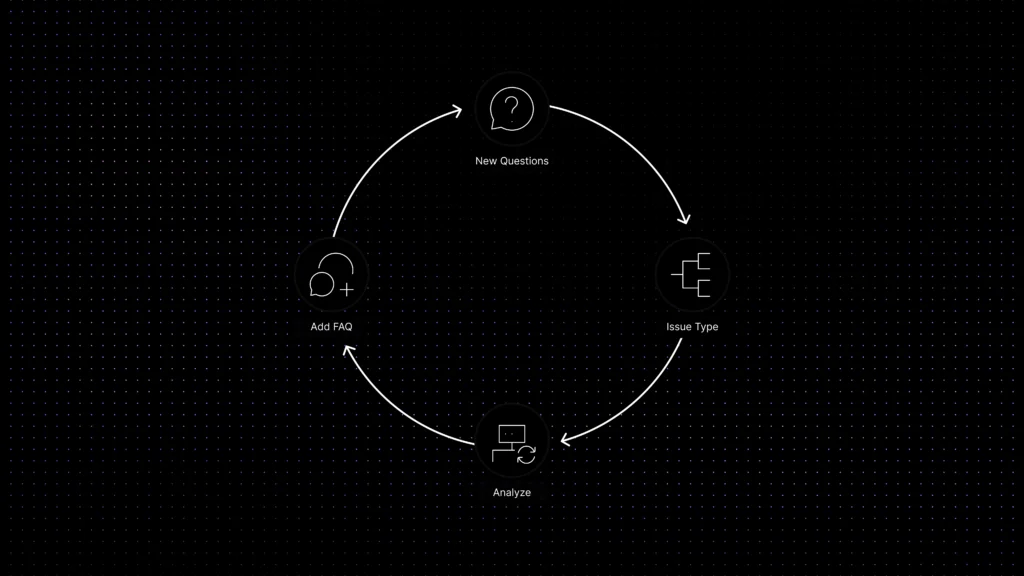
A customer feedback loop fixes that by creating a repeatable path from conversation to action. In practical terms, the loop looks like this: a customer reports a problem, the ticket is categorized and tagged, similar issues are grouped into a theme, the theme is reviewed against volume and impact, and a product, documentation, workflow, or support leader decides what should happen next.
That sounds simple, but it changes the role of support. Instead of being the team that only resolves individual issues, support becomes a structured voice of customer function. The queue stops being a place where feedback goes to die. It becomes an operating signal for product improvement.
This is also where many teams overcomplicate things. You do not need a giant voice of customer program to start. You need a small, trustworthy system. If the same onboarding blocker appears in twenty conversations, that is already a usable signal. If billing confusion shows up every Monday after invoices go out, that is already a usable signal. If customers keep asking for the same missing workflow, that is already a usable signal.
The real test is not whether you collected feedback. It is whether the business can reliably answer three questions: what are customers repeatedly struggling with, how often is it happening, and who owns the next action?
Why support tickets are one of the richest sources of voice of customer data
Support tickets capture a kind of feedback that surveys often miss. They show what customers care enough to interrupt their day over. That makes support one of the most honest sources of voice of customer data in a SaaS business.
Tickets are especially valuable because they are tied to real moments of friction. A survey might tell you a user is dissatisfied. A support conversation often tells you exactly why. It might reveal that a setup flow was unclear, a permission model was confusing, a promised integration did not behave the way the customer expected, or an article in the knowledge base answered half the question but not the last mile.
Support tickets also have context. They happen in time. They happen after a release, during onboarding, around renewals, during migration work, or after a pricing change. That timing matters. A single feature request means very little on its own. Ten similar requests from newly activated accounts in the same two week window mean a lot more.
Another reason support feedback is powerful is that it contains both direct and indirect product insight. Direct insight is easy to spot: “We need X feature,” “This page is broken,” or “I cannot find the export button.” Indirect insight is more useful and easier to miss. If customers keep asking how to complete a task, the product may not need another tutorial first. It may need a simpler workflow. If customers are opening tickets to confirm whether something happened successfully, you may have a product feedback problem, not just a support problem.
That is why support teams should not measure the value of the queue only by resolution speed. The queue also tells you where the product creates extra work, where docs fail to prevent repetitive tickets, and where operational friction is costing customers time.
How raw support data becomes usable product insight
The role of ticket categorization, tagging, and taxonomy
The fastest way to make support feedback useless is to leave it unstructured. If every agent tags issues differently, if categories are too broad, or if everything gets dumped into “bug,” “question,” or “other,” the business will have a lot of data and almost no insight.
Ticket categorization is what turns raw support volume into something a product or operations team can trust. Good categorization does not mean creating fifty clever labels on day one. It means building a simple taxonomy that answers a few basic questions consistently: what type of issue is this, what part of the product or journey is involved, what theme does it belong to, and how urgent or repeatable is it?
A useful support taxonomy usually starts with high level issue groups like billing, onboarding, bug, feature request, access, integration, and documentation gap. Under those groups, you can add specific themes over time. For example, onboarding might split into import confusion, setup permissions, first value delay, and integration errors. Billing might split into invoice timing, usage visibility, plan limits, and failed payments.
The point is not academic neatness. The point is comparability. If similar tickets receive similar tags, you can see patterns earlier. You can compare months, spot spikes after releases, and tell product teams something more precise than “customers are complaining again.”
Tagging also helps support itself. A good taxonomy improves routing, makes reporting cleaner, and helps leaders distinguish between random noise and true repeated pain. It creates the foundation for support analytics, trend reviews, and eventually smarter automation or sentiment analysis.
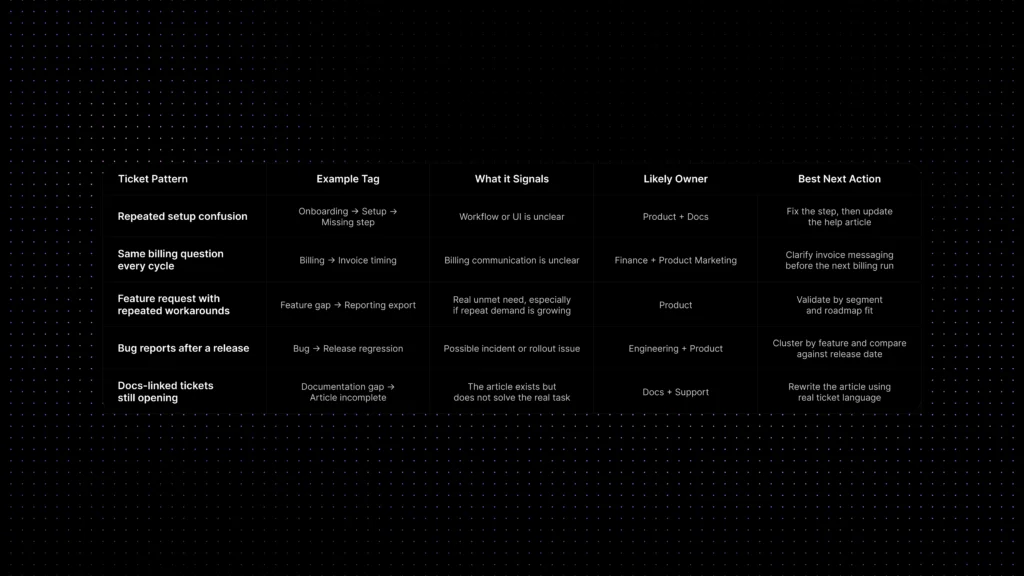
Example taxonomy for turning tickets into product insight
How to analyze support tickets for trends, pain points, and product signals
Once tagging becomes reliable, analysis gets easier. The goal here is not to build a perfect data science layer. It is to help the business see which themes repeat, which ones are growing, and which ones matter enough to change what product or support does next.
Start with the simplest review questions. Which themes show up most often? Which categories are increasing month over month? Which issues create the most follow-up work? Which ones cause the longest resolution times? Which tags correlate with cancellations, negative sentiment, or onboarding delays?
This is where support analytics becomes more useful than a basic dashboard of ticket counts. Volume matters, but volume alone can mislead. Twenty quick billing questions may matter less than six onboarding blockers that prevent activation. Ten feature requests from power users may matter more than thirty low-impact cosmetic complaints. The best support insight reviews combine frequency with context, severity, customer type, and business impact.
Sentiment can help here, but it should support judgment rather than replace it. Customer sentiment analysis is useful for detecting frustration spikes, negative release reactions, or emotionally charged conversations. But sentiment alone does not tell you what to build. A calm, polite question can point to a major workflow flaw. An angry message can reflect a one-off incident. Use sentiment as an extra lens, not as your whole decision system.
A strong review habit is to pair quantitative patterns with real examples. Numbers tell you what is recurring. Actual ticket excerpts tell you how customers describe the problem, what language they use, and what kind of fix might matter most. Product teams rarely benefit from being told that “category X increased by 18%.” They benefit from hearing what users were trying to do, where they got blocked, and what happened next.
Over time, the best teams move from reactive ticket reading to structured pattern reviews. Weekly support to product reviews, monthly insight summaries, and release-based trend comparisons are often enough to create momentum without making the process heavy.
How to Measure Whether the Feedback Loop Is Working
A customer feedback loop is only useful if it helps the team see which problems are repeating, which ones are getting worse, and which ones deserve action. The goal is not to track every possible support metric. The goal is to connect support patterns to product, documentation, onboarding, and retention decisions.
Start by looking at repeated issues by category and product area. For example, if onboarding related tickets keep increasing, the problem may not be support capacity. It may be that new users are getting stuck before they reach value. If billing questions spike after invoices go out, the issue may be unclear pricing communication. If documentation gap tickets keep appearing even after users visit a help article, the article may not answer the real task customers are trying to complete.
The most useful feedback loop metrics usually answer three questions:
- How often is this issue happening? Track ticket volume by category, product area, tag, and customer segment.
- Is the issue becoming more important? Watch month over month growth, repeated tickets after releases, reopened tickets, and issues linked to onboarding delay or churn risk.
- Who should act on it? Separate product problems, documentation gaps, workflow issues, billing confusion, and support-process problems so each pattern has a clear owner.
This is how support teams move from anecdotal feedback to usable product insight. Instead of saying “customers are confused,” the team can say “setup permission tickets increased this month, appeared mostly in new accounts, and were linked to longer onboarding time.” That is a signal product, docs, and success teams can actually act on.
How to close the loop between support and product teams
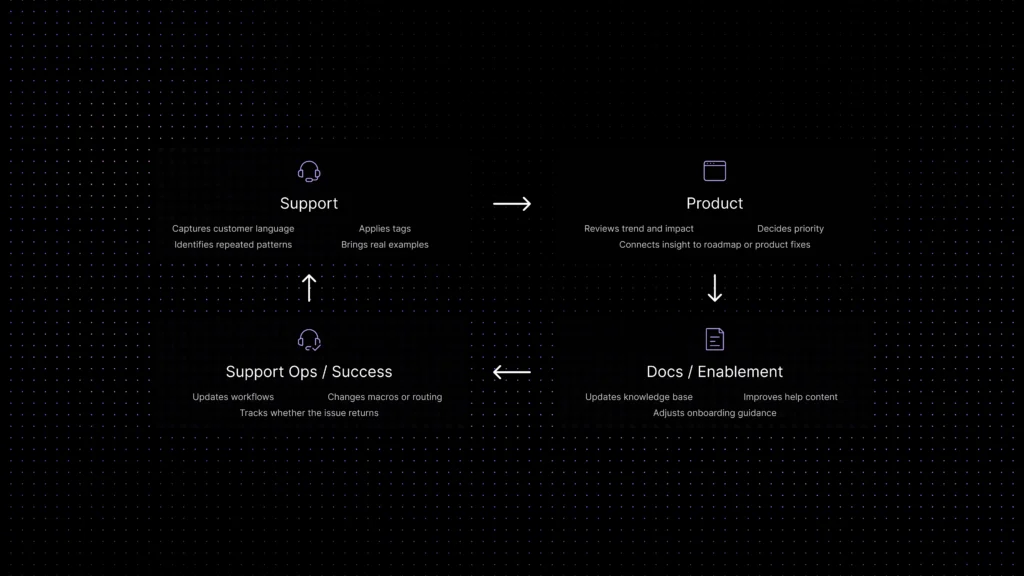
A feedback loop is not complete when a tag gets applied. It is complete when someone acts on the pattern and support can see what happened next.
This is where many teams fail. Support does a decent job collecting signals, but product never gets a clean summary. Or product receives a summary, but support never learns whether the issue was accepted, deferred, solved another way, or folded into documentation work. When that happens, both teams stop trusting the process. Support feels ignored. Product feels buried in vague requests. The loop breaks.
Closing the loop usually requires three things. First, a repeatable handoff format. Product needs more than a pile of screenshots. A good handoff includes the theme, affected customer segment, example tickets, trend size, likely root cause, and recommended next action. Second, clear ownership. Someone has to decide whether the response belongs with product, docs, onboarding, support operations, or success. Third, visible follow-up. Support should know whether the issue is planned, rejected, fixed, or still under review.
For a more in-depth look at the customer feedback loop and actionable steps, check out Closing the Customer Feedback Loop.
Common mistakes that make support feedback noisy or unusable
The first mistake is treating all feedback as equally valuable. It is not. A single loud request from one customer may matter less than a repeated low-drama problem showing up across dozens of tickets. Good systems separate anecdote from pattern.
The second mistake is weak or inconsistent tagging. If agents do not trust the taxonomy, they will stop using it properly. If the taxonomy is too broad, you will not learn much. If it is too detailed, people will avoid it or apply it inconsistently. The goal is not perfect granularity. It is repeatable structure.
The third mistake is relying on sentiment or automation before the basics are clean. AI can help classify, cluster, or summarize patterns, but it cannot rescue a chaotic workflow with no clear categories, no review process, and no ownership. Start with reliable tags and predictable reviews. Then add more advanced analysis where it saves time.
The fourth mistake is separating support insight from business action. If the loop ends in a report that nobody owns, the process becomes theatre. Teams do not need more dashboards. They need a small number of repeated signals that clearly influence documentation, onboarding, workflow design, or product prioritization.
The fifth mistake is expecting tags and analytics to solve everything. They do not fix poor judgment. They do not replace talking to customers. They do not automatically tell you the best solution. They make patterns visible. Humans still have to decide what the pattern means and what the business should do next.
What tags and analytics do not solve on their own
It is worth saying this directly: good support analytics do not replace product judgment, and ticket categorization does not make every decision obvious.
Some themes will stay noisy. Some requests will come from the wrong segment. Some repeated tickets will point to a support process issue rather than a product issue. And some high volume issues will still be low priority if they are easy to solve another way.
That is why the best support insight systems combine structure with interpretation. Support brings pattern visibility. Product brings prioritization context. Documentation, success, and operations often bring the fastest non code fixes. The goal is not to create a machine that makes roadmap decisions automatically. The goal is to stop wasting the product insight your support team is already hearing every day.
Where Inquirly fits
Inquirly fits this workflow when support teams want conversations, tickets, labels, workflows, knowledge, and AI assistance in one connected support workspace.
A support feedback loop breaks when customer conversations live in one tool, ticket tags live in another, product requests are copied into Slack, and follow-up actions disappear across disconnected systems. To turn support tickets into product insight, teams need structured ticket data, consistent labels, searchable conversation history, and enough analytics to detect repeated patterns before they disappear inside daily support work.
With Inquirly, support conversations can do two jobs at once: help the customer now and teach the business what to improve next. If your team is turning support conversations into a more structured operating system, pricing should also be part of the decision. The right platform is not only the one that organizes tickets and feedback well; it is the one whose cost model still makes sense as ticket volume, AI usage, and support workflows grow. For a full breakdown, see our guide to customer support software pricing.
Conclusion
Most support teams do not have a feedback problem. They have a structure problem. The queue is full of signal, but the signal is trapped inside individual conversations, inconsistent tags, and ad hoc escalation habits.
If you want support tickets to become product insight, start by making the feedback loop smaller and more trustworthy. Use a simple taxonomy. Tag repeated issues consistently. Review patterns with real examples, not just ticket counts. Decide who owns the next action. Then keep closing the loop until support can see that the same issue is not returning week after week.
That is when support stops being the place where product problems are merely reported. It becomes one of the clearest ways the business learns what to fix next.
If you are building a more structured support operation, this is also the right time to look at how ticketing, workflows, analytics, and knowledge work together inside one system. That is where support to product learning becomes sustainable, not accidental.