How much does an AI chatbot cost in 2026?
AI chatbot pricing can range from free to thousands of dollars per month. Basic chatbot tools can start free or under $50 per month, while customer support platforms may combine monthly subscriptions, agent seats, AI conversations, or per-resolution charges. Enterprise deployments can cost significantly more depending on support volume, integrations, security requirements, and implementation.
For example, Intercom’s integrated customer-service plans currently start at $29 per seat per month plus $0.99 per Fin outcome. Tidio’s standalone Lyro AI Agent starts at $32.50 per month for 50 AI conversations. Zendesk combines per-agent plans with AI usage based on automated resolutions. Inquirly offers a free Lite plan, Elite at $25 per month, and Pro at $40 per month with unlimited agents. The important number isn’t just the advertised starting price, it’s what your total cost becomes at your actual support volume.
AI chatbot pricing looks simple on a pricing page. Then the invoice arrives.
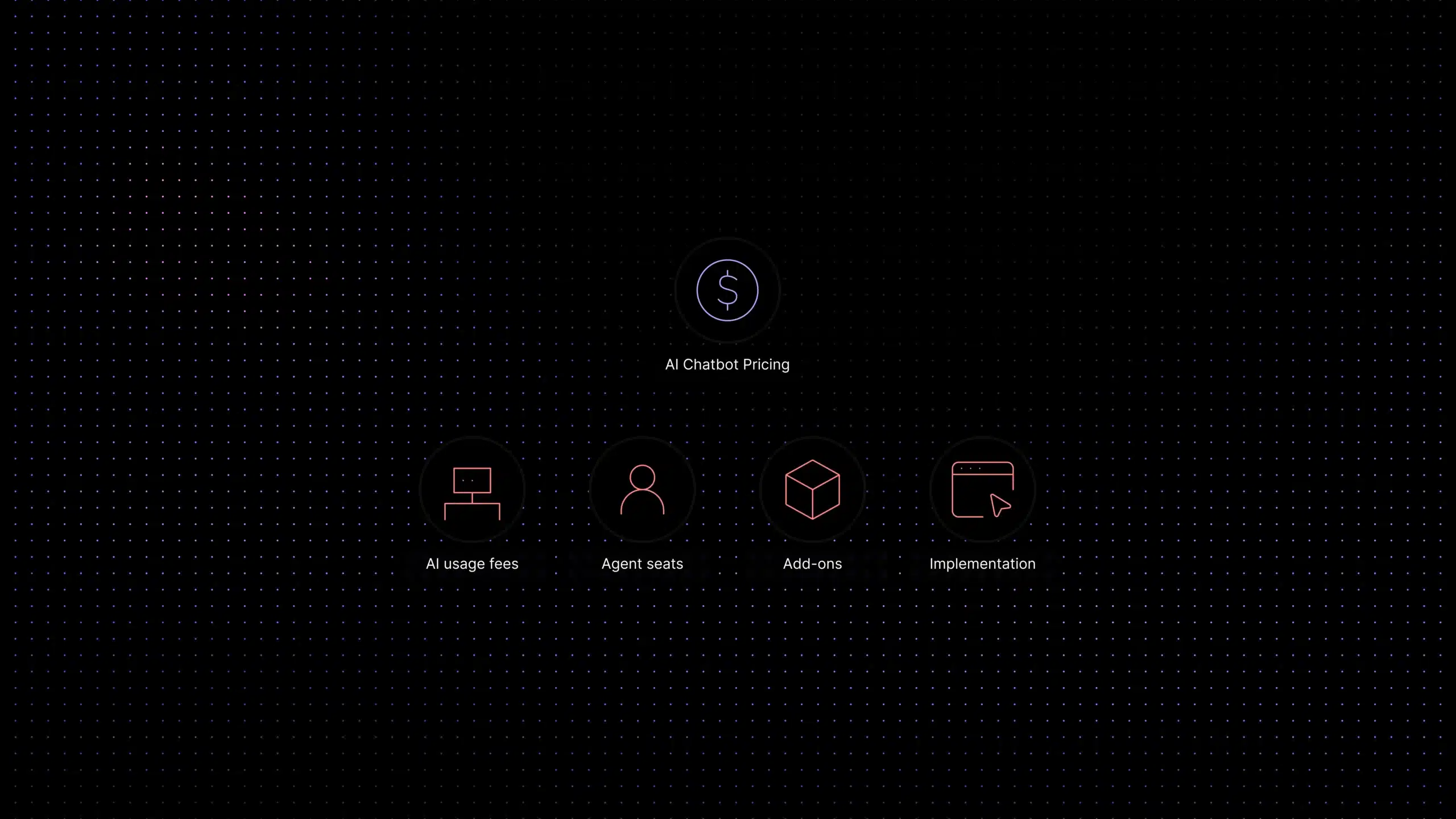
A vendor advertises a clean monthly plan. You assume the cost is predictable. Then you discover AI usage fees, seat minimums, add-ons, onboarding charges, conversation limits, resolution-based billing, and contract terms that were not obvious during the demo.
That is the problem with buying AI customer support software in 2026. The category has matured fast, but pricing has become harder to understand, not easier. The visible subscription is only one part of the customer support software cost.
Support leaders are not just asking, “How much does an AI chatbot cost?” They are asking whether the model scales cleanly, whether AI usage becomes a variable cost problem, and whether the platform supports the real workflow around AI customer support automation.
This guide breaks down the main AI chatbot pricing models, the hidden costs vendors do not lead with, and the AI chatbot ROI framework you can use to make a clean buying decision.
AI Chatbot Pricing Comparison: Real Examples for 2026
*Pricing structures and entry-level prices can change. Always verify the latest vendor pricing before publishing or making a purchase decision.
Pricing checked: August 2026. Vendor pricing changes frequently. We verify pricing against official vendor pages and recommend confirming current rates before purchasing.
Decoding the 4 Main AI Chatbot Pricing Models
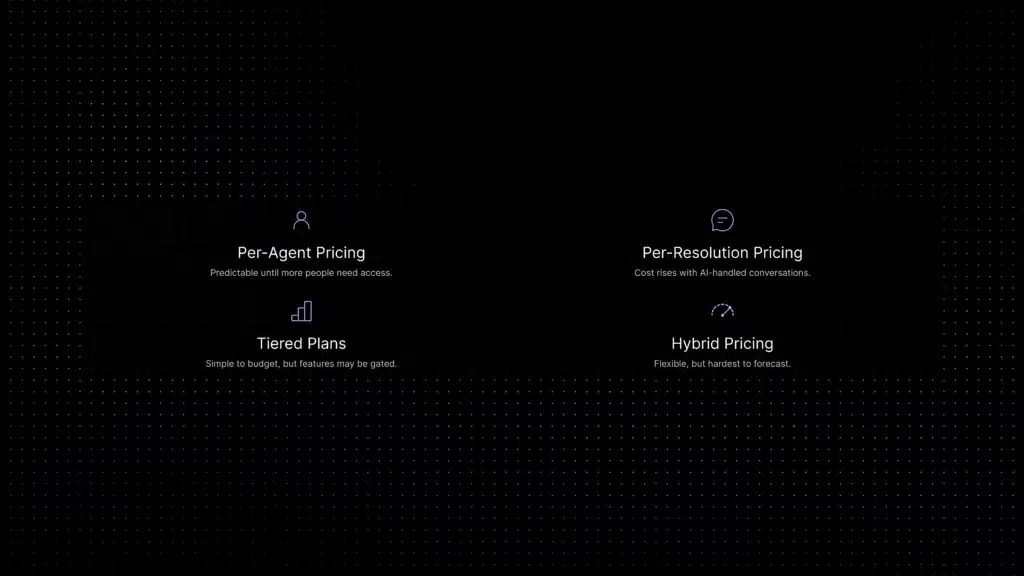
Most AI chatbot pricing falls into four models. Some vendors use one. Many use a mix. The confusing part is not the model itself. It is how quickly costs stack when your team, channels, and conversation volume grow.
Per-Seat / Per-Agent Billing
This is the classic helpdesk model. You pay for each support agent, admin, or user who needs access. It is familiar, easy to explain, and predictable when your team size is stable.
The problem is that support work is no longer limited to full-time support agents. Product managers want visibility into bug reports. Customer success wants to see renewal-risk conversations. Operations wants to review AI performance. Leadership wants reporting access. Finance wants to understand cost drivers.
Under strict seat-based pricing, every one of those users can become another paid seat. That creates a bad incentive: you limit access to save money, then lose cross-functional visibility into customer pain.
Pay-Per-Resolution or Per-Conversation Pricing
Modern AI platforms often charge based on usage. The most common version is per-resolution pricing, where you pay when the AI successfully resolves a customer issue.
This sounds fair. If the AI creates value, the vendor gets paid. But support volume is not always smooth.
A product launch, outage, billing issue, seasonal spike, or viral campaign can push conversation volume far above your average. If your chatbot resolves more conversations during that spike, your bill rises at the exact moment your support team is already under pressure.
Usage-based pricing is not automatically bad. It can work well when volumes are stable and the pricing controls are clear. But it requires serious forecasting. You need to model average volume, peak volume, and future growth before you commit.
Tiered Feature Plans
Tiered plans are usually easier to budget. You pay for a defined package, such as Lite, Elite, or Pro. Each tier includes a set of capabilities, limits, and support levels.
This model works best when the vendor is transparent about what each plan includes. It becomes frustrating when core features are locked behind expensive upgrades.
Watch for feature walls around:
- AI automation volume
- Knowledge base connections
- Channel access
- Reporting and analytics
- Routing workflows
- Security controls
- Admin permissions
- Integrations
A tiered model is clean when the buying decision is straightforward. It becomes messy when the “affordable” plan is only useful for a demo.
Hybrid Models
Hybrid pricing combines seat costs, usage fees, feature tiers, add-ons, and sometimes annual commitments. This is common in enterprise customer support software.
The base subscription may look manageable. Then you add AI resolution charges, premium support, WhatsApp, advanced reporting, extra workspaces, onboarding, sandbox environments, data retention, and admin seats.
Hybrid pricing is not always unfair. Complex teams often need complex systems. But for growing teams, hybrid pricing creates a serious forecasting problem. You cannot judge the cost by the pricing page alone. For a broader breakdown, see Inquirly’s guide to customer support software pricing.
Why does customer support software cost increase after launch?
Customer support software cost usually increases after launch because teams add more seats, more channels, more automation, more reporting, and more AI usage. This is not theoretical: G2 notes that help desk pricing varies by vendor, scale, complexity, and deployment model, while official vendor pricing pages show both usage-based and seat-based structures in the market.
The Hidden Costs of AI Chatbots: What Vendors Do Not Lead With
The visible subscription price is only part of the customer support software cost. The real cost includes the money you spend to implement, manage, scale, and govern the system. This is where many buyers get caught.
The “Success Tax”
The success tax happens when your AI chatbot works well, resolves more conversations, and then your bill climbs sharply because the vendor charges per resolution.
That can feel backwards. The whole reason you bought AI was to reduce support pressure and make costs more efficient. But if every successful resolution creates another charge, automation becomes a variable cost center.
This is especially risky for teams with uneven support volume. A normal month may look affordable. A launch month may not. A month with an incident may become expensive fast.
What counts as a billable AI resolution?
A billable AI resolution usually means the AI handled the customer’s issue without further human help, but vendors define it differently. For example, Intercom says Fin is priced at $0.99 per outcome, and its pricing page defines the events that count as an outcome, including confirmed resolution, no further help after Fin responds, or completion of a workflow.
Before choosing a usage-based AI chatbot, ask:
- What counts as a billable resolution?
- Are partial answers billed?
- Are handoffs billed?
- Are reopened conversations billed again?
- Can we set hard usage limits?
- What happens during traffic spikes?
- Can we forecast monthly spend before going live?
If the vendor cannot answer clearly, your CFO will not like the model.
Mid-article CTA: Want the clean version of this model? Compare Inquirly’s Lite, Elite, and Pro plans and see how unlimited agents keep collaboration from turning into a seat tax.
Setup and Implementation Fees
Some AI chatbot platforms are not truly self-serve. They need implementation consultants, developer support, custom workflow setup, knowledge base cleanup, data migration, or integration work before they create value.
That means the first invoice is not the real cost. The real cost includes onboarding fees, implementation packages, developer time, workflow configuration, knowledge base restructuring, integration setup, training sessions, internal admin hours, and migration work from your previous helpdesk.
There is also the opportunity cost. If your support operations lead spends six weeks configuring an enterprise stack, that time comes from somewhere. For a growing team, implementation drag matters. A tool that takes months to launch may be technically powerful but operationally wrong.
The Seat-Multiplier Trap
The seat-multiplier trap is simple. You start with a few support agents. Then other teams need access. Suddenly, the cost multiplies. Not because you hired more agents. Because more people need visibility.
This matters for AI support because visibility is not optional. If AI is answering customers, managers need to review performance. Product teams need to see recurring issues. Customer success needs to understand account risk. Leadership needs reporting.
If every observer, collaborator, and manager becomes a full-price seat, pricing punishes the exact collaboration that makes support better. That is why unlimited agents matter: the full team can work inside the support system without turning every internal stakeholder into another billing event.
AI Chatbot Cost Calculator: Estimate Your Monthly Spend
Monthly chatbot cost = base subscription + agent seats + AI usage + channel/add-on fees
Suppose a support team has:
5 agents
2,000 customer conversations/month
800 AI-resolved conversations
$100 monthly platform fee
$0.50 per AI resolution
$30 per agent
Then:
Base platform: $100
Agent seats: 5 × $30 = $150
AI usage: 800 × $0.50 = $400
Estimated monthly chatbot cost = $650
Run this calculation using average volume and peak volume. A pricing model that looks inexpensive at 500 conversations may behave very differently at 5,000.
Intercom Alternatives Pricing: Comparing the Giants vs. Modern Lean Platforms
Enterprise customer support platforms are powerful. They are also heavy.
Tools like Intercom and Zendesk can support complex organizations with layered workflows, large teams, advanced administration, and broad integration ecosystems. Official pricing pages show the difference in structure: Intercom publishes outcome-based pricing for Fin, while Zendesk publishes per-agent support plans.
The issue is not that enterprise stacks are bad. The issue is that many growing teams buy enterprise complexity before they need it.
They get:
- Longer implementation cycles
- Rigid annual contracts
- Seat-based expansion pressure
- AI usage layers
- Add-on pricing
- Complex admin configuration
- Feature bloat
- Reporting that requires dedicated ownership
- Workflows that need constant maintenance
This is where teams start searching for Intercom alternatives pricing. They are not always looking for fewer features. They are looking for cleaner economics.
They want AI support that works without turning the helpdesk into a full-time internal software project.
The Lean Platform Approach
Modern lean platforms take a different path. Instead of building a massive support suite with every possible enterprise feature, they focus on the core work growing teams need every day:
- Answer customer questions
- Deflect repetitive tickets
- Route conversations
- Support human agents
- Keep channels connected
- Maintain visibility
- Control cost
That is the Inquirly approach, and worth flagging that Inquirly is the company publishing this guide, so weigh the comparison with that in mind. Inquirly is built for growing teams that want AI-powered customer support without software bloat or surprise pricing. You get an all-in-one workspace for tickets, live chat, email, WhatsApp, and SMS, so customer conversations stay connected instead of scattered across tools.
Inquirly also avoids the seat tax by offering unlimited agents across its Lite, Elite, and Pro plans. That means support, success, product, and operations teams can collaborate without every new user creating another cost line.
The result is a cleaner buying decision: one workspace, unlimited agents, transparent tiers, and AI support without enterprise drag.
How to Calculate True AI Chatbot ROI
How do you calculate AI chatbot ROI?
Calculate AI chatbot ROI by comparing the cost of manual human resolution with the cost of automated AI resolution plus the platform fee. Then factor in speed-to-resolution, lower queue pressure, and reduced agent burnout.
AI chatbot ROI should not be based on vague productivity claims. You need a simple financial model that finance can understand. Start with the cost of manual support.
Step 1: Calculate Manual Resolution Cost
Manual resolution cost = total monthly support labor cost / number of human-resolved conversations
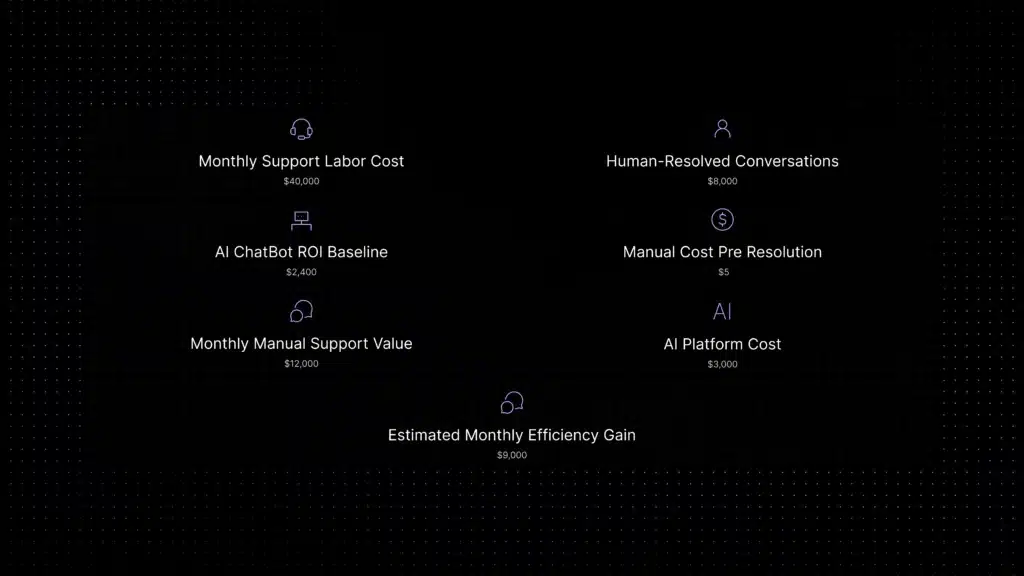
Example: your monthly support labor cost is $40,000. Your team resolves 8,000 conversations per month. Your manual cost per resolution is $5.
That does not mean every ticket costs exactly $5. Simple tickets cost less. Complex tickets cost more. But it gives you a baseline.
Step 2: Estimate Automatable Volume
Not every conversation should be automated. A good AI chatbot handles repetitive, documentation-based questions best.
Look at your last 30 to 90 days of tickets. Tag the repetitive categories. Estimate the portion AI could safely handle. If 30% of your 8,000 monthly conversations are repetitive, that gives you 2,400 candidates for automation.
Step 3: Compare AI Cost Against Human Cost
Monthly AI value = automatable conversations x manual cost per resolution
Then subtract platform cost. Example: 2,400 automatable conversations x $5 manual cost per resolution = $12,000 monthly manual support value. If your AI support platform costs $3,000 per month, the direct monthly efficiency gain is $9,000.
The numbers above are illustrative. Use your own fully loaded labor cost, not a generic salary estimate.
Step 4: Add Speed-to-Resolution Impact
Cost savings are only part of the value. AI also improves response speed.
When customers get instant answers to repetitive questions, your team reduces queue pressure. First response time improves. Agents spend less time on low-value work. Customers do not wait behind password resets to get help with urgent issues.
Speed matters because slow support creates hidden costs: more follow-up messages, higher customer frustration, lower CSAT, more escalations, more churn risk, and more agent context switching.
Step 5: Factor in Agent Burnout
Support burnout has a cost, even if it does not appear neatly on a pricing page.
When agents spend their day answering the same questions, quality drops. Morale drops. Turnover risk rises. New hires take time to train. Senior agents get pulled into repetitive work instead of complex issues.
The best ROI case is not “AI instead of humans.” It is “AI for predictable work, humans for judgment.”
For a real labor-cost baseline, use your payroll data first. If you need an external reference point, the U.S. Bureau of Labor Statistics publishes wage data for customer service representatives, but your fully loaded internal cost will be more accurate than any market benchmark.
ROI CTA: Want to pressure-test the numbers with your own volume? Request a demo and compare your current manual support cost against Inquirly’s predictable AI support model.
Choosing an AI Chatbot That Scales with Clean Pricing
The right AI chatbot should make support easier to run, not harder to budget.
Before you buy, ask these questions:
- Can we predict monthly cost before we go live?
- Will pricing punish us when volume spikes?
- Do we pay per agent, per resolution, or both?
- Can managers and cross-functional teams access the system without extra seat costs?
- Does the AI answer from our own documentation?
- What happens when the AI does not know the answer?
- Can we control escalation rules?
- Are all key channels included?
- Are security and data controls included or upsold?
- How long will implementation actually take?
If the answer requires a long pricing call, a custom spreadsheet, and three follow-up emails, that is a signal. Support teams need clarity.
Whatever you choose, weigh the checklist above against the vendor’s actual pricing page and contract terms, not just the demo.
One factor worth checking regardless of vendor: how your customer data is used to train models, and what happens when the AI doesn’t know an answer. If you want a deeper look at that architecture, read the knowledge base AI chatbot guide and the customer self-service guide.
The Bottom Line on AI Chatbot Pricing
AI chatbot pricing is not just about the monthly subscription. It is about cost behavior.
A cheap tool can become expensive if every resolution, seat, channel, and add-on creates another charge. An enterprise platform can become operationally heavy if your team spends more time managing the system than improving support. A usage-based model can look efficient until volume spikes.
The best pricing model is the one your team can understand before the invoice arrives.
For growing support teams, that usually means:
- Predictable plans
- Unlimited agents
- Clear AI limits
- Fast setup
- Connected channels
- Human escalation
- Private data controls
- No unnecessary software bloat
That is what Inquirly is built to deliver.
See How Predictable AI Support Can Be
You do not need another bloated support stack. You need AI customer support that answers repetitive questions, keeps every channel organized, gives agents context, and lets your team scale without pricing surprises.
Start your free Inquirly trial or request a demo to see how easy predictable AI support can be. No seat tax. No software bloat. Just faster support with cleaner pricing.