Choosing customer support software in 2026 is no longer just a question of finding a ticketing system.
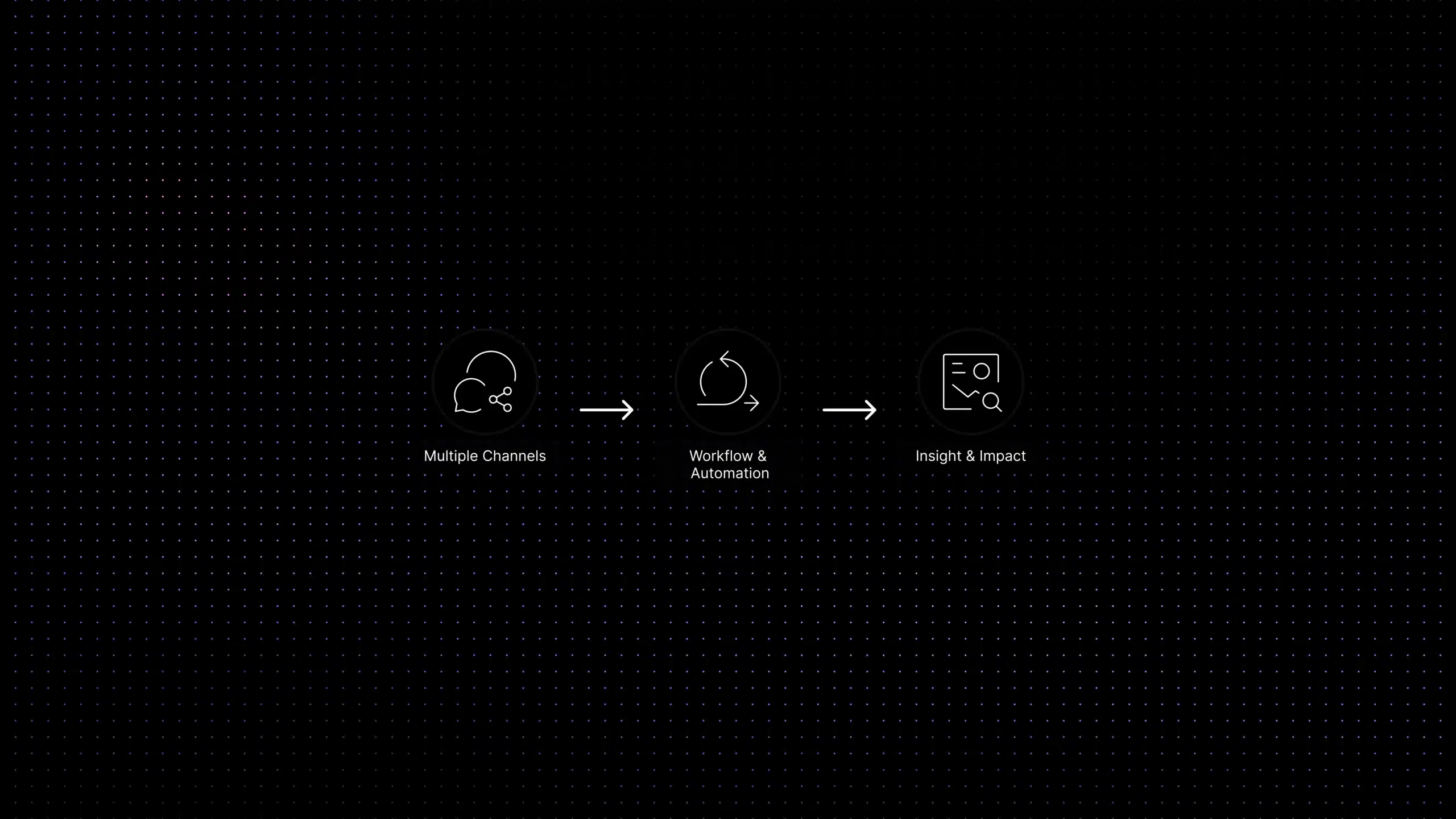
Most teams now need a platform that can manage conversations across channels, organize tickets, support a knowledge base, automate repetitive work and help agents answer faster with AI.
That makes the buying decision harder. Different platforms are designed around different support models, team sizes and operational requirements.
The 2026 support software landscape
Different platforms solve different support problems
Enterprise operations
Zendesk is powerful for complex support operations, but may feel heavy for smaller teams.
Conversational support
Fin, formerly Intercom, is strong for conversational and in-app support, but seat and AI costs require careful modeling.
Affordable help desk
Freshdesk and Zoho Desk are popular choices for conventional help desk workflows and budget-conscious teams.
Shared inbox workflows
Help Scout and Front are suited to teams that organize customer support around collaborative inboxes.
Ecommerce support
Gorgias is designed around ecommerce workflows, particularly for Shopify-focused support teams.
Lean SaaS support
Inquirly fits SaaS teams that want AI-first support automation without adopting a complicated enterprise stack too early.
What this guide compares
This guide compares the best customer support software for 2026 by use case, features, pricing model, AI capabilities and buying fit. Pricing changes frequently, so use the price notes as a starting point and verify each vendor’s official pricing page before making a final decision.
Source context: Gartner surveyed 5,728 customers in December 2023. The 14% figure should not be interpreted as a universal AI-resolution benchmark.
Quick Answer: What Is the Best Customer Support Software in 2026?
- The best choice depends on the support operation you need to run:
- Enterprise customer service: Zendesk
- AI-led and in-app support: Fin, formerly Intercom
- Lean SaaS support with unlimited agents: Inquirly
- Traditional help desk workflows: Freshdesk or Zoho Desk
- Email and shared-inbox support: Help Scout or Front
- Ecommerce customer support: Gorgias
- Live chat for small teams: Tidio
- Chat, ticketing and call-center support: LiveAgent
How we evaluated these customer support tools
We reviewed each platform against eight buyer criteria:
- Ticket and conversation management
- Email, live chat and other supported channels
- Routing, automation and escalation controls
- Knowledge-base and self-service capabilities
- AI answers, agent assistance and human handoff
- Reporting, SLAs and operational controls
- Published starting price and additional AI costs
- Best-fit team, implementation complexity and important limitations
Product and pricing information was checked against official vendor pages and documentation on August 5, 2026. We did not treat a vendor’s own performance claims as universal benchmarks.
Disclosure: Inquirly publishes this comparison and is one of the products included. Inquirly is evaluated using the same fields as the other platforms. No vendor paid for inclusion or placement.
Pricing note: Software pricing changes often. The pricing snapshots in this guide are directional and should be verified on each vendor’s official pricing page before purchase. Pay special attention to AI usage fees, seat limits, conversation limits, add-ons, and annual contract requirements.
Best Customer Support Software: 2026 Comparison
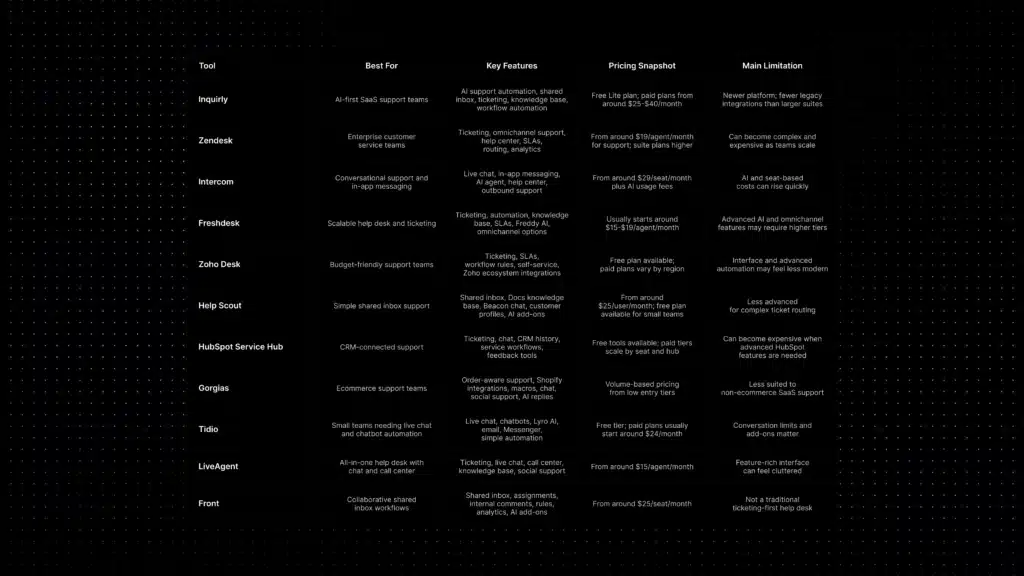
Use this quick comparison to narrow your shortlist. The best tool depends on whether your team needs AI-first SaaS support, enterprise ticketing, conversational messaging, ecommerce workflows, or a simpler shared inbox.
Best for AI-first SaaS support
Inquirly
Built for SaaS teams that want AI-assisted workflows, ticketing, shared inbox, knowledge-based answers, and repetitive-ticket reduction without a heavy enterprise stack.
Pricing snapshot: Free Lite plan; paid plans from around $25–$40/month.
Watch out for: Newer platform with fewer legacy integrations than large enterprise suites.
Best for enterprise service teams
Zendesk
Strong for mature support operations that need ticketing, omnichannel support, SLAs, routing, help center content, and deep reporting.
Pricing snapshot: Support plans usually start around $19/agent/month; suite plans are higher.
Watch out for: Can become complex and expensive as teams scale.
Best for in-app messaging
Intercom
Strong for conversational support, live chat, product messaging, onboarding flows, AI agent workflows, and customer engagement.
Pricing snapshot: Plans usually start around $29/seat/month plus AI usage fees.
Watch out for: Seat-based and AI costs can rise quickly.
Best for scalable help desk
Freshdesk
A practical help desk option for ticketing, automation, knowledge base, SLAs, Freddy AI, and omnichannel workflows.
Pricing snapshot: Entry paid plans often start around $15–$19/agent/month.
Watch out for: Advanced AI and omnichannel features may require higher tiers.
Best budget-friendly Help desk
Zoho Desk
A cost-effective support platform for ticketing, SLA rules, workflow automation, self-service, and Zoho ecosystem users.
Pricing snapshot: Free plan available; paid plans vary by region.
Watch out for: Interface and advanced automation can feel less modern.
Best simple shared inbox
Help Scout
Good for human-centered support teams that want shared inbox collaboration, Docs knowledge base, Beacon chat, and customer profiles.
Pricing snapshot: Paid plans usually start around $25/user/month.
Watch out for: Less advanced for complex ticket routing.
Best CRM-connected support
HubSpot Service Hub
Best when support needs to connect with CRM, sales, marketing, service workflows, feedback tools, and customer history.
Pricing snapshot: Free tools available; paid tiers scale by seat and hub level.
Watch out for: Costs rise when advanced HubSpot features are needed.
Best for ecommerce support
Gorgias
Specialized for ecommerce brands that need Shopify-style order context, macros, chat, social support, and AI replies.
Pricing snapshot: Often volume-based, with low entry tiers.
Watch out for: Less suited to non-ecommerce SaaS support.
Best lightweight live chat
Tidio
Useful for small teams that need live chat, chatbots, Lyro AI, email, Messenger, and simple automation.
Pricing snapshot: Free tier; paid plans commonly start around $24/month.
Watch out for: Conversation limits and add-ons matter.
Best all-in-one help desk
LiveAgent
Combines ticketing, live chat, call center, customer portal, knowledge base, social support, and help desk workflows.
Pricing snapshot: Usually starts around $15/agent/month.
Watch out for: Feature-rich interface can feel cluttered.
Best collaborative inbox
Front
Strong for teams that rely on shared inboxes, assignments, internal comments, rules, analytics, and cross-functional collaboration.
Pricing snapshot: Usually starts around $25/seat/month.
Watch out for: Not a traditional ticketing-first help desk.
Pricing note: Software pricing changes often. These snapshots are directional, verify each vendor’s official pricing page, and pay close attention to AI usage fees, seat limits, conversation limits, add-ons, and annual contract requirements before purchasing.
Customer Support Software Comparison: Pricing, Shared Inbox, Ticketing, and AI
| Software | Best fit | Starting price to show | AI cost signal | Main limitation |
|---|---|---|---|---|
| Inquirly | Lean SaaS support teams | Free Lite; Elite $25/month or $20/month billed annually | Aily is available on Elite and Pro; confirm usage allowances | Fewer legacy integrations than enterprise suites |
| Zendesk | Complex enterprise service operations | From $19/agent/month, billed annually | Omnichannel suites and advanced AI increase total cost | Higher implementation and administration complexity |
| Fin, formerly Intercom | AI-led and in-app customer support | Help desk from $29/seat/month, billed annually | Fin starts at $0.99 per outcome | Seat fees, outcome charges and commitments require modeling |
| Freshdesk | Scalable traditional help desk | From $19/agent/month, billed annually | Extra AI sessions and Copilot can add cost | Omnichannel and advanced features require higher plans |
| Zoho Desk | Budget-conscious teams and Zoho users | Free for three users; paid pricing varies by region | AI availability varies by plan and data center | Less straightforward global pricing and feature availability |
| Help Scout | Human-centered email and shared inbox support | From $25/user/month | AI Answers uses resolution-based pricing after its trial | Less suited to complex routing and enterprise queues |
| HubSpot Service Hub | Support connected to CRM, sales and marketing | Free for two users; Starter from $7/seat/month annually | Customer Agent uses HubSpot Credits | Professional tiers add higher seat and onboarding costs |
| Gorgias | Shopify and ecommerce support | From $10/month for 50 tickets | AI Agent is billed by automated resolution or interaction | Volume pricing can rise during seasonal peaks |
| Tidio | Live chat and lightweight AI support | Free; Starter from $24.17/month annually | Lyro starts separately from $32.50/month | Conversation and AI quotas affect total cost |
| LiveAgent | Support teams needing chat, email and voice | From $15/agent/month | Verify current AI chatbot inclusion by plan | Broad interface may feel excessive for simple inbox workflows |
| Front | Collaborative and cross-functional inboxes | From $25/seat/month | AI features are available as add-ons | Less ticketing-first than a conventional help desk |
What Is Customer Support Software?
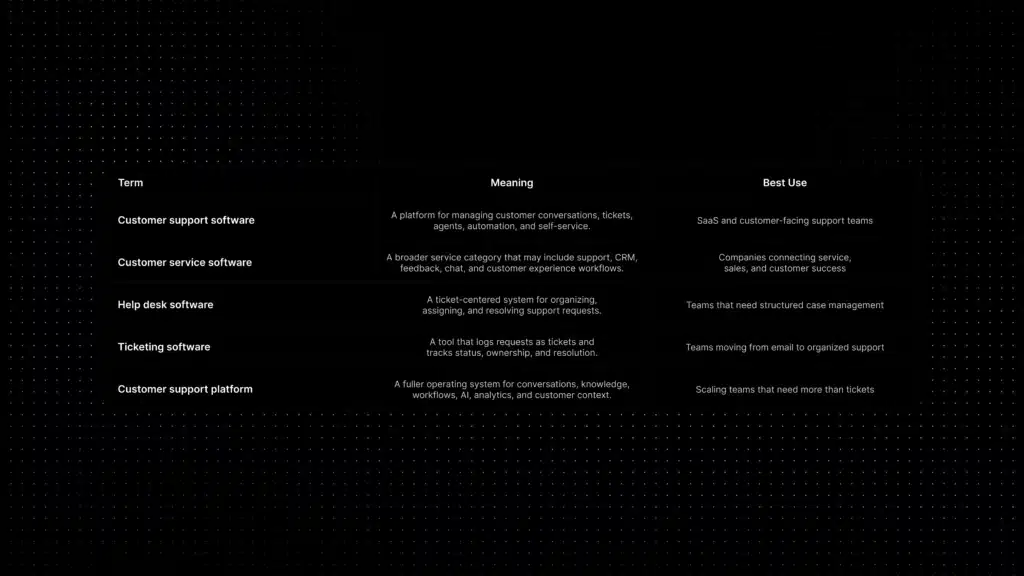
Customer support software helps companies receive, organize, assign, answer, and measure customer requests. In its simplest form, it turns emails and messages into trackable conversations or tickets. In a more complete setup, it also includes live chat, automation, knowledge base content, customer context, SLA tracking, AI suggestions, and analytics.
Customer support software
A platform for managing customer conversations, tickets, agents, automation, and self-service.
Best use: SaaS and customer-facing support teams.
Customer service software
A broader service category that may include support, CRM, feedback, chat, and customer experience workflows.
Best use: Companies connecting service, sales, and customer success.
Help desk software
A ticket-centered system for organizing, assigning, and resolving support requests.
Best use: Teams that need structured case management.
Ticketing software
A tool that logs customer requests as tickets and tracks status, ownership, and resolution.
Best use: Teams moving from email to organized support.
Customer support platform
A fuller operating system for conversations, knowledge, workflows, AI, analytics, and customer context.
Best use: Scaling teams that need more than tickets.
What to Look for in Customer Support Software
- Ticket and conversation management: The platform should make ownership, priority, status, and history clear. Without this, support becomes a shared inbox with no operational control.
- AI automation: Modern support teams increasingly need AI-assisted replies, answer suggestions, ticket classification, and automated answers for repetitive questions.
- Knowledge base support: The tool should make it easy to publish help articles and connect them to chatbots or agent-assist workflows.
- Omnichannel inbox: Email, chat, social, WhatsApp, and other channels should feed into one workspace instead of creating scattered support queues.
- Workflow automation: Look for routing, tagging, escalation rules, SLA alerts, and automation triggers that reduce manual work.
- Customer context: Agents need visibility into previous conversations, account information, plan type, product usage, and support history.
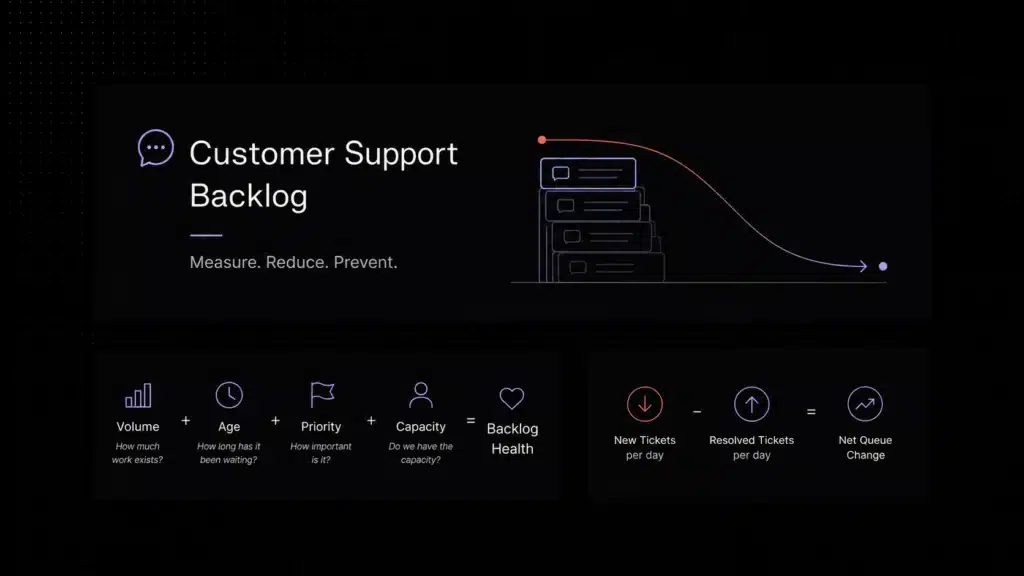
- Analytics and reporting: The platform should help teams monitor first response time, resolution time, ticket volume, AI deflection, CSAT, and backlog health. If you need baseline definitions for these metrics, see our customer support benchmarks.
- Pricing model: Compare per-agent pricing, conversation-based pricing, AI-resolution fees, add-ons, and contract terms before choosing.
- Scalability: A tool that works for five agents may not work for fifty. Review upgrade paths, permissions, reporting, and integration depth.
AI is becoming a real buying factor rather than a decorative add-on. Deloitte Digital’s 2026 service research found that 64% of surveyed service leaders reported higher agent productivity from AI, while 39% reported lower cost per contact. That is why buyers should evaluate whether a support platform uses AI to improve real workflows such as routing, knowledge retrieval, reply assistance, and repetitive ticket reduction, not only whether it advertises an AI feature. Deloitte’s Future of Service research supports this shift toward AI-led service operations.
Zendesk, Best Enterprise Customer Service Suite
Zendesk is one of the most established names in customer service software. It is strong for enterprise support teams that need ticketing, routing, help center content, SLAs, automation, reporting, and multiple communication channels.
Its strength is depth. Large teams can build complex workflows, manage permissions, connect multiple channels, and analyze performance across support operations. For teams with mature support processes, Zendesk can become a central operating system for customer service.
The trade-off is complexity and cost. Smaller teams may find Zendesk more powerful than necessary, especially if they mainly need AI answers, a shared inbox, and simple ticket automation.
Pricing snapshot: Support plans usually start around $19/agent/month, while full suite plans are higher. Verify the current Zendesk pricing page before making a final decision.
Best for: Enterprise or mid-market teams with complex support operations, SLAs, and reporting needs.
Watch out for: Cost, implementation effort, and add-ons can grow as the team scales.
Inquirly, Best AI-First Customer Support Software for SaaS Teams
Inquirly is built for SaaS teams that want customer support automation without adopting a heavy enterprise suite too early. It combines customer conversations, ticketing, workflow automation, knowledge-based answers, and AI-assisted support in one workspace.
The strongest reason to consider Inquirly is its AI-first support workflow. SaaS teams can use it to reduce repetitive tickets, help agents reply faster, route issues more cleanly, and make support knowledge more useful across conversations.
Inquirly also fits teams looking for AI live chat software that connects chat, ticketing, knowledge-based answers, routing, and human handoff in one support workflow.
Pricing snapshot: Inquirly offers a free Lite plan, with paid plans around $25/month and $40/month. Verify current pricing on the Inquirly pricing page before making a final decision.
Best for: SaaS startups and growth-stage teams that want AI support automation, ticket reduction, and faster response workflows.
Watch out for: As a newer platform, Inquirly may not have the same depth of legacy integrations or enterprise marketplace coverage as larger suites.
Intercom, Best Conversational Support and In-App Messaging Platform
Intercom is best known for live chat, in-app messaging, proactive support, and conversational customer engagement. It is especially popular with product-led SaaS companies that want to support users directly inside the product.
Its AI layer, including Fin, makes Intercom a strong option for teams that want automated answers and conversational support flows. It also works well when support, onboarding, product messaging, and customer engagement are connected.
Intercom is a strong platform, but buyers should model cost carefully. Seat pricing, usage-based AI charges, and add-ons can change the total cost significantly.
Pricing snapshot: Plans usually start around $29/seat/month, with AI outcomes or AI resolution fees charged separately. Verify current pricing before purchase.
Best for: SaaS products that need in-app messaging, live chat, and AI-powered conversational support.
Watch out for: Pricing can increase quickly with more seats, AI usage, and advanced features.
Freshdesk, Best Scalable Help Desk and Ticketing Software
Freshdesk is a strong help desk option for growing teams that want traditional ticketing, automation, knowledge base features, SLAs, and optional AI capabilities without starting with an enterprise-heavy tool.
It is often a practical middle ground between simple shared inbox tools and enterprise suites. Teams can start with basic ticketing and grow into more advanced automation, reporting, and omnichannel support.
Freshdesk is useful for SMB and mid-market teams that want a familiar help desk structure and a relatively clear upgrade path.
Pricing snapshot: Entry paid plans usually start around $15-$19/agent/month depending on region and product line. Verify the current Freshdesk pricing page.
Best for: Growing SMBs and mid-market teams that need structured ticketing and scalable help desk workflows.
Watch out for: Advanced AI, analytics, and omnichannel capabilities may require higher tiers or separate product bundles.
Zoho Desk, Best Budget-Friendly Customer Support Software
Zoho Desk is a cost-effective help desk platform for teams that need ticketing, SLAs, automation rules, self-service, and integration with the broader Zoho ecosystem.
Its biggest advantage is affordability. For small teams, the free and low-cost tiers can be enough to move away from unmanaged email support and into a more organized ticketing workflow.
Zoho Desk is especially attractive when the business already uses Zoho CRM, Zoho One, or other Zoho applications.
Pricing snapshot: A free edition is available for small teams, while paid plans vary by region and currency. Verify the local Zoho pricing page before purchase.
Best for: Budget-conscious startups and small businesses that need help desk basics.
Watch out for: The interface and advanced AI experience may not feel as modern as newer AI-first tools.
Help Scout, Best Simple Shared Inbox for Human Support
Help Scout is built around a simple shared inbox, knowledge base, and customer-friendly support experience. It is less intimidating than enterprise ticketing tools and works well for teams that want support to feel personal rather than transactional.
It is a strong fit for email-heavy support teams that value ease of use, clean collaboration, Docs knowledge base content, and lightweight reporting.
Help Scout also offers AI add-ons, but it is still best understood as a simple, human-centered support platform rather than a complex automation suite.
Pricing snapshot: Paid plans usually start around $25/user/month, with a limited free plan available for small teams. Verify current pricing before making a final decision.
Best for: Small support teams, service-led companies, and email-heavy workflows.
Watch out for: Less suitable for complex queue management, advanced ticket routing, or enterprise workflow design.
HubSpot Service Hub, Best CRM-Connected Customer Service Software
HubSpot Service Hub is strongest when customer support needs to connect directly with CRM, sales, marketing, and customer success data. It allows teams to manage support tickets while keeping customer history inside the HubSpot ecosystem.
For businesses already using HubSpot, Service Hub can reduce data fragmentation. Sales, marketing, and support teams can all see relevant customer interactions in one system.
The main question is whether you need HubSpot as your broader CRM platform or only a standalone customer support tool.
Pricing snapshot: HubSpot offers free service tools and paid Service Hub tiers. Pricing depends on seats, hub level, and bundle configuration. Verify official HubSpot pricing before making a final decision.
Best for: Teams already using HubSpot CRM and wanting support connected to sales and marketing context.
Watch out for: Costs can rise when the team needs professional or enterprise HubSpot features.
Gorgias, Best Ecommerce Customer Support Software
Gorgias is designed for ecommerce support, especially Shopify-style workflows. Instead of being a generic SaaS help desk, it focuses on order-aware customer service.
Agents can view order details, shipping status, and customer purchase context while handling messages from email, chat, and social channels. This is valuable for stores where many tickets are about orders, returns, refunds, and delivery questions.
For ecommerce teams, this specialization is a strength. For SaaS support teams, many of those ecommerce-specific features may not be necessary.
Pricing snapshot: Pricing is usually based on ticket volume, with low entry plans and higher tiers for larger monthly ticket counts. Verify the current Gorgias pricing page before making a final decision.
Best for: Ecommerce brands, Shopify stores, and retail support teams.
Watch out for: Ticket-volume pricing can become expensive or unpredictable if support volume rises quickly.
Tidio, Best Live Chat and Chatbot Platform for Small Teams
Tidio is a practical choice for small businesses that want to add live chat and chatbot automation without implementing a full support suite. It is easy to start and useful for websites that need immediate customer conversations.
Its Lyro AI and chatbot workflows help answer common questions, qualify leads, and reduce repetitive conversations. For small teams, this can be enough to improve response speed before investing in a larger help desk.
Tidio is not always the best fit for teams that need mature ticketing, advanced SLAs, or deep support operations reporting.
Pricing snapshot: A free tier is available, and paid plans commonly start around $24/month. Pricing depends on conversations, seats, and add-ons. Verify current pricing before making a final decision.
Best for: Small businesses, websites, and teams that need live chat plus lightweight AI chatbot automation.
Watch out for: Conversation limits and AI add-ons can affect total cost.
LiveAgent, Best All-in-One Help Desk with Chat and Call Center
LiveAgent combines ticketing, live chat, call center features, customer portal functionality, and social support in one platform. It is useful for teams that need multiple communication channels without buying several tools.
The platform is feature-rich and can be attractive for teams that want email, chat, and voice support under one subscription.
The trade-off is usability. Because LiveAgent includes many features, the interface may feel less clean than simpler shared inbox or AI-first support tools.
Pricing snapshot: Plans usually start around $15/agent/month. Higher tiers add more advanced support features. Verify current pricing before purchase.
Best for: Teams that want ticketing, chat, voice, and social support in one affordable help desk.
Watch out for: The user interface can feel busy for teams that only need simple workflows.
Front, Best Collaborative Shared Inbox for Support Teams
Front is a collaborative inbox platform that helps teams manage customer emails, SMS, social messages, and internal collaboration around conversations. It feels closer to a team inbox than a traditional ticketing tool.
It works well when support depends on handoffs, internal notes, shared ownership, and fast collaboration across teams. It is also useful when companies want to keep an email-like workflow while adding structure.
Front is not always the best option for teams that need ticketing-first help desk operations with strict queue management and SLA logic.
Pricing snapshot: Plans usually start around $25/seat/month and scale by tier. Verify current Front pricing before making a final decision.
Best for: Teams that rely on shared inboxes, email collaboration, and cross-functional conversation management.
Watch out for: It may feel less suitable for strict ticketing, large help centers, or complex support operations.
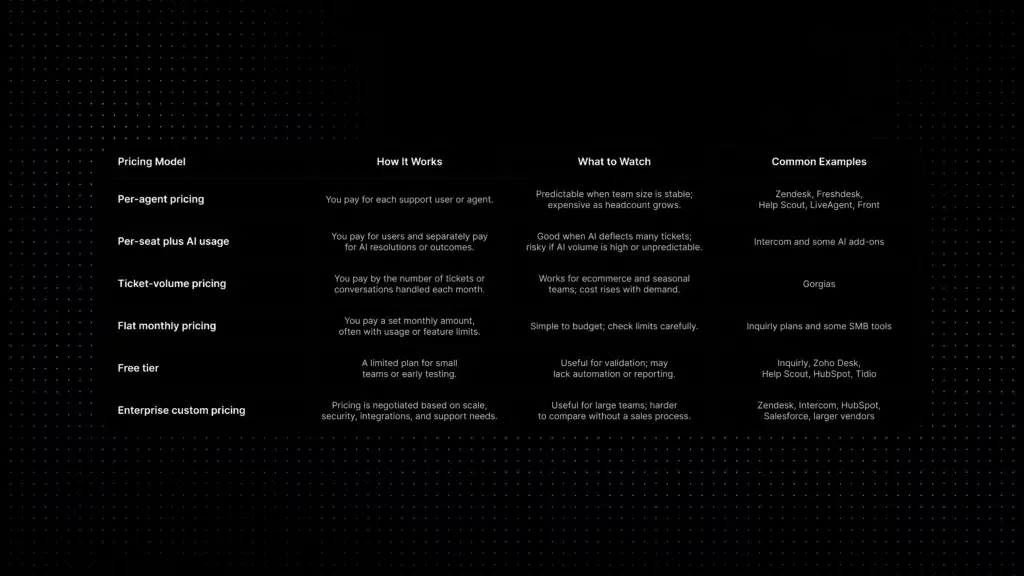
Customer Support Software Pricing Models Explained
Pricing is one of the easiest places to make a bad support software decision. Two tools may look similar on a pricing page but behave very differently once ticket volume, AI usage, agents, channels, and add-ons are included.
Per-agent pricing
You pay for each support user or agent.
Watch out for: Predictable when team size is stable, but more expensive as headcount grows.
Per-seat plus AI usage
You pay for users and separately pay for AI resolutions or outcomes.
Watch out for: Useful if AI deflects many tickets, risky if AI volume is unpredictable.
Ticket-volume pricing
You pay by the number of tickets or conversations handled each month.
Watch out for: Works for seasonal teams, but cost rises when demand rises.
Flat monthly pricing
You pay a set monthly amount, often with usage or feature limits.
Watch out for: Simple to budget, but check limits carefully.
Free tier
A limited plan for small teams or early testing.
Watch out for: Useful for validation, but may lack automation or reporting.
Enterprise custom pricing
Pricing is negotiated based on scale, security, integrations, and support needs.
Watch out for: Useful for large teams, harder to compare without a sales process.
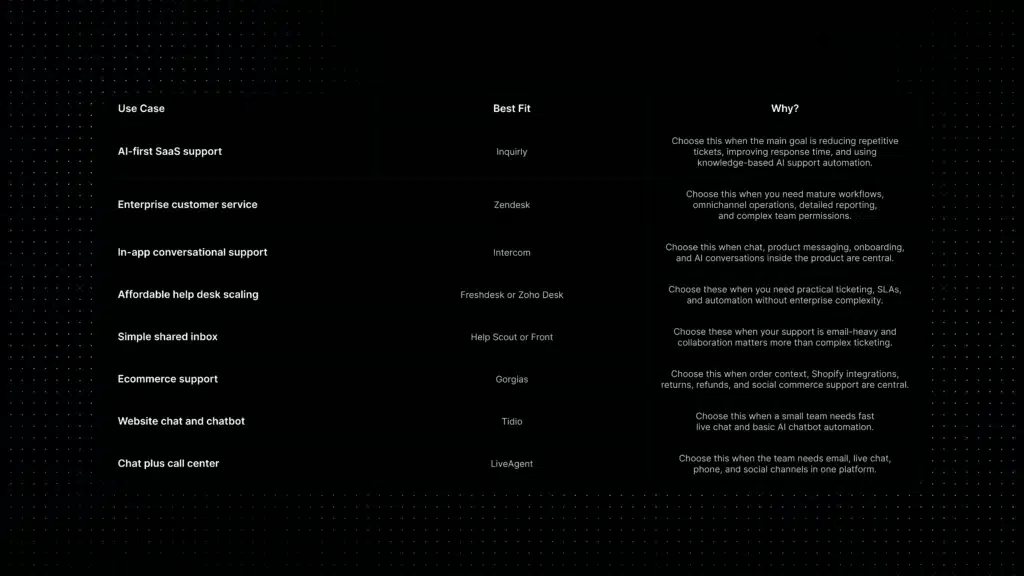
Customer Support Software Without Per-Seat Pricing
Some teams want customer support software without per-seat pricing because agent-based billing can become expensive as the team grows. In that case, compare tools that offer flat monthly plans, usage-based pricing, or lower-cost starter plans instead of only traditional per-agent pricing.
This matters most for startups, small support teams, and SaaS companies where several people may occasionally help with support. A flat or flexible pricing model can make budgeting easier than paying for every user who needs access.
Before choosing a non-seat-based customer support tool, check whether the plan includes ticketing, shared inbox access, AI usage, help center features, automation rules, reporting, and enough conversation volume for your team.
How to Choose the Best Customer Support Software
Before comparing logos, compare your actual support model. The best customer support software is the one that fits how your team receives, resolves, automates, and measures customer conversations.
- How many support agents will actively use the platform?
- Which channels matter now: email, live chat, WhatsApp, social, voice, in-app messaging, or all of them?
- Do you need traditional ticketing, conversation management, or both?
- Do customers ask many repetitive questions that AI could answer from your knowledge base?
- Do you need a public help center or only internal support content?
- How important are SLAs, priority rules, assignment logic, and escalation workflows?
- What metrics will you track: first response time, resolution time, backlog, CSAT, AI resolution rate, or ticket deflection?
- Do support agents need customer account context, subscription data, product usage data, or CRM history?
- Is pricing more predictable under per-agent, flat monthly, or usage-based billing?
- Will the tool still work when your support volume doubles?
This is also where proactive customer support matters. The best platform should not only help your team answer tickets after they arrive; it should also help you identify repeated friction, improve self-service, and reduce avoidable support demand over time.
Where Inquirly Fits in This Market
Inquirly is a strong fit for SaaS teams that want AI-first customer support software without adopting a heavy enterprise service suite too early.
SaaS support is different from ecommerce support, IT help desk support, and enterprise contact center support. SaaS teams often need fast answers from product documentation, clean escalation paths, customer context, and support automation that does not require a large operations team to maintain.
For small and growth-stage SaaS teams, the best question is not always “Which platform has the most features?” The better question is “Which platform helps us reduce avoidable support work without making the support stack harder to manage?”
That is where Inquirly fits: AI-assisted workflows, knowledge-based answers, shared inbox, ticketing, and support automation in one workspace built for lean SaaS teams.
Conclusion: Choose Based on Your Support Model, Not the Longest Feature List
The best customer support software for 2026 is not always the platform with the most features. It is the platform that fits your channels, team size, customer expectations, automation needs, and pricing tolerance.
Enterprise teams may need the depth of Zendesk. Product-led SaaS companies may value Intercom’s in-app messaging. E-commerce brands may need Gorgias because order context is central. Email-heavy teams may prefer Help Scout or Front. Budget-focused teams may compare Freshdesk and Zoho Desk.
For SaaS teams that want to reduce repetitive tickets, improve response time, and scale support with AI automation, Inquirly deserves a close look. It is built for teams that want modern support workflows without adopting an unnecessarily complex support stack too early.
Start by mapping your support model, then compare tools against the work your team actually needs to do every day. That is the clearest way to choose customer support software that will still fit six months from now.