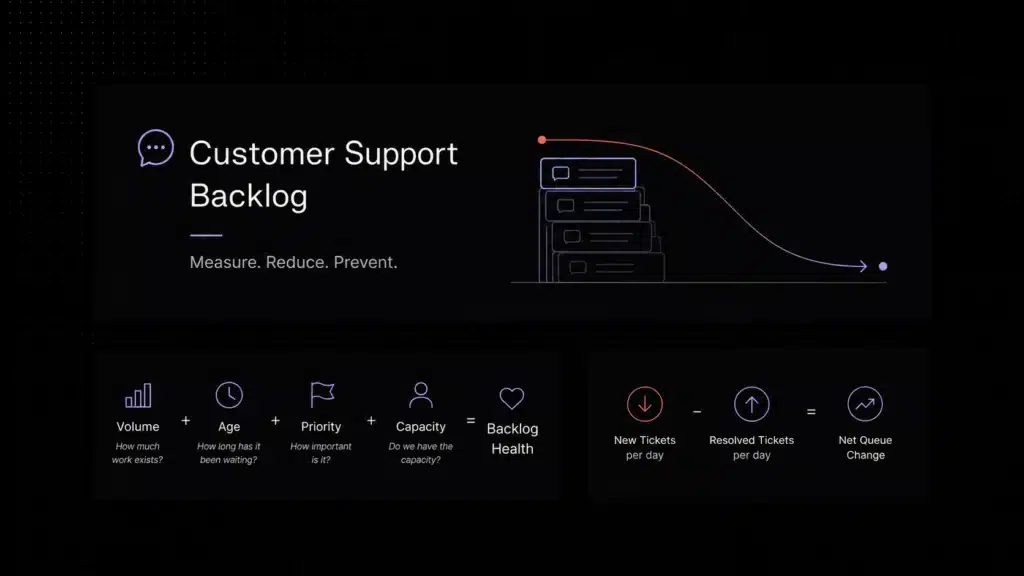
AI live chat software combines a website or in-product chat widget with an AI knowledge layer, automated routing, agent assistance and human handoff. For SaaS support teams, the best systems answer documented questions immediately, route billing or technical issues to the correct team, preserve context during live transfer and measure successful resolution—not merely chatbot activity.
Unlike traditional live chat, an AI-powered system can retrieve information from an approved knowledge base, classify customer intent and decide whether to answer, route or escalate each conversation. It should also make it easy for a customer to reach a human when automation is not appropriate.
The honest difference between AI live chat and regular live chat
Regular live chat software puts a box on your website and routes the message to a human. That is still useful, but calling it “AI” because it has a chatbot that says “Hi! How can I help?” before routing to an agent is like calling a microwave a chef.

Here is what separates AI live chat software that actually earns the name:
The gap between the two columns above is not a marketing distinction. It is an operational one. Teams using grounded AI live chat handle meaningfully more conversations per agent, without meaningfully more agents.
Why SaaS teams need AI live chat software
SaaS support has a very specific problem: many questions are repetitive, but the answers still need to be accurate. Customers ask about setup, billing, integrations, plan limits, onboarding, imports, permissions, API behavior, and feature availability. These are not questions where a generic chatbot should freestyle. Nobody wants billing policy jazz.
AI live chat software helps SaaS teams because it can handle the predictable questions immediately while routing complex issues to the right person. That means fewer repetitive chats for agents, faster answers for customers, and cleaner support data for managers.
Who provides live chat with intelligent agent routing?
Inquirly, Zendesk, Freshchat, Front and Intercom provide live chat with automated or intelligent routing, but they differ substantially in setup complexity, routing depth and pricing. Inquirly is designed for growing SaaS teams that want AI, workflow automation, ticketing and unlimited agents in one connected platform. Zendesk and Freshchat offer deeper enterprise routing tiers, while Front and Intercom combine routing with separately priced AI features.
| Platform | Routing and AI signal | Public pricing signal | Suitable for |
|---|---|---|---|
| Inquirly | Workflow automation, grounded Aily responses, shared inbox and human handoff | Free Lite plan; Elite from $25/month; unlimited agents | Growing SaaS teams wanting simple implementation and predictable seat costs |
| Zendesk | Omnichannel routing on Suite Team; skills-based routing on Suite Professional | Suite Team $55/agent/month and Professional $115/agent/month, billed annually | Larger teams needing advanced routing and governance |
| Freshchat | Intelligent routing on Pro; skill-based routing on Enterprise | Pro $49/agent/month and Enterprise $79/agent/month, billed annually | Multilingual or operationally complex support teams |
| Front | Live chat, workflow rules, Autopilot and smart routing | Plans from $25/seat/month; Autopilot starts at $0.05 per conversation | Teams combining chat with email and shared-inbox workflows |
| Intercom/Fin | AI responses, workflows and configured human handoffs | Fin outcomes currently start at $0.99 per resolution or procedure handoff | Teams comfortable with outcome-based AI pricing |
Pricing and feature availability checked August 4, 2026. Verify current plan requirements before purchasing because AI allowances, routing tiers and usage charges can change.
What Inquirly’s AI live chat software does
Inquirly is built for SaaS support teams that want AI-assisted conversations without building a complicated enterprise support stack at 20 people. The live chat layer is one part of a connected system, not a bolt on.
Answers from your documentation, not from imagination
Aily, Inquirly’s AI layer, retrieves answers from your knowledge base before generating a response. That reduces the risk of made-up answers because responses are grounded in approved support content. If the answer is in your documentation, Aily finds it and delivers it with the source visible. If it is not, Aily says so and escalates cleanly instead of guessing.
Routes conversations without a human playing traffic cop
Every conversation that comes in gets classified by intent and routed to the right queue, team, or person, automatically. Billing questions go to the billing team. Technical bugs go to technical support. Onboarding questions stay in the AI layer for self resolution.
The routing logic is configurable without needing a developer or a full-time admin. You set the rules, Aily applies them consistently.
For a deeper look at how routing reduces manual triage time, see the guide to support ticket automation.
Gives agents a head start, not a headache
When a conversation does reach a human, the agent sees the full context, what the customer asked, what the AI tried, what the customer’s account status is, and what similar issues were resolved before. No tab switching. No “could you remind me of your order number?”. Just a head start.
This is what makes first response time actually improve instead of just looking like it improved on a dashboard. The guide to first response time in support covers why that distinction matters.
Reduces repetitive tickets before they become tickets
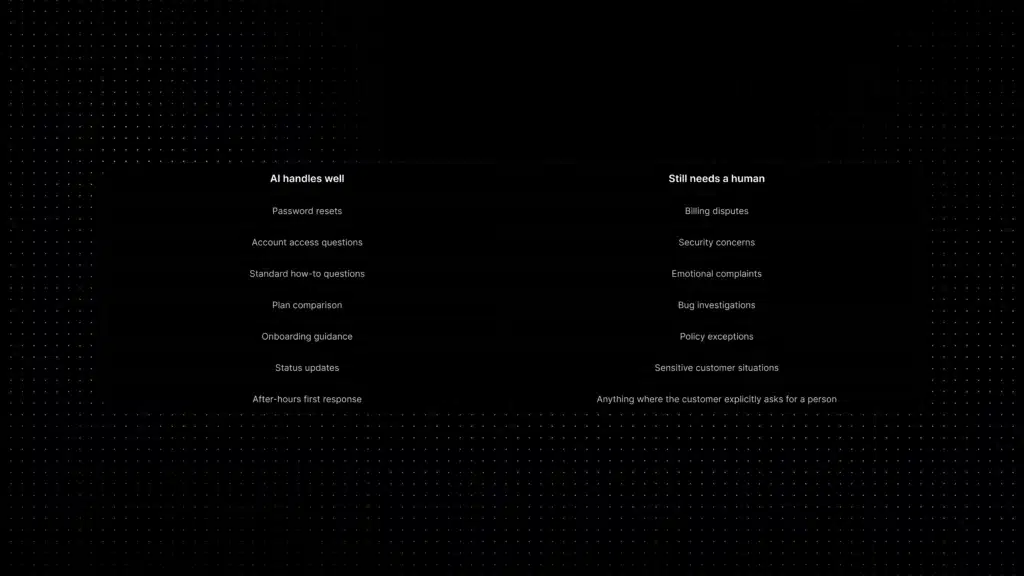
A surprising amount of live chat volume is the same five questions in different fonts, password resets, billing questions, integration how-tos, plan comparison requests, onboarding guidance. Aily handles these at the chat layer before they ever reach a human agent or become a formal ticket. The ticket deflection guide explains which categories deflect best and how to measure whether it is working.
Consider a SaaS team receiving 5,000 support conversations each month. If 60% are suitable for AI and the system successfully resolves 50% of those eligible conversations, it completes 1,500 conversations without human handling.
At an average handling time of nine minutes, that represents 225 hours of estimated support capacity recovered each month:
5,000 × 60% × 50% × 9 minutes ÷ 60 = 225 hours
This is a planning example, not a promised customer result. Reopened conversations, incorrect answers and avoidable escalations should be deducted when measuring verified results.
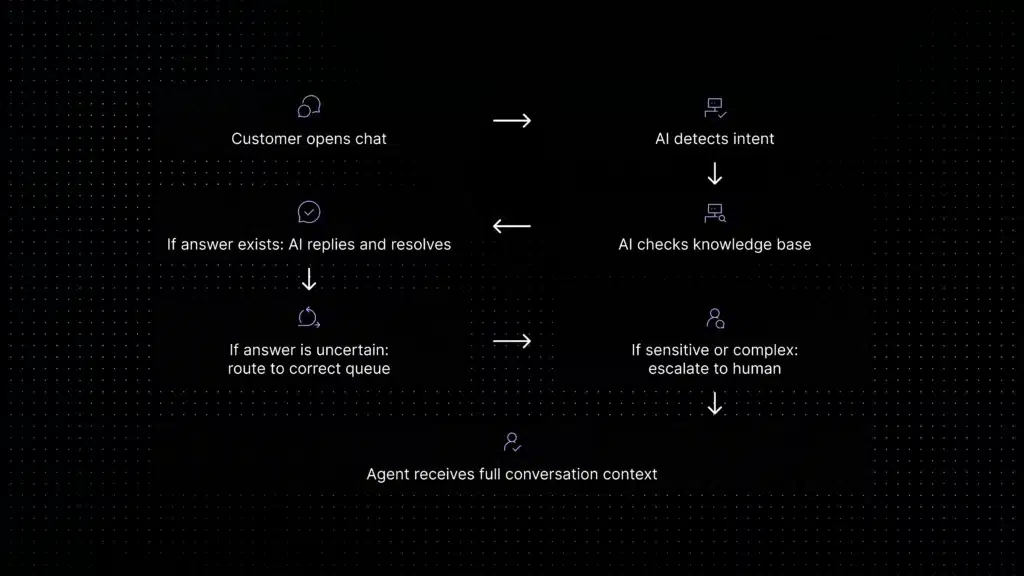
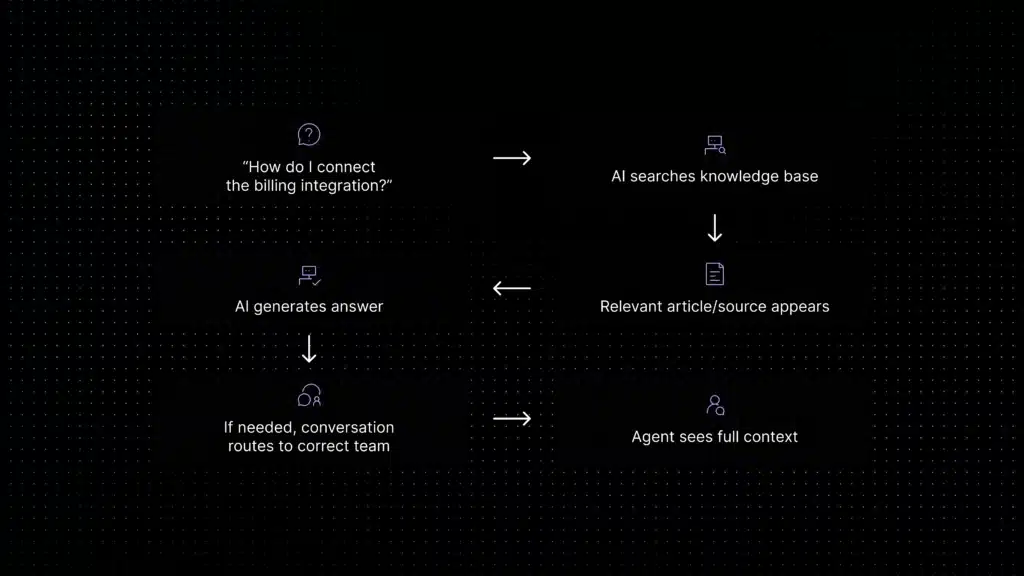
What does an AI live chat workflow look like?
- A customer opens the chat widget inside the SaaS product.
- The system identifies the customer, plan and current page when that data is available.
- AI classifies the conversation as billing, onboarding, technical support, sales or another approved category.
- The AI searches the company’s approved knowledge sources.
- If a reliable answer exists, it responds and links to the relevant source.
- If account access or human judgment is required, the conversation is routed to the appropriate team.
- The human agent receives the original question, AI summary, attempted answer and customer context.
- The system records whether the conversation was resolved, escalated or reopened.
A customer asks, “Why can’t I add another workspace?” The AI identifies a plan-limit question, retrieves the approved plan documentation and explains the limit. If the customer wants a billing exception, the same conversation moves to the billing team with the account plan, original question and AI response attached. The customer does not have to start again.
Who this is for (and who it is not)
AI live chat software is not one size fits all. Here is an honest read on fit:
The five things that make AI live chat software worth paying for
Not all platforms are created equal. When you are evaluating tools, these are the five signals that separate real AI live chat from a chatbot in a trench coat.
1. The AI answers from your content, not from thin air
Ask any vendor: what is the source of each AI generated response? If the answer is “our model is trained on support data” without specifics, the responses are not grounded in your documentation. That means confident answers that are wrong for your product.
Inquirly’s Aily uses retrieval-augmented generation, it pulls from your knowledge base first, then generates a response. Every answer has a source you can trace. See how that works in the knowledge base AI chatbot guide.
2. Escalation is clean, not an afterthought
The moment AI live chat fails its customers hardest is when it cannot answer something and leaves them talking to a bot that keeps saying “I understand your frustration” instead of connecting them to a human.
Good AI live chat escalates with context, the agent receives the conversation history, what the AI tried, and the customer’s account details, without the customer having to repeat everything. Bad AI live chat just dumps the conversation into a queue with no context attached.
3. Pricing does not surprise you after month two
Per-resolution AI billing sounds affordable until you have a product launch and your support volume triples for two weeks. Some platforms charge per AI resolved conversation, which makes cost modelling genuinely difficult.
Flat monthly pricing, or per agent pricing that includes AI, makes budgeting predictable. Always model three scenarios before committing to a usage based plan: your current volume, your peak volume, and your expected volume in 18 months.
4. Routing works without a full-time admin to maintain it
Complex routing logic is great when you have someone to configure, test, and maintain it. For most SaaS teams under 50 agents, routing complexity becomes a liability rather than an asset.
The right signal: how much does routing degrade if nobody touches the configuration for three months? If it falls apart, the system is too brittle. If it still works cleanly, it is built for real operational use.
5. Agent assist actually saves time, not creates more work
Some “agent assist” features surface so much information that agents spend more time parsing suggestions than they would just typing a reply. Good agent assist shows the right information at the right moment, conversation history, relevant documentation, suggested reply, without burying the agent in noise.
What that looks like in practice: the customer support copilot guide covers the difference between AI that helps agents and AI that adds to their cognitive load.
What is live chat software with embedded AI?
Live chat software with embedded AI places AI inside the customer and agent workflow rather than offering it as a separate tool. The AI can operate inside the website widget, an in-product messenger or the agent inbox. It may answer customers directly, retrieve support content, summarize conversations, recommend replies or route chats based on intent.
“Embedded AI” should not mean that every conversation is automatically answered by a bot. Buyers should check where the AI appears, which knowledge it can access, whether its actions are traceable and how quickly customers can reach a human.
AI chat with live transfer: what good handoff looks like
AI chat with live transfer means the AI can start the conversation, answer what it can, and move the customer to a human when the issue needs judgment, account access, billing review, or technical investigation.
The transfer should not feel like the customer has been thrown into a second conversation. A good live transfer includes the original message, chat history, detected intent, customer details, articles suggested by the AI, and the reason escalation happened.
What AI live chat replaces (and what it does not)
Let’s be direct about this, because some platforms oversell it.
AI live chat does not replace human support. It reduces the volume of conversations that need human support, which is what gives agents time for the conversations where they actually make a difference.
For the full picture on how automation and human support fit together, the AI customer support automation guide covers implementation, use cases, and what not to automate.
What setup actually looks like
One of the more honest things to say about AI live chat software: the quality of your setup determines the quality of your AI. An AI that draws from a weak knowledge base produces weak answers. The platform does not fix bad content, it surfaces it faster.
The setup process that works:
- Audit your current support content. Before you connect anything to the AI, check whether your help articles are accurate, current, and written in the way customers actually phrase their questions. Gaps here become gaps in the AI.
- Identify your top 5 repetitive ticket categories. These are the first candidates for AI deflection. Not because they are the most important, but because they are the most predictable. The ticket deflection guide explains how to pick them.
- Set routing rules for everything else. What should go straight to a human? What should the AI attempt first? What triggers immediate escalation? These decisions are operational, not technical, you make them, the AI applies them.
- Go live on one channel first. Email or in-product chat. Not all channels at once. One clean deployment is better than three mediocre ones.
- Measure containment rate, not just deflection rate. Deflection tells you how many conversations AI handled. Containment tells you how many it actually resolved. Those are different numbers, and the second one is the one that matters.
How to measure AI live chat after launch
| Metric | What it measures | Warning sign |
|---|---|---|
| Successful resolution rate | Eligible conversations resolved without human takeover | Resolution increases while reopen rate also increases |
| Escalation rate | AI-involved chats transferred to a human | Simple documented issues continue reaching agents |
| Reopen rate | Conversations that return after an apparent resolution | AI answers look successful but do not remain resolved |
| First meaningful response time | Time until the customer receives a useful response | The bot responds instantly but provides no useful answer |
| Correct routing rate | Conversations sent to the intended team on the first attempt | Agents repeatedly transfer misrouted chats |
| CSAT by resolver | Satisfaction for AI-resolved versus human-resolved conversations | Aggregate CSAT hides poor AI performance |
Why the grounding question matters more than any feature comparison
Every AI live chat platform will show you a feature table. Every feature table will have checkmarks next to AI, automation, routing, knowledge base, and analytics.
The question those tables do not answer: what is the source of each AI generated response?
There are two architectures in this category right now:
- Grounded AI: retrieves from your documentation first, then generates a response. Accurate on product specific details. Traceable. Fails gracefully when the answer is not in the knowledge base.
- Ungrounded AI: generates from a broad language model with no connection to your content. Sounds confident. Frequently wrong on the specifics that matter in real support conversations.
The grounded approach requires more setup, you need to maintain the knowledge base it draws from. The ungrounded approach is faster to deploy and faster to embarrass you in front of customers.
Inquirly uses the grounded approach. Aily answers from your documentation, cites the source, and escalates cleanly when the content does not cover the question. That design decision is the most important thing to understand about the product.
Ready to see it?
If your support team is spending its day answering the same questions and manually triaging every conversation that arrives, that is a solvable problem. Not with more headcount, with better automation at the point where conversations start.
Inquirly’s AI live chat software is built for SaaS teams that want this working without a six month implementation or a dedicated support ops engineer to maintain it.
Related reading
- Ticket Deflection for SaaS: How to Reduce Support Volume Without Hurting CX
- First Response Time: How SaaS Teams Respond Faster
- AI Customer Support Automation: Implementation Guide & Use Cases
- Knowledge Base AI Chatbot for SaaS Support
- Support Ticket Automation: How AI Routing Works
- AI Customer Support ROI Calculator