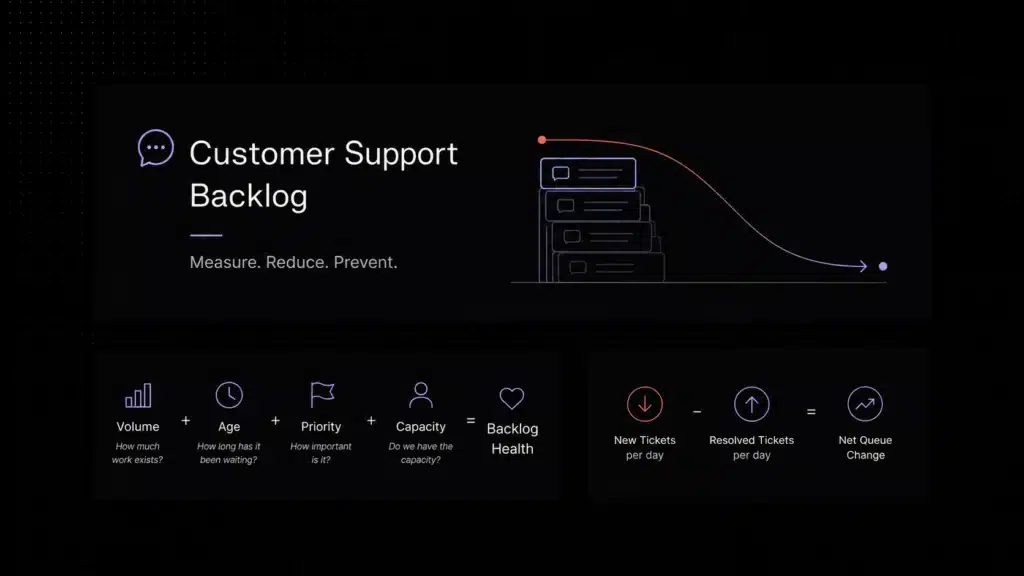
A practical workflow guide for SaaS teams trying to find where requests stall, bounce, or miss SLA targets as volume and support complexity grow.
A support workflow audit is a structured review of how support requests move from intake to resolution, used to find bottlenecks, unclear ownership, routing gaps, and SLA risks before they hurt customer experience.
Support teams rarely decide to build a messy workflow. It happens gradually. A new channel opens. A premium queue gets added. Escalations start going to a specialist group. Someone creates a fast workaround for billing issues. A few months later, the team is still answering customers, but no one can clearly explain why some requests move smoothly and others seem to disappear into the system.
That is why workflow problems are expensive. They do not always look like one dramatic failure. They show up as delayed first responses, uneven backlog, repeated handoffs, unclear ownership, or tickets that keep getting reassigned before anyone actually solves the problem. Customers feel the delay long before the team fully understands where it starts.
A customer support workflow audit helps make that invisible drag visible. It gives SaaS teams a practical way to inspect how work enters support, how it gets classified, who owns the next step, where it waits, and why certain requests miss SLA targets even when agents are working hard.
This guide breaks the process down in plain language. It explains what a support workflow means in practice, what stages to audit, how to spot the most common bottlenecks, and what to fix first before adding more tools or automation. The goal is not to create a huge manual audit project. It is to give SaaS teams a practical way to see where work stalls, where ownership gets fuzzy, and where support friction should be visible long before customers feel the delay.
What a support workflow means in practice
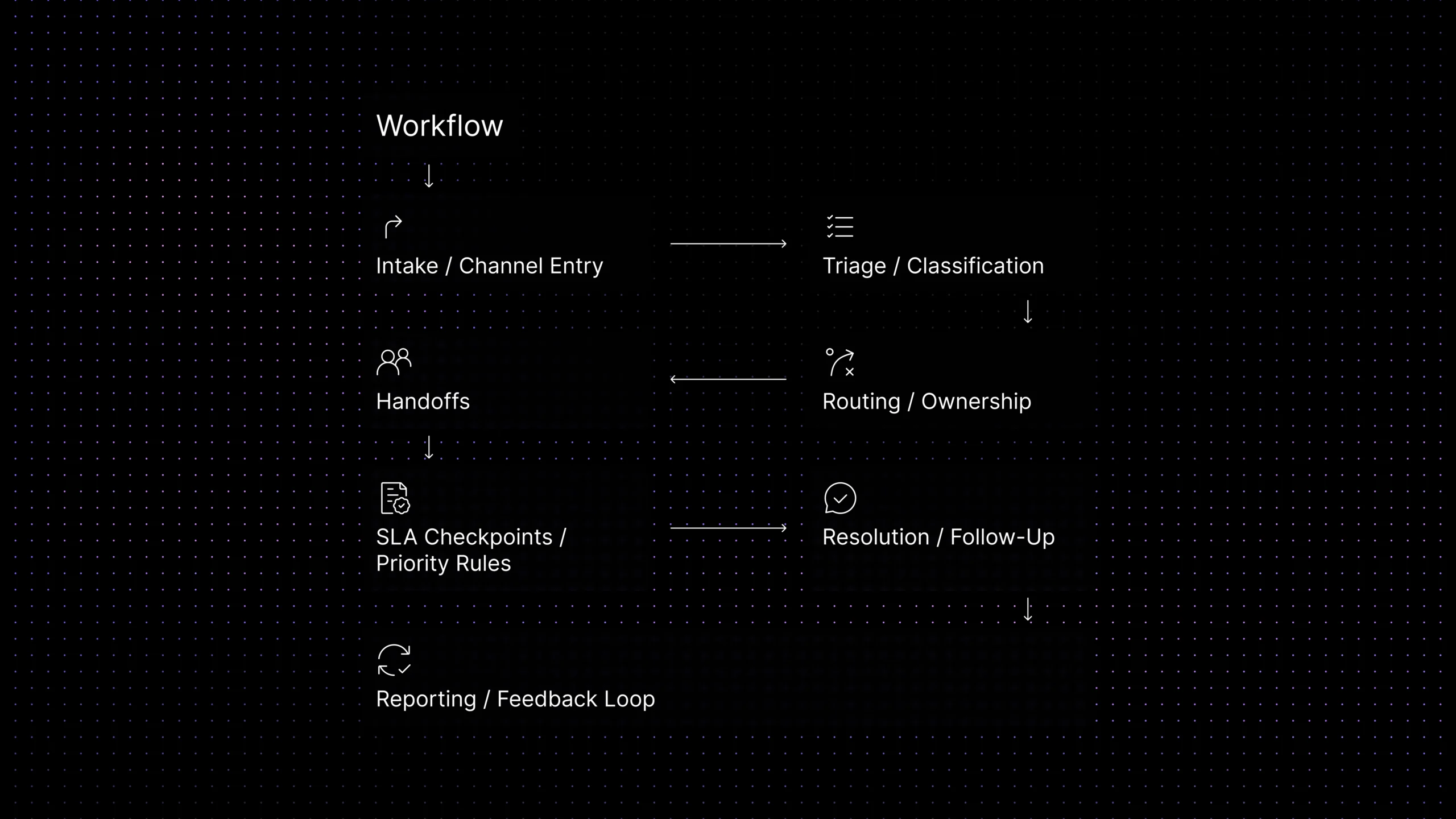
A support workflow is the full path a request follows from the moment it enters support to the moment it is resolved, confirmed, and learned from. In a SaaS team, that path usually includes intake, triage, routing, ownership, handoffs, escalation, resolution, and follow-up.
That is slightly broader than ticket workflow. Ticket workflow usually focuses on how an individual ticket moves through statuses, queues, or assignment rules. Help desk workflow often refers to the operating process inside the help desk itself. Support workflow is the wider operational view: it includes the ticket, the queue, the person, the timing rules, the context, and the handoff between systems or teams.
That wider lens matters because customers do not experience your support operation in separate parts. They feel the full chain. When the workflow is healthy, each step is predictable and the next owner is obvious. When the workflow is weak, small delays compound into repeat questions, missed priorities, and longer resolution times.
Support workflow vs ticket workflow vs help desk workflow
| Area | Support workflow | Ticket workflow | Help desk workflow |
|---|---|---|---|
| Main focus | How support work moves across the full operation | How one ticket moves through stages or queues | How the help desk team and tool handle support work |
| Best used for | Auditing bottlenecks, handoffs, routing, and ownership | Cleaning up statuses, queue rules, and ticket movement | Reviewing process design, queue structure, and tool behavior |
| Common signals | Backlog growth, SLA misses, ownership confusion | Stuck statuses, aging tickets, reopen rate | Uneven queue load, poor visibility, inconsistent handling |
| Why it matters | Shows where the system slows customers down | Improves consistency inside ticket movement | Improves day-to-day support operations |
Use support workflow as the main audit lens. It gives you the clearest way to see where support slows down across the whole system, not only inside a ticket status board.
Why support workflows break as SaaS teams scale
Most workflow problems are created by growth, not neglect. Teams add channels, specialist queues, escalation paths, new priorities, and new automation rules faster than they update process design. Each change makes sense on its own. Together, they make the workflow harder to see and harder to manage.
The first failure is usually visibility. Teams can see tickets arriving, but they cannot easily see where work waits the longest. The second failure is ownership. A request moves, but responsibility does not move with it clearly. The third failure is policy drift. Priority rules, escalation paths, or SLA expectations get updated in one place but not everywhere they need to be.
This is also why adding more automation is not always the answer. If the workflow itself is unclear, automation simply moves confusion faster. A workflow audit forces the team to answer the basic questions first: where does work enter, what determines priority, who owns the next step, and what metric tells you that stage is healthy?
What a support workflow audit actually checks
A lightweight audit is not a formal internal-audit project. It is a structured review of the workflow stages that affect speed, ownership, and resolution quality. The goal is to identify where work stalls, bounces, or loses context.
At each stage, a useful audit checks five things: how requests enter the stage, what information is available, what rule decides the next move, who owns that move, and what metric tells you the stage is performing well. If one of those five pieces is weak, the workflow becomes inconsistent very quickly.
That is why the most useful audit output is rarely a long report. It is a short, practical list of stage-level findings: which queues age too long, which issue types are hard to classify, where routing sends work to the wrong owner, where handoffs lose context, and where SLA risk starts to appear.
Teams can do this review manually, but the stronger long-term model is not a one-time spreadsheet exercise. The real goal is to make workflow friction easier to see continuously. If context is missing at intake, if routing keeps bouncing the same issue types, or if handoffs repeatedly slow down after escalation, the support system should make those signals visible before they turn into SLA misses.
Audit the workflow stage by stage. Most bottlenecks appear where context, priority, or ownership shifts.
The 8 stages to audit in a support workflow
Intake and channel entry
Start by checking where support work enters the system: email, live chat, contact forms, self-service escalations, product widgets, or internal handoffs. Audit whether every entry point captures the same minimum data. If one request arrives with account and issue details while another arrives almost empty, the queue becomes inconsistent before triage even starts.
Triage and classification
Review how requests are labeled, categorized, and prioritized. If issue types are vague or applied differently by different people, the team loses time before anyone can route work confidently. Many backlog problems begin here because the queue looks full, but the real problem is poor classification upstream.
Routing and ownership
Routing is where the workflow either gains speed or loses it. Check whether assignment rules still reflect the way the team actually works. Look for repeated reassignments, high transfer rates, or one queue receiving work it is not designed to handle. Those are usually routing signals, not agent-performance issues.
Handoffs between people or teams
Handoffs are one of the highest-friction stages in SaaS support. Audit whether context travels with the request, whether the next owner can act from the existing history, and whether the customer has to repeat key details after a transfer. Repeated explanation is one of the clearest signs that workflow design is hurting resolution quality.
SLA checkpoints and priority rules
Review the timing rules that matter most: first response, next response, time to resolution, and escalation thresholds. Then check whether those rules actually line up with ticket priority and queue design. A lot of SLA misses are not capacity problems; they start with workflows that surface urgency too late. For broader service management context, Atlassian explains how SLAs define expected response and resolution standards, which is why workflow audits should check SLA checkpoints before breaches happen.
Resolution and follow-up
A request is not complete just because someone changed the status to solved. Audit whether the customer actually received a clear answer, whether follow-up depends on one person remembering it, and whether the same issues reopen because the workflow closed too early or too vaguely.
Feedback loop and reporting
Finally, inspect what the team learns from the workflow. Can managers see which stage creates the most delay? Can they separate volume pressure from routing problems? Can they see whether self-service, ticketing rules, or knowledge coverage are improving the workflow over time? If reporting cannot answer those questions, the same bottlenecks will return.
The most common support bottlenecks and how to spot them
Most bottlenecks fall into a few familiar categories. Intake bottlenecks happen when requests arrive without enough information. Triage bottlenecks happen when labels, priorities, or issue types are unclear. Routing bottlenecks happen when ownership rules are outdated or too broad. Handoff bottlenecks happen when work changes hands without enough context. SLA bottlenecks happen when urgent work is technically visible, but not visible early enough to act on.
The easiest way to spot them is to compare what the workflow says should happen with what actually happens in the queue. If one queue ages faster than others, inspect routing and intake. If a ticket type gets reassigned over and over, inspect classification and ownership. If escalation takes too long after transfer, inspect handoff quality, not just staffing levels.
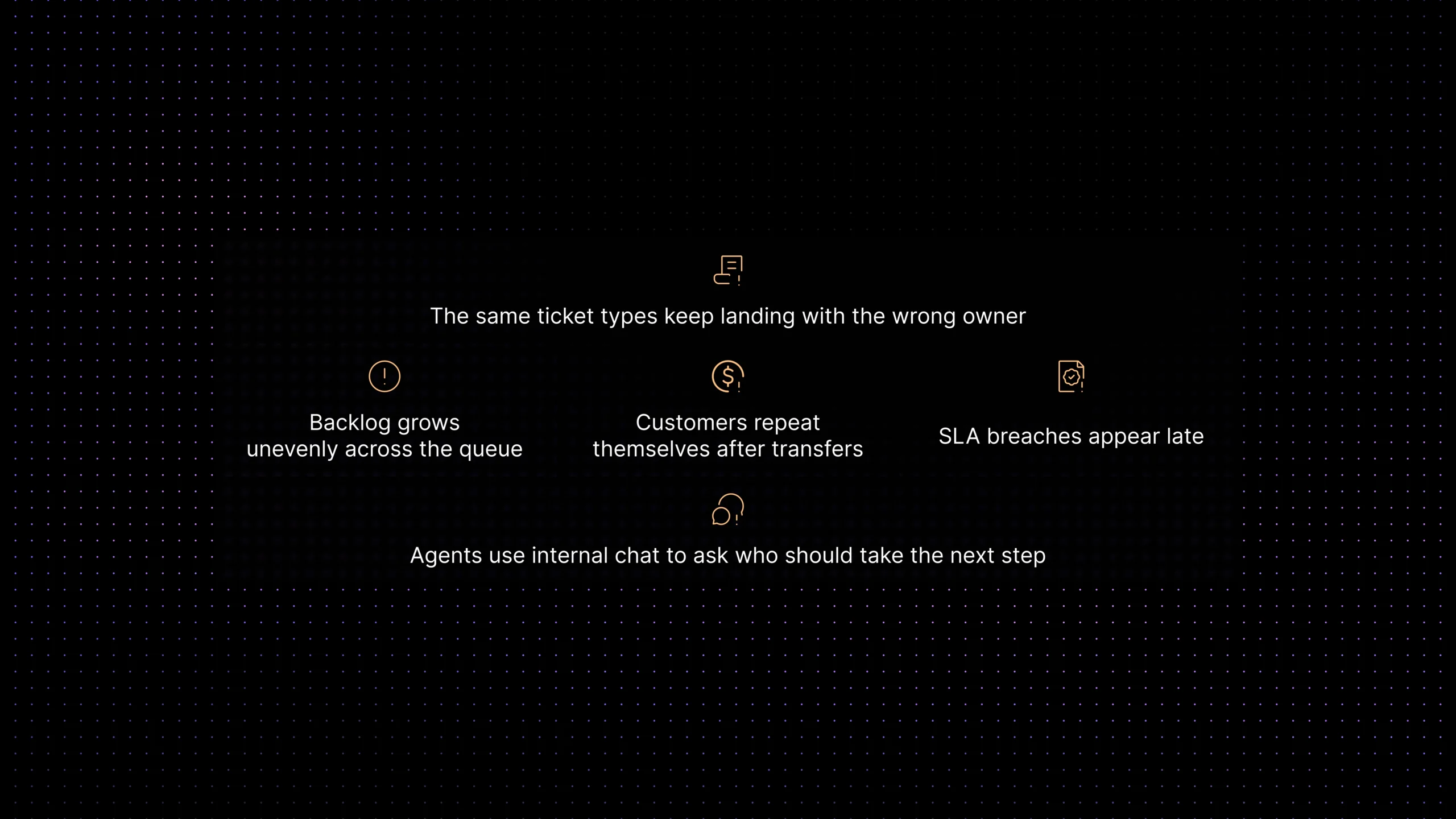
What bottlenecks usually look like
-
Backlog grows unevenly instead of evenly across the queue.
-
The same ticket types keep landing with the wrong owner.
-
Agents use internal chat to ask who should take the next step.
-
Customers repeat themselves after transfers or escalations.
-
SLA breaches appear late, even though the request entered on time.
Support workflow audit checklist
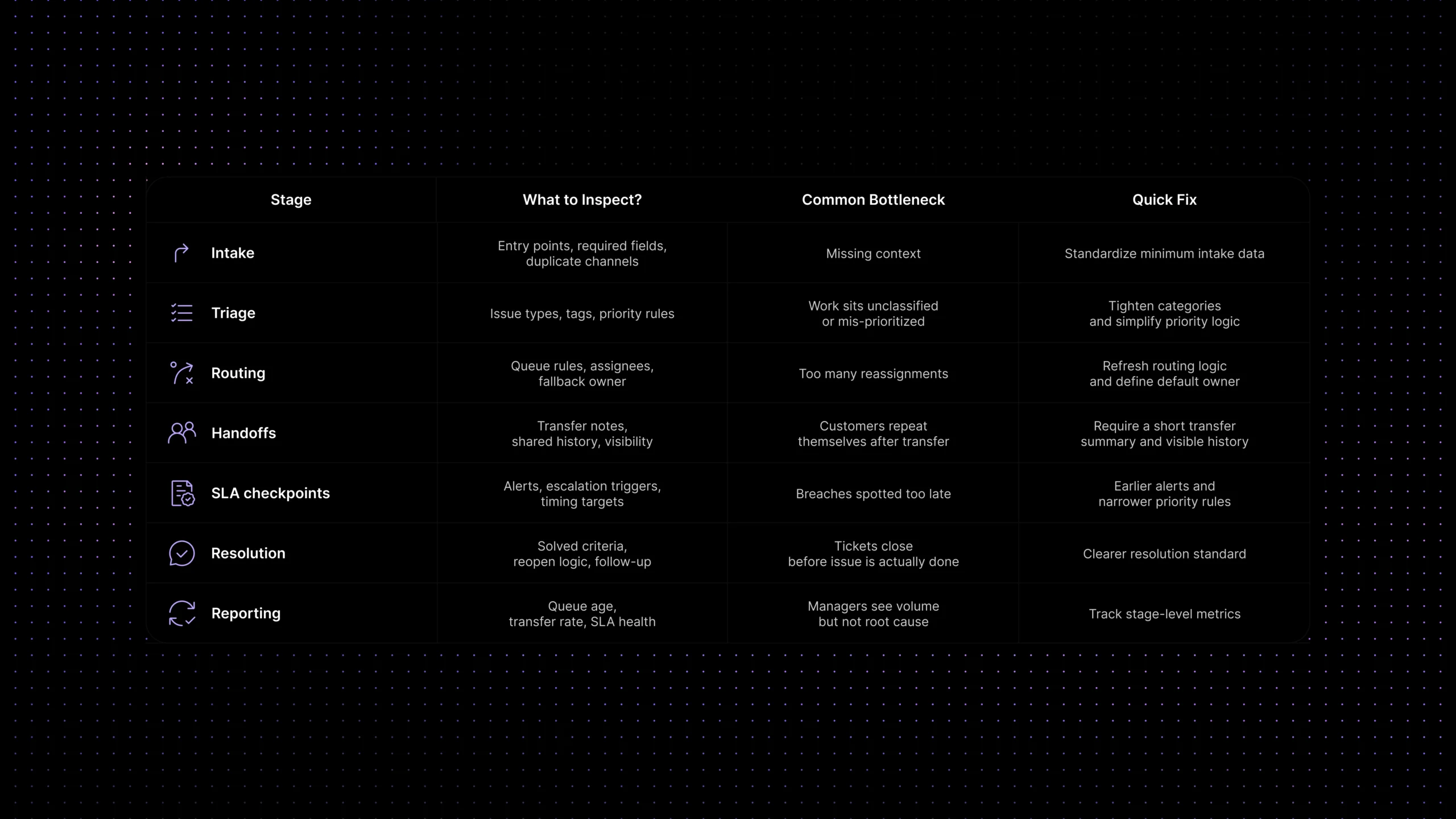
| Stage | What to inspect | Common bottleneck | Quick fix |
|---|---|---|---|
| Intake | Entry points, required fields, duplicate channels | Requests arrive with missing context | Standardize the minimum intake data |
| Triage | Issue types, tags, priority rules | Work sits unclassified or mis-prioritized | Tighten categories and simplify priority logic |
| Routing | Queue rules, assignees, fallback owner | Too many reassignments | Refresh routing logic and define a default owner |
| Handoffs | Transfer notes, shared history, visibility | Customers repeat themselves after transfer | Require a short transfer summary and visible history |
| SLA checkpoints | Alerts, escalation triggers, target timing | Breaches are noticed too late | Create earlier alerts and narrower priority rules |
| Resolution | Solved criteria, reopen logic, follow-up | Tickets close before the issue is really done | Define a clearer resolution standard |
| Reporting | Queue age, transfer rate, SLA health | Managers see volume but not root cause | Track stage-level metrics, not only totals |
What a workflow audit does not solve on its own
A workflow audit can show you where work breaks. It cannot solve every underlying cause by itself. If staffing is too thin, the audit will surface it but not remove the need for capacity. If the product creates high repeat-contact volume, the workflow can only absorb so much before you need better self-service, clearer documentation, or product fixes.
That is why the best audits do not end with one giant redesign. They create a sequence of fixes. First, remove the obvious stalls. Then tighten routing and ownership. Then connect the cleaner workflow to ticketing, self-service, and knowledge. That order matters because cleaner workflow gives the rest of the support stack something stable to build on.
A workflow audit also will not fix weak governance by itself. If sensitive support data is moving across too many tools or AI layers without clear control, the workflow may still be fast in places while remaining hard to trust.
What to fix first
If the team is under pressure, start with the stage that creates the most downstream drag. In many SaaS teams, that is not resolution. It is triage or routing. Fixing intake quality, issue classification, priority rules, and assignment logic usually clears more friction than rewriting macros or tweaking follow-up templates.
A simple order works well. First, standardize intake so requests arrive with enough context. Second, tighten triage so issue types and priorities are consistent. Third, fix routing so ownership is obvious and reassignments drop. Fourth, strengthen handoffs so context moves with the work. Only after those steps should you layer in more advanced automation or reporting.
This sequencing also makes your broader support strategy clearer. Teams that need stronger assignment logic should explore support ticket automation. Teams that want better entry points should review customer self-service for SaaS. Teams that are losing context between stages should review unified customer context in support. Teams under volume pressure should look at ticket deflection with AI and the broader AI customer support automation stack.
Where Inquirly fits
A support workflow only improves when routing, ticketing, ownership, context, and trusted knowledge work together. That is why workflow cleanup usually reaches beyond one queue or one status board. Growing teams need conversations, tickets, automation, and support knowledge to operate from one coordinated workspace instead of disconnected tools.
That is where Inquirly fits naturally. Inquirly helps teams bring workflow automation, ticketing, shared conversation history, and knowledge into one support system, so the next step is easier to see and easier to own.
That also makes Aily more useful. Aily can help teams spot missing context earlier, support better triage and routing decisions, and improve resolution quality when the workflow already has access to the right support history and knowledge. Instead of treating AI as a separate add-on, Inquirly makes it part of a more controlled workflow layer.
That matters for governance too. SaaS teams need workflow visibility without exposing support conversations and customer context to third-party AI training loops they do not control. A cleaner workflow is not just faster. It is easier to measure, easier to improve, and easier to trust as complexity grows.
Conclusion
The hardest part of workflow improvement is not making the support process more sophisticated. It is making the friction visible enough to fix. A good support workflow audit helps you see where work enters, where it waits, where it changes hands, and where customers start paying the price for operational drag.
The practical goal is simple: fewer stalls, clearer ownership, healthier SLA performance, and a support experience that feels more consistent to both customers and agents.