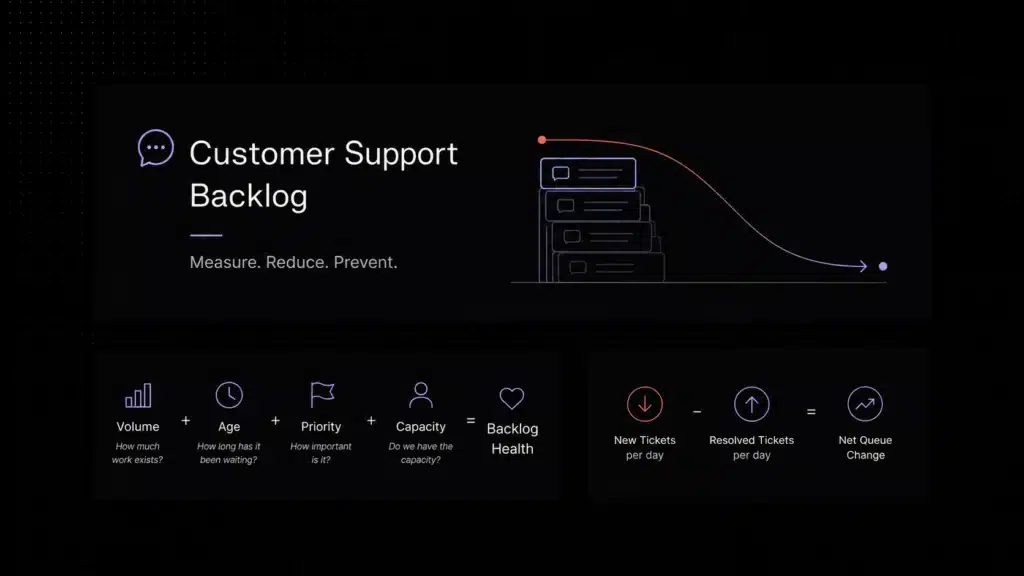
| What is support ticket automation? | Support ticket automation is the use of workflow rules and AI to categorize, prioritize, label, route, and assign incoming customer requests automatically. It helps support teams reduce manual triage, respond faster, route issues to the right owner, and escalate complex cases with more context. |
|---|
Customer support operations rarely break because every ticket is difficult. They break because too much of the queue is repetitive, inconsistent, or manually triaged in ways that do not scale. The same patterns show up every day: billing questions, login issues, plan changes, onboarding confusion, feature how-tos, bug reports, and requests that need to go to a very specific team. As ticket volume grows, manual intake becomes expensive, slow, and increasingly error-prone.
This is why more SaaS companies are investing in support ticket automation instead of relying only on headcount growth. A good automation layer does not just send canned replies. It helps categorize incoming requests, apply labels, set priority, route conversations to the right queue, and trigger the next workflow step with less manual effort. That reduces repetitive work for agents and creates a more consistent customer experience.
If you are already thinking about the larger move toward AI customer support automation, support ticket automation is one of the most operational parts of that strategy. A knowledge base AI chatbot can deflect simple questions before a ticket needs human attention. Ticket automation handles what reaches the queue by making sure the right issues are identified, prioritized, assigned, and escalated inside a workflow the team can actually control.
What Is Support Ticket Automation?
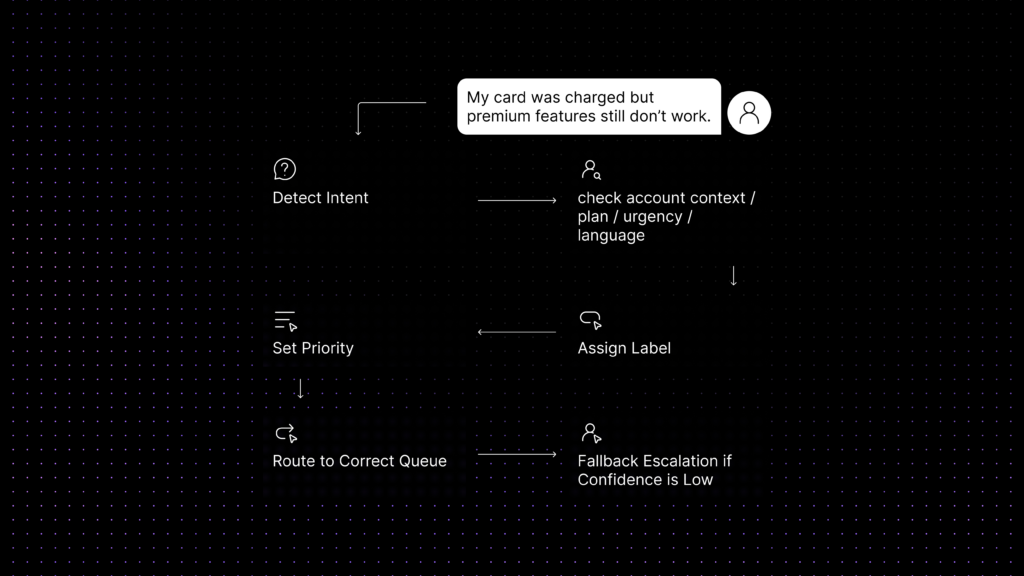
Support ticket automation is the workflow layer that moves an incoming customer request from raw message to actionable support item without requiring an agent to handle every triage step manually. In practice, that usually means a system can recognize the event that started the workflow, check relevant conditions, and then perform actions such as assigning the ticket, applying a label, setting a priority, or escalating the request.
A mature setup can automate several parts of the ticket lifecycle: intake, categorization, prioritization, routing, assignment, and follow-up actions. Some workflows are fully rule-based. Others use AI signals such as intent detection, keyword patterns, language, sentiment, or customer metadata to make better routing decisions when the issue is ambiguous.
The goal is not to automate support for its own sake. The goal is to reduce manual triage where humans add little value and preserve human judgment where service quality actually depends on it. In other words, support ticket automation should make the queue more accurate and more manageable, not simply more automatic.
What Is AI Ticket Routing?
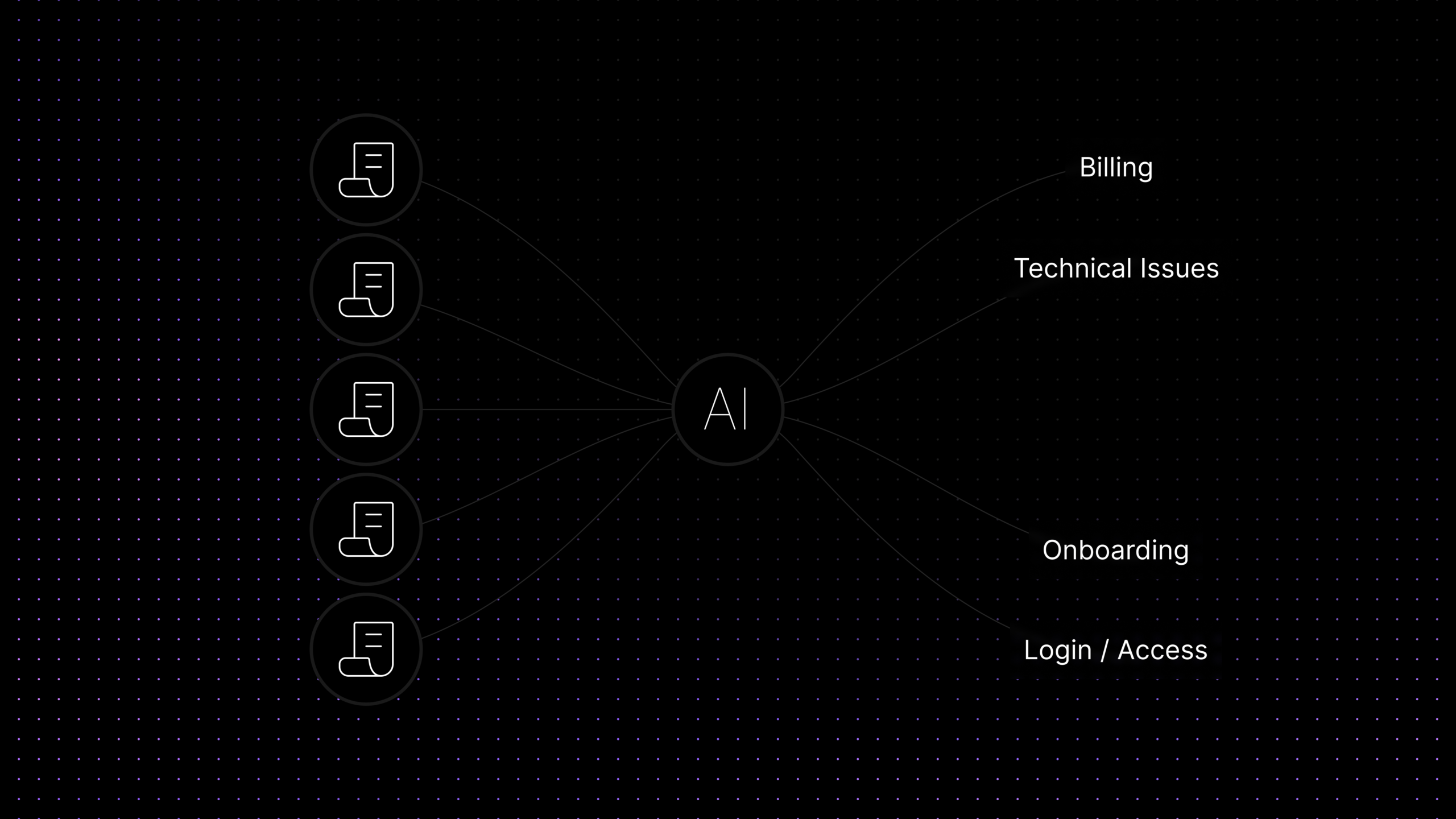
AI ticket routing is the part of support automation that decides where a ticket should go by interpreting what the customer is actually asking, not only by matching a fixed keyword rule. A traditional routing rule might send every message containing the word “billing” to the finance queue. An AI-assisted routing workflow can look at the full request and recognize whether the user is asking about an invoice, a failed payment, a refund, a plan upgrade, or a contract issue that belongs with a different team.
That distinction matters because real customer messages are often messy. People combine multiple questions in one message. They use informal wording. They describe symptoms instead of naming the issue type. They refer to a product workflow without knowing the internal team name. AI ticket routing helps interpret that uncertainty so the system can tag tickets correctly and assign them with more context.
IBM explains that natural language understanding focuses on intent, meaning, and context rather than individual word matching, and that human language is nuanced, complex, and full of ambiguity. That is exactly why AI ticket routing should be tested against real customer messages, not only clean internal categories. Customers often describe symptoms, emotions, or outcomes before they name the actual issue type.
In a stronger support setup, AI routing should not operate as a black box. An assistant like Aily works best as a high-speed triage layer inside a defined workflow: reading intent, spotting ambiguity, and helping route the ticket with more context while still respecting issue types, ownership boundaries, fallback logic, and escalation rules.
The best AI ticket routing systems still depend on structure. They work best when teams already have clear issue types, labels, assignment rules, escalation paths, and ownership boundaries. AI improves routing quality when the workflow design is strong. It does not replace workflow design.
Rule-Based Routing vs AI Ticket Routing
Both routing methods matter. SaaS teams usually need a combination of deterministic rules for obvious cases and AI support for tickets that are harder to classify correctly.
| Area | Rule-Based Routing | AI Ticket Routing |
|---|---|---|
| Decision logic | Uses explicit triggers, keywords, fields, or conditions set by the team | Uses message meaning, context, and classification signals to recommend or apply routing |
| Best fit | Stable, predictable workflows with clear rules | Ambiguous, multi-topic, or inconsistently worded requests |
| Data used | Issue types, plans, channels, tags, customer fields, and fixed events | Message content, intent, historical patterns, customer context, and routing confidence |
| Strengths | Easy to audit, fast to implement, and reliable for known cases | Improves triage quality when customers do not describe issues cleanly |
| Weaknesses | Breaks when wording changes or categories overlap | Needs oversight, testing, and fallback logic when confidence is low |
| Buyer fit | Essential foundation for every support team | Best added after core routing rules and ownership models are already clear |
Why SaaS Teams Automate Ticket Intake and Assignment
SaaS support environments are especially well suited to ticket automation because the volume pattern is repetitive but the operational consequences are different by ticket type. A basic product how-to question and a contract-related enterprise billing issue may both arrive in the same inbox, but your team should handle them with different urgency, ownership, and workflow.
Automation helps teams separate those paths earlier. It can recognize whether a request is tied to onboarding, access, payments, troubleshooting, feature education, or a potential incident. It can label the conversation correctly, route it to the right owner, and reduce the time agents spend acting as human switchboards.
This matters even more when multiple variables affect service priority. Ticket automation also matters because self-service does not resolve every issue before it reaches the queue. Gartner found that only 14% of customer service and support issues are fully resolved in self-service, and even issues customers describe as “very simple” are fully resolved only 36% of the time. That means SaaS teams still need a clean automation layer for the tickets that do reach support: what the issue is, who should own it, how urgent it is, and when it should escalate. Gartner’s self-service research reinforces why ticket routing quality still matters after deflection. Customer plan level, account status, geography, language, product line, or issue severity can all change how a ticket should be handled. A strong AI ticketing system helps teams combine those inputs without turning the queue into a manual spreadsheet exercise.
In practical terms, the value shows up in three places: faster first response, lower misrouting, and better use of specialist time. Senior technical staff spend less time re-triaging simple requests. Teams that have stabilised routing and triage often find the next question is earlier intervention — using the same signals that power routing to act before tickets are created at all. The guide to proactive customer support and predictive service covers how routing signals connect to early intervention design. General support agents spend less time figuring out ownership. Customers spend less time being transferred between queues.
Common Support Workflows You Can Automate First
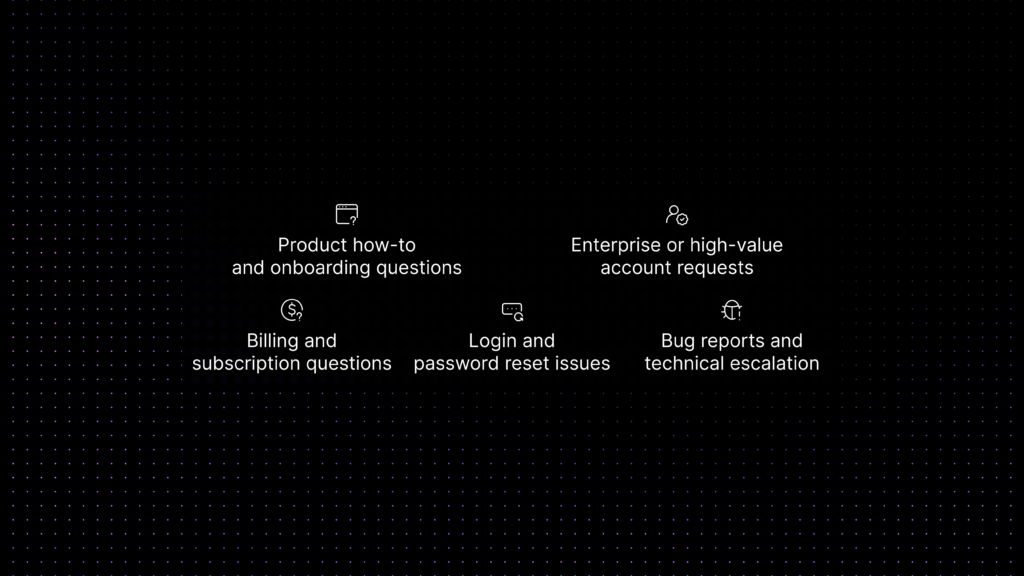
The safest starting point is not the most sophisticated automation. It is the set of repetitive workflows where ownership is clear, escalation boundaries are known, and the risk of a wrong action is manageable.
-
Billing and subscription questions.
These tickets are common, structured, and easy to recognize. Teams can automatically label billing conversations, separate invoice questions from refund or cancellation requests, and route higher-risk billing disputes to the right human queue.
-
Login and password reset issues.
When the request is about account access, SSO, login verification, or password recovery, automation can either suggest a self-service path or move the issue immediately to the team responsible for identity and access workflows.
-
Product how-to and onboarding questions.
Many new-user questions do not need deep investigation. They need accurate guidance. Automation can tag these requests, connect them to a knowledge base AI chatbot or help-center article, and then assign only unresolved cases to an onboarding or support specialist.
-
Bug reports and technical escalation.
Not every bug report should jump directly to engineering. Automation can collect issue type, product area, environment details, and account context first, then send reproducible technical issues to the right queue while routing general confusion elsewhere.
-
Enterprise or high-value account requests.
Customer segment matters. A modern help desk automation workflow can recognize high-priority accounts, apply different SLA handling, and route urgent commercial or technical requests to a named owner or dedicated team.
How to Set Up Support Ticket Automation
Support ticket automation works best when the design starts with workflow clarity rather than tool enthusiasm. The most effective teams build the operating model first and then apply automation to it.
That matters because teams often avoid automation for the wrong reason. Recent service research shows that the value of AI comes from redesigning the workflow, not just adding automation on top of a messy queue. Deloitte Digital’s 2026 service research found that 64% of surveyed service leaders reported higher agent productivity from AI, while 39% reported lower cost per contact. For support ticket automation, the lesson is practical: define categories, events, conditions, actions, and fallback ownership before configuring the tool. Automation performs better when the workflow is already clear enough to automate. The problem is not automation itself. It is badly designed automation that takes too long to configure, becomes hard to maintain, or depends on scattered rules that no one trusts. The best systems reach value faster because the workflow model stays clear: events, conditions, actions, ownership, and safe fallback paths.
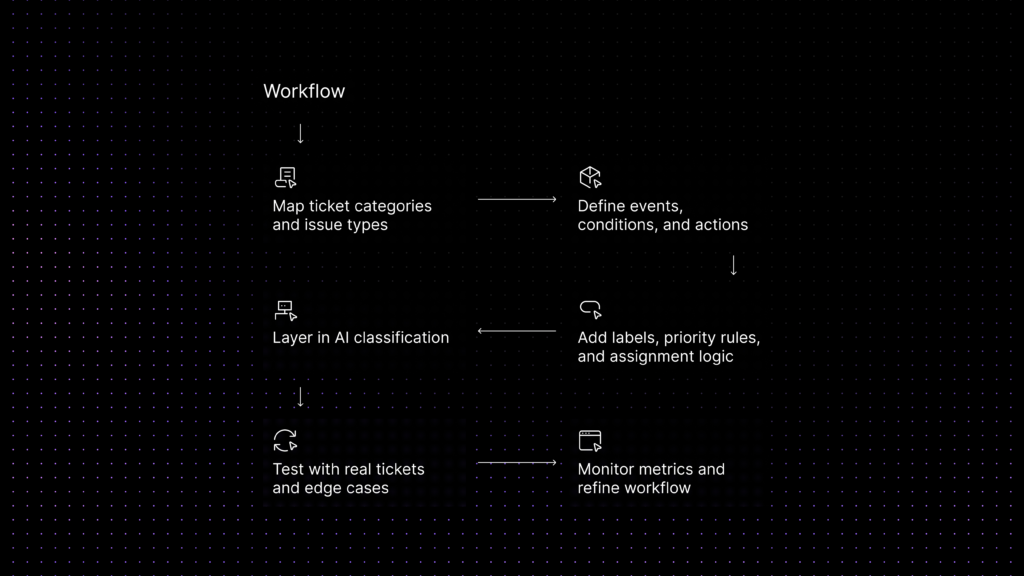
Step 1: Map ticket categories and issue types.
Review your incoming queue and identify the top categories that create the most manual triage. Separate product questions, billing requests, access issues, bug reports, onboarding questions, and account-management requests into distinct types.
Step 2: Define events, conditions, and actions.
Start with the trigger that launches the workflow, such as a conversation being created or a new message arriving. Then define the conditions that must be true, such as queue status, account segment, keyword pattern, or region. Finally define the action, such as label application, assignment, priority update, or escalation.
Step 3: Add labels, priority rules, and assignment logic.
Labels should reflect how your team actually operates, not just how the product is organized internally. Build routing logic that can recognize urgency, account value, ownership, and the correct queue for each issue type.
Step 4: Layer in AI classification where rules are not enough.
AI adds the most value when ticket language is ambiguous or when customers describe symptoms instead of categories. Use it to improve classification and routing, but keep clear fallback logic when confidence is low.
Step 5: Test with real tickets and edge cases.
Use real customer wording, mixed-intent messages, emotionally charged tickets, and vague descriptions. The goal is to see where routing fails before it reaches production at scale.
Step 6: Monitor metrics and refine the workflow.
Track first response time, assignment speed, misrouting rate, resolution time, escalations, and reopened tickets. Ticket automation is not a one-time setup. It is an operational system that should improve as your queue changes. The ticket patterns that emerge from monitoring routing accuracy are also some of the most valuable signals for product improvement. The guide to turning support tickets into product insights shows how routing categories and escalation patterns reveal upstream product gaps.
5 Real Examples of AI Ticket Routing in Practice
Real value appears when routing logic handles the gray areas that fixed rules miss. These examples show where AI ticket routing becomes practically useful.
- A customer writes, “My card was charged but my team still cannot access the premium features.” A simple keyword rule may only see “charged” and route the ticket to billing. An AI-assisted workflow can recognize that the issue combines payment status and entitlement access, then send it to the queue that owns billing-to-product activation problems.
- An admin says, “No one in our company can log in after we changed identity settings.” This is not a generic password reset. It is an account-wide access problem. AI routing can classify the message as a broader authentication or SSO issue and prioritize it appropriately.
- A user reports, “The import tool keeps spinning after I upload a CSV.” The customer never says “bug report.” They describe a symptom. AI ticket triage can classify it as a possible technical issue, apply the right label, and route it to advanced support instead of a general education queue.
- A prospect on a high-value account asks a product question that also signals expansion potential. AI ticket routing can recognize both the product topic and the commercial importance of the account, then direct the conversation to a blended support or success path rather than a standard queue.
- A multilingual request arrives describing a setup problem in an imprecise way. AI routing can combine intent detection with language or region metadata so the ticket goes to the right language-capable team instead of forcing a manual re-assignment later.
Common Mistakes That Break Ticket Automation
- Automating too much too early. Teams often try to build a perfect end-to-end routing system before they have clean categories, owners, or escalation rules. That usually creates more exceptions, not less work.
- Using vague labels and overlapping issue types. If “technical,” “support,” and “urgent” all mean different things to different teams, the automation layer has no stable logic to follow. Routing quality depends on operational clarity.
- Ignoring fallback ownership. Every automated workflow needs a safe destination when confidence is low or conditions conflict. Without that fallback, tickets bounce between teams or sit unowned in a queue.
- Separating routing from the rest of the support stack. A queue becomes cleaner when automation works together with self-service, knowledge content, conversation history, and escalation rules. Routing alone does not fix weak support design. Agents who absorb the cost of poor routing — re-triaging misassigned tickets manually, cleaning up automation failures — are also the agents most at risk of customer support burnout. Automation that reduces repetitive triage is also an agent wellbeing intervention.
- Measuring only ticket volume. A team can automate more tickets and still damage service quality if misrouting increases, escalations become slower, or customers repeat themselves after every transfer. Good automation must be efficient and accurate.
What to Look for in a Support Ticket Automation Platform
For buyers, the key question is not whether a platform has AI somewhere on the feature page. The real question is whether the platform can turn support operations into a controlled workflow. That starts with routing foundations: triggers, conditions, actions, labels, issue types, assignment logic, and clear queue ownership.
Then look for hybrid workflow design. A good support ticket automation platform should support both rule-based routing and AI-assisted classification. Rules handle the obvious cases. AI improves decisions when customer language is unclear, multi-part, or inconsistent.
Visibility matters too. Teams need to understand why a ticket was routed the way it was, which conditions were met, which labels were applied, and where the workflow handed the conversation next. A black-box routing layer is hard to trust and even harder to improve.
Governance matters too. Ticket automation often relies on message content, customer metadata, account signals, and support history to classify and route requests. Buyers should understand what data the platform uses, how the team governs AI-assisted routing decisions, and whether the platform sends customer conversations into third-party AI training outside the support workflow.
Finally, evaluate reporting and maintainability. The best help desk automation platforms make it easy to review routing accuracy, monitor queue performance, identify repeated escalations, and refine the workflow as products, support teams, and customer expectations evolve.
Evaluation Checklist for Buyers
| Evaluation area | Why it matters | What to ask |
|---|---|---|
| Triggers and events | Determines when the workflow actually starts | Can we launch automation from events such as conversation created or message created? |
| Conditions and logic | Controls whether routing is precise or noisy | Can we combine multiple conditions with clear AND/OR logic and account context? |
| Labels and assignment | Connects triage decisions to real team workflows | Can the platform apply labels and assign tickets to the right agent or team automatically? |
| AI routing quality | Improves handling of ambiguous requests | Can it classify intent accurately and fall back safely when confidence is low? |
| Escalation control | Protects service quality when automation should stop | Can it escalate complex, sensitive, or high-priority cases without trapping customers in automation? |
| Reporting and fit | Determines whether the system can be improved over time | Can we track routing outcomes, queue performance, and workflow quality in a way our team can actually use? |
Where Inquirly Fits
For teams evaluating vendors, the strongest platforms do more than place AI on top of a shared inbox. They turn support operations into a workflow system that can react to what happens in the queue without creating a second layer of complexity.
That is where Inquirly stands out. Inquirly connects conversations, labels, assignments, workflows, and reporting in one system, so support ticket automation can run on real support context instead of fragmented signals or disconnected add-ons.
This is also where Aily becomes valuable. Aily can act as a private AI triage specialist that helps classify ambiguous requests, supports routing decisions with more context, and preserves structure when a ticket needs escalation. For SaaS teams, that means better triage quality without handing sensitive customer conversations off to systems they do not fully govern.
That distinction matters because good ticket automation is not just about sending tickets somewhere faster. It is about reducing repetitive triage, improving ownership, and keeping routing logic, AI assistance, and support context inside one controlled workflow.
Conclusion
Support ticket automation is not just about reducing clicks in a help desk. For SaaS teams, it is a way to turn the queue into a controlled operating system: requests are identified faster, obvious work is handled earlier, specialists spend more time on the right issues, and customers reach the right path with less friction.
The most effective teams do not begin by asking which vendor has the loudest AI message. They begin by asking which workflows are repetitive, which issue types are stable, which queues need better ownership, and where AI routing can improve accuracy without removing control. That is what makes automation useful in production.
If your team is evaluating support ticket automation, focus on the fundamentals first: events, conditions, actions, labels, assignment rules, escalation paths, and reporting. Teams that get those basics right usually see faster triage and cleaner routing as they scale.
See how Inquirly combines workflows, routing, labels, reporting, and Aily’s private AI assistance in one support system built for SaaS teams.