The best Intercom alternatives in 2026 include Inquirly, Zendesk, Freshdesk, Help Scout, Front, HubSpot Service Hub, Crisp, and Chatwoot.
These Intercom competitors solve different problems. Inquirly focuses on AI-first SaaS customer support, Zendesk on complex enterprise support, Freshdesk on traditional help-desk workflows, Front on collaborative inboxes, HubSpot on CRM-connected service, Crisp on startup-friendly messaging, and Chatwoot on open-source deployments.
This guide compares eight leading Intercom alternatives across pricing models, AI capabilities, ticketing, live chat, knowledge management, setup complexity, and ideal team type. The goal is not to declare one universal winner, but to identify which platform best fits your actual support workflow.
| Intercom alternative | Best for | Why consider it |
|---|---|---|
| Inquirly AI-FIRST |
SaaS teams that prioritize AI support | Combines AI answers, knowledge-base retrieval, ticketing, routing, and contextual human handoff in a focused support platform. |
| Zendesk | Complex enterprise support operations | Offers extensive ticketing, reporting, routing, administration, and omnichannel capabilities for large support organizations. |
| Freshdesk | Traditional help-desk workflows | Provides familiar ticketing, automation, self-service, and omnichannel features for growing customer-service teams. |
| Help Scout | Simple, human-first customer support | Delivers a shared-inbox experience with knowledge-base and AI features while keeping workflows relatively straightforward. |
| Front | Collaborative, email-centric teams | Combines shared inboxes with internal collaboration tools for teams managing customer conversations primarily through email. |
| HubSpot Service Hub | CRM-connected customer service | Connects customer support with HubSpot’s CRM, sales, and marketing data to create a unified customer record. |
| Crisp | Startups seeking workspace pricing | Offers live chat, a shared inbox, automation, and customer messaging under a workspace-based pricing structure. |
| Chatwoot | Open-source and self-hosted deployments | Gives technical teams greater control over hosting, infrastructure, data, and customization. |
This guide compares these eight Intercom competitors across support workflows, AI capabilities,
pricing models, setup complexity, and ideal team type. Pricing and plan information was checked
against official vendor pages on July 21, 2026; verify current limits, add-ons, discounts, and taxes before purchasing.
Best Intercom Alternatives and Competitors by Use Case
- Choose Inquirly if you want an AI-first support workspace for SaaS teams, with Aily designed to use approved support content and a published plan-based pricing model that does not list a per-resolution AI fee.
- Choose Zendesk if you run a large or complex support organization that needs mature ticketing, omnichannel routing, and enterprise administration.
- Choose Freshdesk if you want a traditional help desk with ticketing, automation, reporting, and separately priced Freddy AI options.
- Choose Help Scout if your team wants a simple, human-feeling shared inbox and knowledge base without heavy administration.
- Choose Front if collaborative email workflows and shared accountability matter more than a formal ticket lifecycle.
- Choose HubSpot Service Hub if support needs to live alongside your CRM, sales, and marketing data.
- Choose Crisp if you are a small team that prefers flat, per-workspace pricing and a live-chat-centered workflow.
- Choose Chatwoot if you want an open-source platform that can be self-hosted and customized.
Intercom alternatives at a glance
Intercom Alternatives Comparison: Pricing, AI & Best Use Cases
Compare the main support platforms by ideal use case, pricing structure, and key limitations.
Pricing and feature availability may change. Check each vendor’s current pricing page before making a purchase decision.
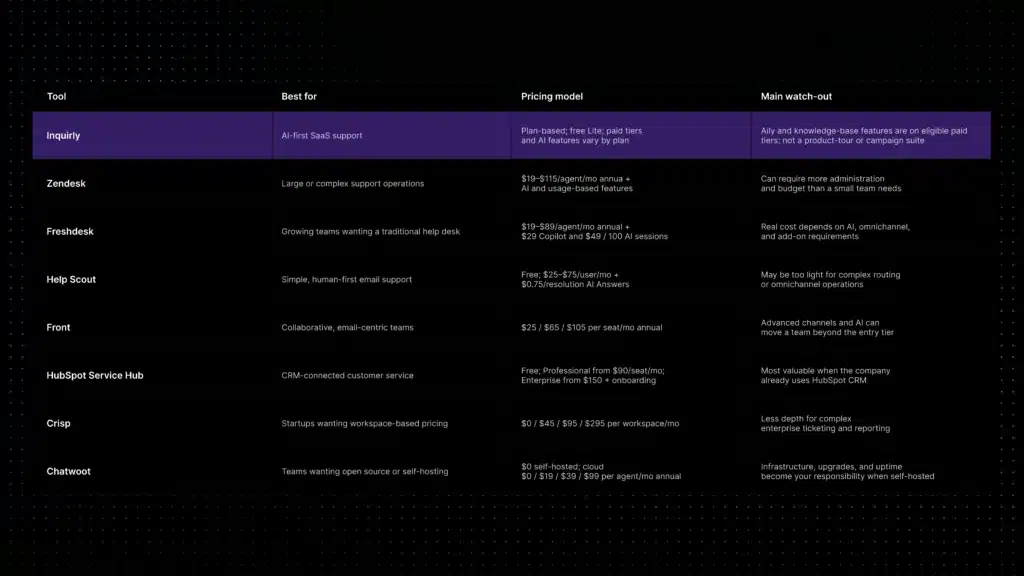
The table summarizes the current positioning of each platform. It is not a substitute for a plan-by-plan evaluation of your channels, agent count, AI volume, integrations, and compliance requirements.
How we evaluated these Intercom alternatives
We compared the tools using public product information, official pricing pages, support-workflow fit, AI grounding and escalation, channel coverage, setup complexity, and suitability for SaaS teams versus broader customer-engagement use cases. We also considered what each product does not try to replace, because a missing capability can be as important as a listed feature.
1. Inquirly, best AI-first alternative for SaaS support teams
Inquirly is built for the reactive-support part of the Intercom workflow: live chat, ticket management, omnichannel conversations, routing, automation, and AI-assisted answers. It is a closer fit for SaaS teams that want a focused support workspace rather than product tours, outbound campaigns, or lifecycle messaging in the same system.
Inquirly describes its AI layer, Aily, as a knowledge-base-first assistant designed to use approved support content and escalate when the available information is insufficient. That is the behavior to test in a real pilot: ask documented questions, incomplete questions, and questions that require a human decision, then inspect the answer and handoff context.
Its current public pricing is plan-based with unlimited agents on the listed tiers. The pricing page does not list a per-resolution AI fee, while Aily and knowledge-base management are available on eligible paid plans. Confirm current plan inclusions and usage limits before comparing the total cost with Intercom.
Best for: SaaS teams that want AI-assisted inbound support, routing, ticketing, and knowledge-base workflows without adopting a full customer-engagement suite.
Watch out for: teams that need product tours, campaign orchestration, or deep lifecycle messaging should consider Intercom or HubSpot Service Hub instead.
See Inquirly’s Intercom alternative page for the product-specific comparison.
2. Zendesk, best for large, complex support organizations
Zendesk is one of the most established help desk platforms for organizations with multiple agent groups, strict routing rules, enterprise reporting, and a broad integration ecosystem. Its Suite plans combine ticketing, messaging, omnichannel routing, knowledge tools, and automation at different tiers.
Zendesk separates its seat-based plan tiers from usage-based AI features. On the public pricing page checked July 21, 2026, Support Team starts at $19 per agent per month, Suite Team at $55, and Suite Professional at $115 when billed yearly. AI-agent automated resolutions and other usage-based features can affect the final bill.
Best for: larger organizations with complex routing, multiple teams, governance requirements, and dedicated support operations.
Watch out for: administration and add-on costs can be disproportionate for a small SaaS support team.
3. Freshdesk, best for growing teams that want traditional help desk structure
Freshdesk offers a familiar ticketing and help desk model with automation, reporting, knowledge-base features, and role controls. It is often considered when a team wants more structure than a shared inbox without taking on the full footprint of an enterprise service platform.
As of July 21, 2026, Freshdesk lists Growth at $19, Pro at $55, and Enterprise at $89 per agent per month when billed annually. Freddy AI Copilot is a separate $29 per-agent monthly add-on, and additional Freddy AI Agent sessions are listed at $49 per 100 sessions. Omnichannel requirements and other add-ons can change the total cost.
Best for: growing teams that want a conventional help desk, predictable ticket workflows, and a wide set of operational controls.
Watch out for: AI, sessions, and channel add-ons can materially change the final bill.
4. Help Scout, best for simple, human-first email support
Help Scout is designed for teams that want customer support to feel personal rather than like an enterprise ticketing system. It combines shared inboxes, customer history, a knowledge base, and lightweight reporting with a relatively approachable interface.
Help Scout’s public pricing snapshot includes a Free plan for up to five users, one Inbox, and one Docs site. Paid tiers are listed at $25 per user per month for Standard, $45 for Plus, and $75 for Pro. AI Answers is a separate $0.75-per-resolution add-on, so teams should include both seats and AI usage in the comparison.
Best for: email-first teams that value clarity, a human tone, and low administrative overhead.
Watch out for: advanced routing, complex omnichannel operations, and granular reporting may require a different platform.
5. Front, best for collaborative, email-centric operations
Front centers the support experience around collaborative email: shared inboxes, assignments, internal comments, rules, and shared drafts. It is useful when teams need ownership and coordination but do not want every customer interaction to feel like a traditional ticket.
Front’s public pricing snapshot lists Starter at $25 per seat per month for up to 10 seats, Professional at $65 for up to 50 seats, and Enterprise at $105 when billed annually. Starter emphasizes single-channel support; higher tiers add omnichannel capabilities, automation, and analytics. AI add-ons or selected-tier inclusions can change the final bill.
Best for: customer-facing teams that need collaborative inbox workflows and shared accountability.
Watch out for: seat costs and AI add-ons can rise quickly as channels and automation requirements grow.
6. HubSpot Service Hub, best for CRM-connected support
HubSpot Service Hub makes sense when support needs to sit next to sales, marketing, and customer records in the same CRM. Conversations, tickets, customer history, and service reporting can be connected to the broader HubSpot customer platform.
HubSpot Service Hub currently offers Free tools for up to two users, plus Starter, Professional, and Enterprise tiers. The public pricing page checked July 21, 2026 lists Professional from $90 per seat per month and Enterprise from $150 per seat per month, with required one-time onboarding fees of $1,500 and $3,500 respectively; the final quote depends on billing configuration, seats, HubSpot Credits, and add-ons.
Best for: teams that want customer service tightly connected to CRM, sales, marketing, and customer-success data.
Watch out for: Professional and Enterprise economics can be difficult to justify if you are not using the wider HubSpot ecosystem.
7. Crisp, best for startups that want flat, per-workspace pricing
Crisp uses a workspace-based pricing model rather than charging for every teammate. Its public pricing snapshot lists a free plan, Mini at $45 per workspace per month, Essentials at $95, and Plus at $295. The plans include different seat counts and AI-credit allowances, so compare the included seats, automated conversations, and channels, not only the flat workspace price.
That model is attractive when support and success staff need to collaborate without the bill changing every time another teammate joins. It is particularly relevant to startups that want a lightweight customer-conversation layer before adopting a heavier help desk.
Best for: startups and small teams that want live-chat-centered support and workspace-based pricing.
Watch out for: teams with complex SLA, routing, or enterprise reporting requirements may need more structure.
8. Chatwoot, best open-source Intercom alternative
Chatwoot is an open-source customer communication platform with a shared inbox for live chat, email, social channels, and WhatsApp. Teams can self-host it for control over infrastructure and data or use a managed cloud deployment.
The self-hosted Community Edition removes subscription cost, but it does not remove the need for infrastructure, upgrades, monitoring, backups, and incident response. Chatwoot’s public cloud pricing snapshot lists Hacker at $0 for up to two agents, Startups at $19, Business at $39, and Enterprise at $99 per agent per month when billed annually. Cloud plans include different channel, AI-credit, retention, and administration limits.
Best for: technical teams that want an open-source foundation, data control, and the ability to customize the deployment.
Watch out for: self-hosting turns a subscription decision into an engineering-operations decision. Include that labor in the total cost.
Why teams look for an alternative to Intercom
Intercom is a mature customer-messaging and support platform. Its public pricing snapshot checked July 21, 2026 lists Essential at $29 per seat per month, Advanced at $85, and Expert at $132 when billed annually. Fin is listed at $0.99 per outcome with a minimum monthly commitment, so the total cost depends on both seats and successful AI resolutions.
- AI and usage costs are difficult to forecast. Usage-based AI can be reasonable at steady volume but harder to budget during launches, incidents, or seasonal spikes.
- The support team is paying for features it does not use. Product tours, proactive campaigns, and lifecycle messaging are valuable only when they are part of the workflow.
- Setup and administration require more time than the team can spare. A highly configurable platform is not automatically a simple platform.
- The team wants stronger controls over documentation grounding, uncertainty, and human escalation. These behaviors should be tested rather than assumed from an “AI” label.
- Support volume has outgrown a lightweight inbox, but the team does not need a full customer-engagement suite.
None of these signals means Intercom is a bad product. They mean the team should reassess product fit, total cost, and the amount of operational work the platform creates.
How to compare pricing and total cost of ownership
Do not compare Intercom alternatives on the headline price alone. Calculate the complete monthly cost for the configuration you will actually use:
- Platform subscription or plan fee
- Agent, teammate, or seat costs
- AI usage, credits, sessions, or outcome charges
- Channel and messaging fees for WhatsApp, SMS, voice, or omnichannel modules
- Setup, migration, training, administration, and ongoing maintenance time
Model at least three scenarios: a normal month, a growth month, and a high-volume incident or seasonal month. A platform with the lowest entry price may not have the lowest total cost once seats, AI, channels, and administration are included.
For current plan details, review the official pricing pages listed in the sources section at the end of this article. Pricing is a moving target, so refresh this section whenever a vendor changes its packaging or usage model.
Free Intercom alternatives: what “free” really means
A free Intercom alternative can be useful for validating a support process, but free plans usually trade away agent capacity, automation depth, reporting, AI, or managed infrastructure. Compare the limits that matter to your workflow rather than treating every free tier as equivalent.
- Inquirly Lite is currently listed as free with unlimited agents and core inbox, conversation, ticketing, workflow, and analytics features. Aily and knowledge-base management are listed on paid tiers.
- Chatwoot Community Edition can be self-hosted at no subscription cost, but the team pays in infrastructure and engineering time.
- Crisp offers a free entry tier and workspace-based paid tiers; check included agents, contacts, AI credits, and channels.
- HubSpot Service Hub offers free tools for very small teams, but advanced service features and AI capabilities are tied to higher tiers and credits.
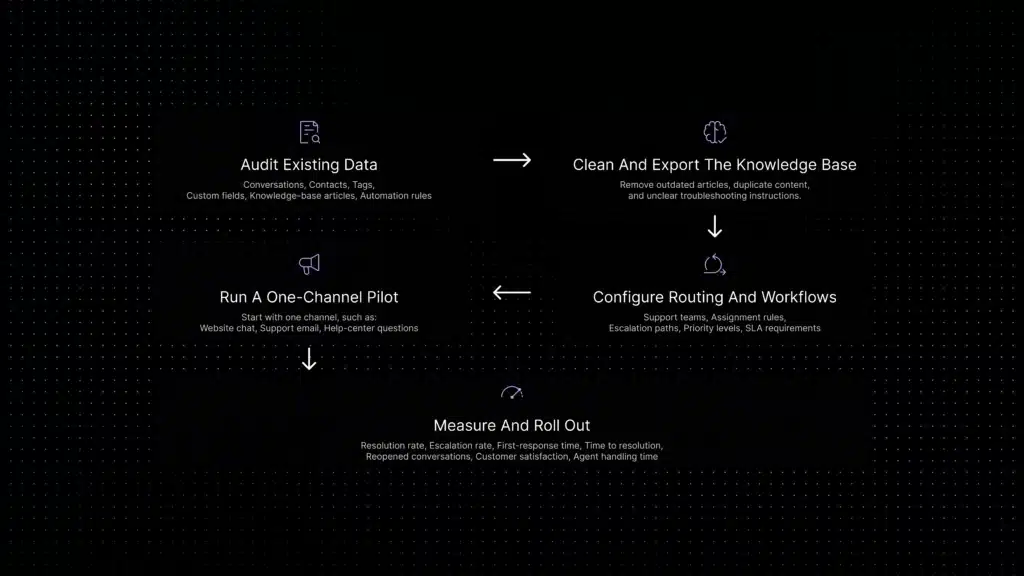
Migrating from Intercom: a practical five-step checklist
A staged migration reduces risk and makes it easier to compare answer quality before the old system is retired.
- Export and audit the knowledge base. Remove outdated articles, resolve duplicate answers, and identify documentation gaps before connecting an AI assistant.
- Map the current workflow. List channels, teams, tags, routing rules, automations, permissions, and reports that must be recreated or intentionally retired.
- Pilot one channel. Start with email or in-product chat rather than migrating every channel at once.
- Measure containment and resolution quality. Track whether AI actually resolves the issue, not only whether it touched the conversation.
- Expand gradually. Move the remaining channels after agents have validated routing, escalation, reporting, and customer experience.
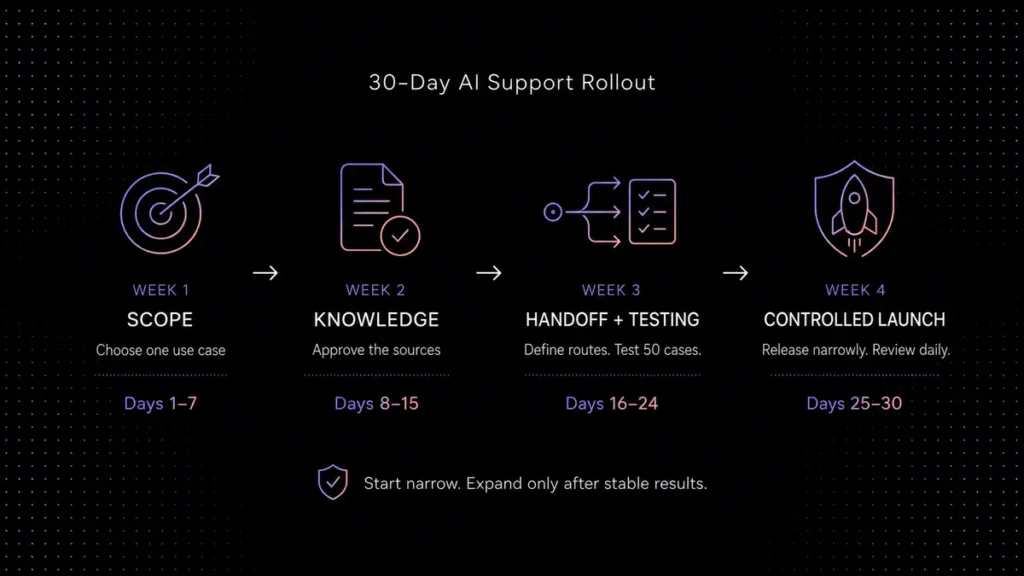
A small, well-scoped migration can take weeks; a complex enterprise migration can take substantially longer. Treat the two-to-three-week sequence sometimes used for a focused pilot as a planning example, not a universal guarantee.
Which Intercom alternative should you choose?
Use the following decision rules as a starting point:
Choose Inquirly when your priority is AI-assisted inbound SaaS support, live chat, ticketing, routing, and documentation-based answers in a focused workspace.
Choose Zendesk when you need mature enterprise ticketing, complex routing, governance, and large-team administration.
Choose Freshdesk when you want a conventional help desk and are comfortable evaluating Freddy AI and channel add-ons separately.
Choose Help Scout when you want a simple shared inbox and knowledge base with a human support experience.
Choose Front when your support process is fundamentally collaborative email and shared-inbox work.
Choose HubSpot Service Hub when support must be tightly connected to your existing HubSpot CRM and go-to-market data.
Choose Crisp when you want workspace-based pricing and a live-chat-centered workflow for a small team.
Choose Chatwoot when self-hosting, open source, and infrastructure control are worth the operational trade-off.
Stay with Intercom when product tours, proactive messaging, lifecycle campaigns, and support need to live in one mature customer-engagement platform.
Choosing the right Intercom alternative for your team
There is not one best Intercom alternative, there is a best fit for the support workflow you actually run. Teams focused on reactive SaaS support may prefer Inquirly, Zendesk, Freshdesk, Help Scout, Front, or Crisp depending on complexity. Teams that need CRM-connected service may prefer HubSpot Service Hub, while technical teams that prioritize control may prefer Chatwoot.
Start with your current channels, the questions customers ask most often, the context agents need during handoff, and the cost of a high-volume month. Then run a small pilot with real conversations. That process will tell you more than a feature list or a prepared demo.
If your priority is AI-first SaaS support, compare Inquirly with Intercom and review the current Inquirly pricing plans before starting a trial.
Official pricing pages checked for this guide
Intercom · Zendesk · Freshdesk · Help Scout · Front · HubSpot Service Hub · Crisp · Chatwoot · Inquirly