| What is customer self-service in SaaS? | Customer self-service in SaaS is a support approach that helps users solve common questions on their own through help centers, knowledge bases, FAQs, guided flows, in-product help, and AI-assisted answers before a human agent is needed. |
|---|
Repetitive support requests are usually a sign that the product is growing faster than the support experience around it. A SaaS company adds features, plans, integrations, and new user roles. Customers arrive through more channels, ask similar questions in different words, and expect immediate answers when they get stuck. The same issues appear every day: login problems, billing clarifications, setup questions, permissions confusion, and “where do I find this?” moments.
That is why customer self-service matters. Done well, it reduces repetitive support requests without making customers feel abandoned. Done badly, it feels like a wall of articles, vague FAQ pages, and dead-end flows that push people away from real help. The difference is not whether a team has a help center. The difference is whether that help center is organized, searchable, easy to scan, and connected to the rest of the support journey.
This article looks at self-service as a support UX and information-architecture problem first. AI can improve discovery and article recommendations, but the foundation still comes from clear help content, strong structure, and a reliable escalation path.
What Customer Self-Service Means in SaaS
In a SaaS environment, customer self-service means giving users a clear way to solve common problems on their own without needing to open a ticket for every question. That usually includes a help center, a knowledge base, an FAQ layer, contextual links inside the product, and guided flows for routine tasks. It is not the same as telling customers to “go search the docs.” Good self-service reduces effort. Bad self-service shifts effort from the support team to the customer.
This distinction matters because SaaS support is not only about information. It is about timing and context. A user who is trying to invite teammates, change billing details, connect an integration, or understand permissions is not looking for a long article library. They are looking for the fastest trustworthy path to the next correct step. Self-service only works when the answer is easy to find, easy to understand, and appropriate to the moment the customer is in.
That is why self-service should be treated as part of the product experience. The structure of the help center, the naming of categories, the clarity of article titles, the consistency of screenshots, and the way FAQs connect to deeper documentation all influence whether a repetitive question becomes a solved moment or another ticket in the queue.
Why Self-Service Matters More in AI Support
Ironically, self-service becomes more important as support teams add more AI. When the underlying content is weak, AI only helps customers reach weak answers faster. When the underlying content is clear, structured, and current, AI can surface the right article, suggest the right FAQ, or guide the user to the next step with far less friction.
That is why self-service should come before sophisticated automation logic. A chatbot is only as good as the knowledge behind it. Article recommendations are only as useful as the article titles and section structure. Search is only as good as the terminology customers actually use. If your team is also exploring a knowledge base AI chatbot, the most important preparation step is not a prompt. It is a clean, useful support content layer.
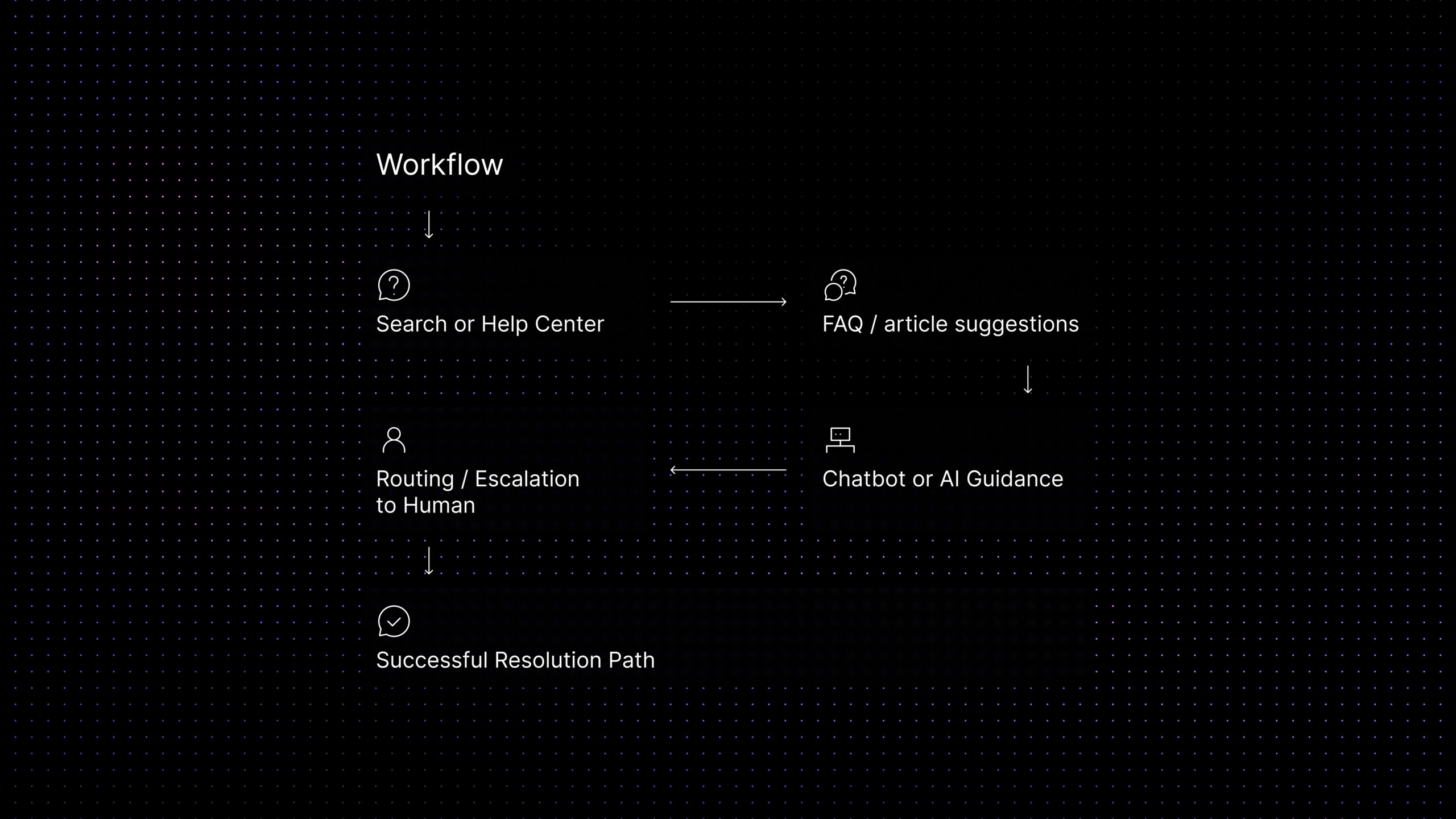
There is also an operational reason self-service matters more in AI-enabled support. Modern support stacks blur the line between documentation and conversation. A help-center article may appear inside a widget. A chatbot may recommend an FAQ before a ticket is created. A routing workflow may depend on whether the customer already viewed documentation. In other words, self-service is no longer a separate asset sitting beside support. It is part of the same resolution path.
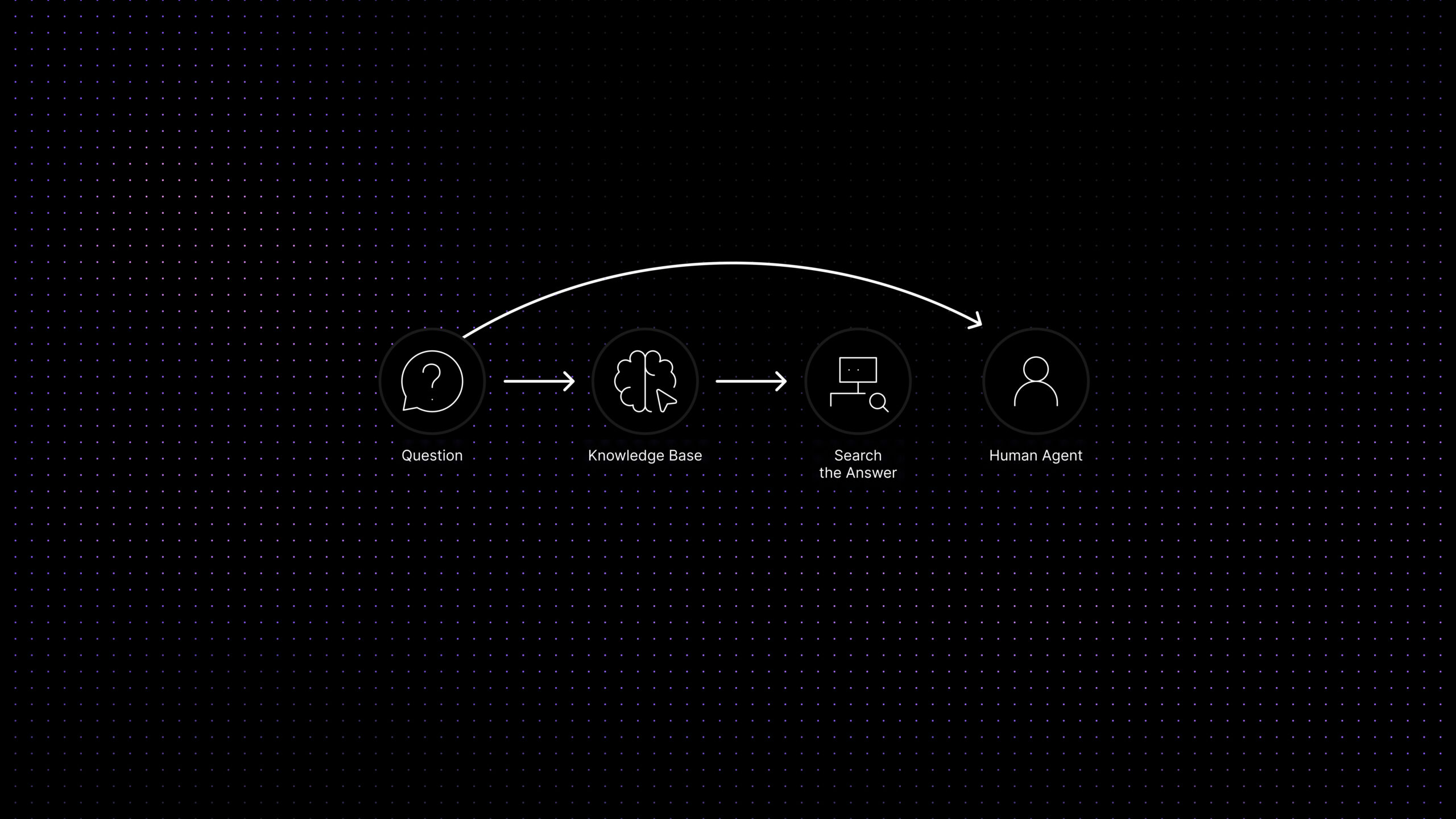
Self-service ecosystem — the best systems guide customers to the right answer or the right handoff.
Top Self-Service Channels for SaaS Teams
The strongest self-service programs usually combine several channels instead of relying on one giant knowledge base.
Help center and knowledge base. This is the core layer. It works best when articles are grouped around customer intent instead of internal team language. Customers look for “change my plan,” “add a teammate,” or “fix login issues,” not abstract internal labels.
FAQ and article suggestions. FAQs are useful for short, repetitive questions with direct answers. They should route readers toward the right deeper article when the issue is larger than one paragraph.
In-product contextual help. Tooltips, empty-state guidance, setup checklists, and contextual article links reduce support requests at the moment confusion happens. This is often more effective than expecting users to leave the product and search a portal.
Customer portal or guided support flow. For account updates, billing actions, and structured requests, a guided portal can be better than a generic contact form. It reduces back-and-forth and helps customers choose the right path before an agent gets involved.
Support widget or chatbot layer. Even when this is not an AI-first article, the widget matters because it is often the front door to self-service. The best versions do not replace the help center. They help users discover it more efficiently and escalate when self-service is no longer enough.
What Customers Should Solve Themselves First
Not every issue should be pushed into self-service. The safest place to start is with repetitive, low-risk requests that already have stable answers. These include onboarding basics, feature how-to questions, login troubleshooting, plan and billing explanations, account settings, and common policy clarifications.
The wrong place to start is with emotionally charged, account-specific, or high-risk issues. Billing disputes, security concerns, urgent bugs, data-loss fears, and contract-specific questions should not be hidden behind generic flows.
A simple rule works well here: the more standardized the answer, the more likely self-service can carry it. The more the answer depends on customer history, urgency, or judgment, the more likely a human should take over.
Ticket types to automate or guide through self-service first
| Ticket type | Why it is safe for self-service | Best self-service layer | Escalate when |
|---|---|---|---|
| Login and password help | Answer is usually standardized and step-based. | FAQ + short troubleshooting article | User cannot access the verified email, or account data looks wrong. |
| Billing explanations | Plan details, invoices, proration, and limits can usually be documented clearly. | FAQ + billing article + portal task | It becomes a dispute, refund request, or contract-specific question. |
| Onboarding basics | New users often ask the same setup questions in slightly different words. | Help-center guide + in-product checklist | The workflow depends on account setup, integrations, or admin permissions. |
| Feature how-to questions | These requests usually have one correct path and benefit from screenshots. | Knowledge-base article + contextual links | The issue sounds like a bug or the steps do not match the customer’s account state. |
| Account settings and profile tasks | Many tasks can be completed directly in a guided portal. | Portal flow + article fallback | The task touches security, permissions, or compliance approval. |
Where Self-Service Fails
Self-service fails when teams confuse content volume with clarity. A help center with hundreds of articles can still fail if titles are vague, categories are internal, or the search experience is weak. It also fails when teams publish one long article for several different user intents. A customer trying to reset a password should not need to scan a 2,000-word “account management” page to find one answer.
This problem is visible in broader customer-service research. Gartner reports that the average self-service customer support success rate is only 14%, and that improving this rate is a significant or moderate priority for 90% of customer service and support leaders it surveyed. For SaaS teams, the lesson is clear: self-service cannot only exist. It has to be searchable, connected, maintained, and easy to escalate from when the answer is not enough. Gartner’s self-service customer service research reinforces why self-service quality matters as much as self-service availability.
It also breaks when content ownership is unclear. In many SaaS teams, product, support, and marketing all touch documentation, but nobody maintains it as a system. That leads to duplicate articles, outdated screenshots, and conflicting instructions. Customers lose trust quickly when self-service content feels stale.
Another common failure point is escalation design. Customers should always know what to do when self-service is not enough. If they cannot find an answer, need account-specific help, or have an urgent problem, the next path should be obvious. How fast that escalation path responds also matters, first response time shapes the customer’s trust in the support experience at the moment self-service has already failed them, which is when they are most sensitive to delay. Hidden contact buttons, circular chat loops, and “search again” dead ends turn self-service into friction.
Finally, self-service fails when teams ignore information architecture. If categories do not match customer mental models, if synonyms are missing, or if article titles do not reflect real customer language, even good content will underperform.
Self-Service Best Practices for SaaS Teams
Start with real support demand, not hypothetical topics. Review the highest-frequency tickets, identify repetitive questions, and group them by customer intent. Then build self-service content around those intent clusters.
Keep article architecture consistent. Strong help-center UX depends on predictable formatting: one clear problem per article, direct titles, short introductions, step-by-step instructions, screenshots where useful, and a clear “what to do next” section.
Design for scanning, not only for completeness. Most customers do not read support content like a manual. They scan headings, numbered steps, warnings, and examples. Good self-service content respects that behavior.
Use FAQs as a routing layer. A short FAQ can answer the immediate question, then link to the exact article that handles the full workflow.
Connect self-service to ticket data. When the same question keeps reaching agents, treat it as a content signal. Forrester’s customer-service self-service guidance makes the same point: strong self-service should do more than deflect common inquiries. It should help organizations understand friction in the product, support onboarding, and create lasting customer success. That makes ticket data a content-planning source, not only a reporting metric. Forrester’s self-service guidance supports treating self-service as part of the wider customer journey.Either the answer does not exist, it is hard to find, or it is hard to understand.
And keep escalation explicit. Self-service should resolve routine issues faster, not trap customers in the wrong path. That means clear contact options, visible handoff moments, and a support experience that stays trustworthy even when documentation is doing more of the work.
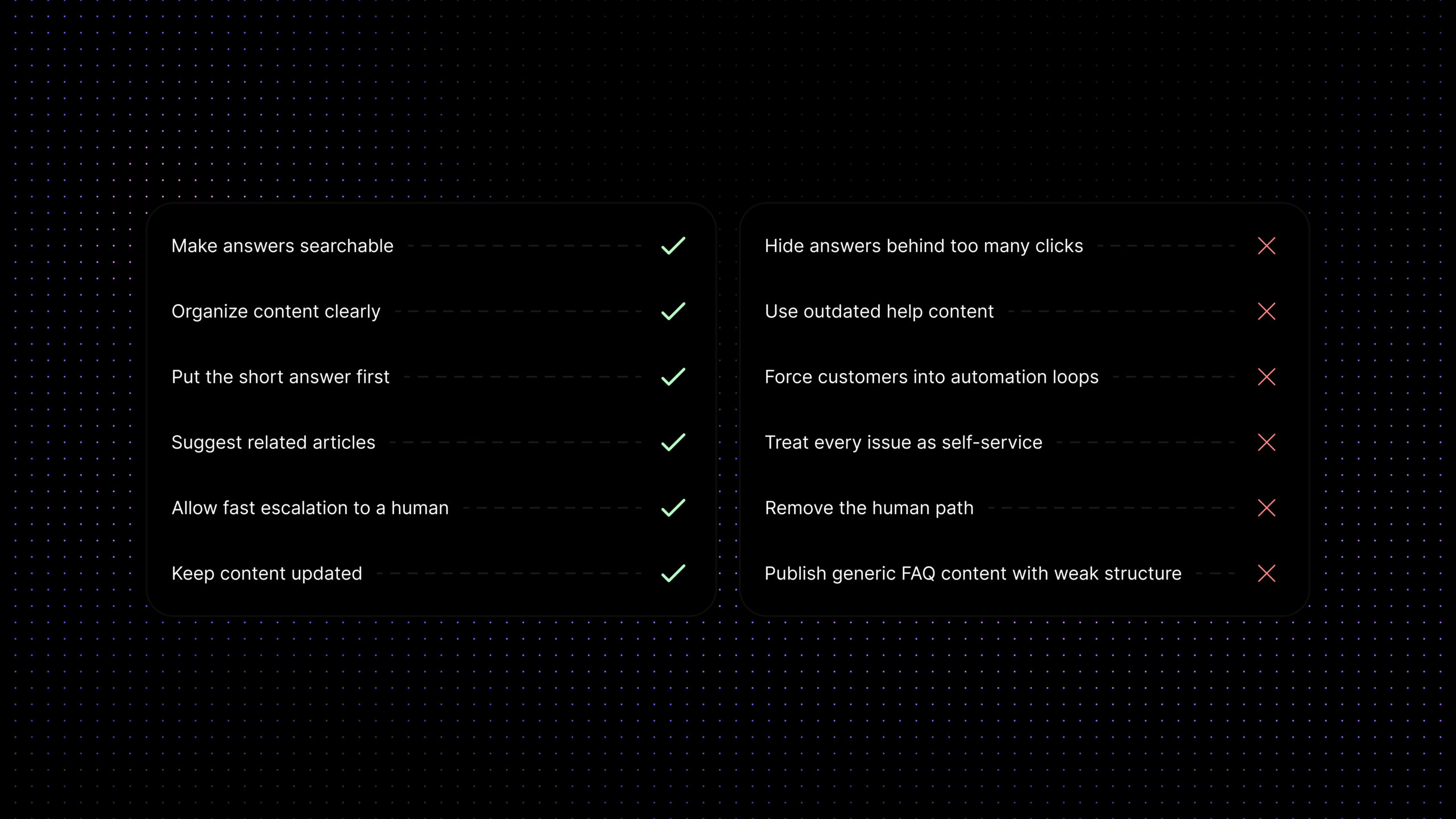
Self-service UX do / don’t checklist
| Do | Don’t |
|---|---|
| Name categories with customer language. | Hide contact options behind endless search loops. |
| Write one clear intent per article. | Publish giant catch-all articles for unrelated tasks. |
| Use FAQs to route readers to deeper articles. | Let duplicate or outdated pages compete with each other. |
| Show the next step when the article is not enough. | Treat ticket reduction as success without checking CSAT. |
| Review ticket data to find content gaps. | Assume more content automatically means better self-service. |
Metrics to Track
A self-service program should be measured by quality, not just volume reduction. Ticket reduction alone can be misleading. If tickets fall but customer frustration rises, the system is not working.
The most useful self-service metrics show whether customers actually found, understood, and used the answer. Start with search success: are users finding helpful results from the terms they actually type? Then measure article usefulness, assisted-resolution patterns, and which articles are opened before a ticket is created.
Gartner recommends looking beyond survey data and using metrics from across the full customer resolution journey. Useful self-service metrics include portal search effectiveness, content feedback, case deflection, cost per resolution, and customer journey analytics. Gartner’s self-service guidance also emphasizes that self-service should be integrated with assisted support rather than treated as a separate project.
For SaaS teams, the practical metric set should include:
- Search success: Are customers finding the right article from the words they naturally use?
- Article helpfulness: Are readers marking content as useful, completing the task, or continuing to contact support?
- Deflection quality: Are fewer repetitive tickets reaching agents because customers solved the issue, not because they gave up?
- Escalation quality: When self-service fails, does the customer reach a human quickly with context preserved?
- Repeat-contact rate: Are customers coming back with the same issue after using self-service?
- Content gap rate: Which repeated tickets still have no useful article, FAQ, or guided flow?
A healthy self-service system reduces repetitive support requests while protecting customer trust. The goal is not to hide the support team. The goal is to make routine answers easier to reach and complex help easier to escalate.
Where Inquirly Fits
Self-service works best when the help center, knowledge layer, tickets, chats, and support workflows are connected instead of treated as separate projects.
Inquirly helps SaaS teams connect knowledge base content, conversations, tickets, and context-aware workflows in one support workspace. That makes it easier to turn repeated questions into better articles, surface the right help content before a ticket is created, and preserve context when a customer still needs human support.
This also strengthens the rest of the support stack. Better documentation makes a knowledge base AI chatbot more accurate. Clear self-service flows make support ticket automation more useful. And when teams want to reduce ticket volume with AI, the fastest wins usually come from improving self-service foundations before adding more complex automation.
Conclusion
Customer self-service for SaaS is not just a documentation project. For SaaS teams, it is a support UX system. When help centers, FAQs, knowledge-base structure, and escalation paths are designed well, repetitive support requests drop for the right reason: customers actually find what they need faster.
The important goal is not to make human support harder to reach. The goal is to make routine answers easier to reach. If your team wants to strengthen that system, start by improving your help-center structure, article clarity, and escalation design—then connect those assets to the rest of your support workflow.
Explore how Inquirly helps SaaS teams connect knowledge base content, tickets, chats, and context-aware support workflows so self-service becomes more useful, not more frustrating.