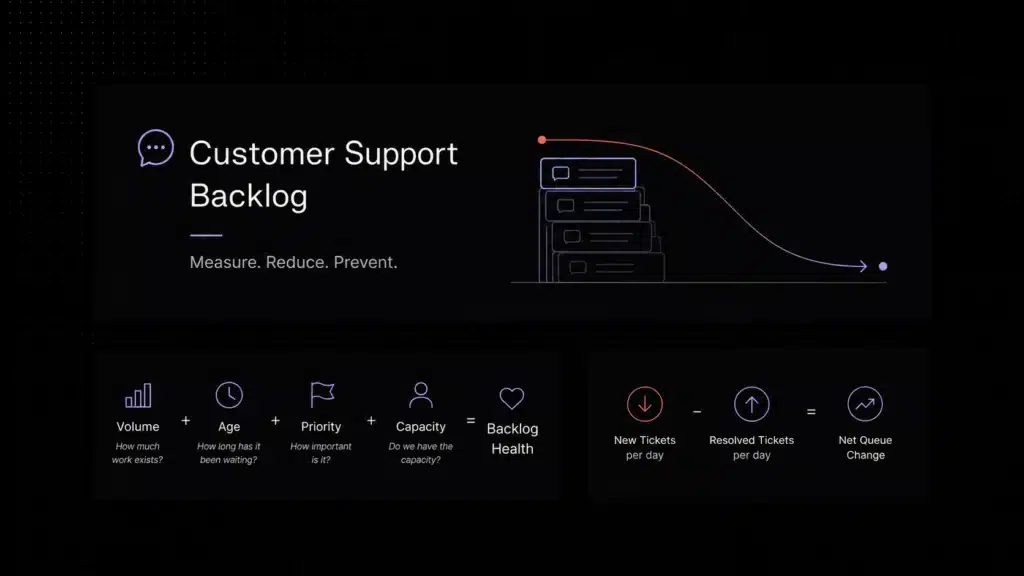
| What is a first response time? | AFirst response time is the time it takes a support team to send the first meaningful reply after a customer reaches out. In practice, improving first response time depends on clear queue ownership, smarter routing, and fewer tickets waiting in the wrong place. |
|---|
Resolution time gets most of the attention in support, but first response time shapes the customer’s experience much earlier. Before a case is solved, before a bug is reproduced, and before a workaround is documented, the customer is already forming an opinion about whether your team feels responsive or absent.
In SaaS, that first touch carries more weight than teams often admit. A customer who is blocked during onboarding, confused by billing, or stuck in a workflow does not need a perfect answer in the first minute. They need a clear signal that the issue is owned, understood, and moving. When that signal comes quickly, trust holds. When it does not, frustration grows fast.
That is why “speed to lead” matters in support too. The phrase usually comes from sales, but the logic applies just as strongly in customer support. The first reply sets the tone for the whole interaction. It affects confidence, escalation pressure, customer patience, and often whether the rest of the conversation feels efficient or chaotic.
This guide explains what first response time really means in support, why it matters more than many teams think, what slows it down, and which fixes usually improve it first.
Fast first response usually comes from clear ownership and queue design, not from telling agents to type faster.
What first response time means in support
First response time measures how long it takes from the moment a customer contacts support to the moment the team sends the first meaningful reply. This concept is widely used across industries, including E-commerce, as explained in this guide to first response time in ecommerce. That reply might confirm the issue, ask for the next piece of information, or direct the customer into the right path. What matters is that the customer can see the request is now moving.
A generic autoresponder does not always count. A receipt email can be useful, but it rarely reduces uncertainty on its own. In real support operations, first response time is about the first reply that changes the customer’s state from waiting in the dark to feeling acknowledged.
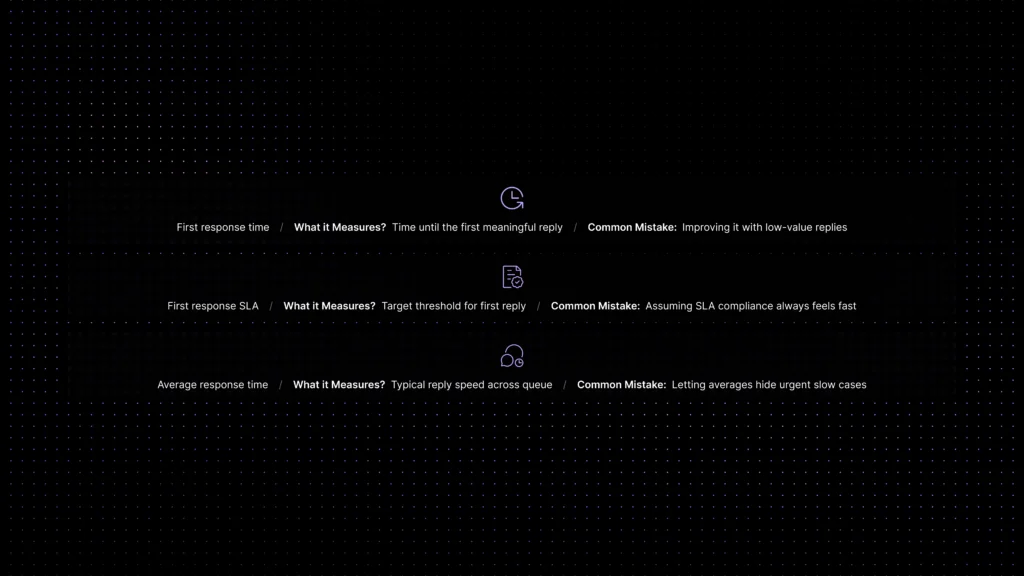
That is why first response time is different from average response time and different again from first response SLA. The metric tells you how quickly customers hear back. The SLA tells you what threshold your team is promising internally or externally. Together, they show whether your support operation is staying responsive under real queue conditions.
Why first response time matters more than teams think
Support teams sometimes treat first response time like a cosmetic metric. It is not. It affects customer confidence before resolution even begins.
When a first reply arrives quickly, three things happen. First, the customer stops wondering whether the message was missed. Second, the team buys time to investigate without seeming absent. Third, the interaction becomes easier to steer because the customer knows there is an owner.
When first response gets slow, the opposite happens. Customers send follow-up messages that inflate volume. Tickets feel more urgent than they were at the start. Internal escalations become noisier. And the team ends up doing extra work that came from delay, not from the original problem itself.
For commercial and expansion conversations, the impact can be even sharper. High-intent prospects, trial users, and newly onboarded customers often read slow support as a product or operational risk. A delayed first reply can quietly weaken trust long before a renewal discussion ever happens.
What a good first response time looks like by support context
There is no single universal number that fits every support team. Channel, urgency, business hours, and customer expectations all change the target. A live-chat queue for product questions should usually move much faster than a low-priority email queue. Enterprise support with strict response windows should behave differently from a small self-serve SaaS team handling standard requests during business hours.
The more useful question is not “What is the perfect benchmark?” but “What does a healthy first reply look like in our support context?” Healthy first response is usually measured in minutes for synchronous channels, in hours rather than days for standard email support, and in clearly defined priority windows for urgent issues.
If your team is consistently sending the first meaningful reply late enough that customers follow up before hearing back, your first response time is probably already hurting the experience, even if the final resolution still lands within an acceptable window.
For the broader context around CSAT, FCR, AI resolution, ticket deflection, escalation, and cost, see our 2026 customer support benchmarks.
Why first response time gets slow
Slow first response rarely comes from one dramatic failure. It usually comes from a pile of smaller workflow problems that stack up inside the queue.
The most common one is unclear ownership. New conversations arrive, but nobody truly owns the first touch. The team assumes someone else will pick it up, or the queue is watched loosely rather than actively managed.
The second is weak routing. Tickets land in the wrong queue, go to the wrong team, or wait for manual triage when the intent is obvious. Even strong agents cannot reply fast if the work starts in the wrong place.
Third is poor prioritization. If urgent account issues, billing blockers, and low-risk questions all look the same in the inbox, the queue ages in the wrong order. What looks like a volume problem is often a priority-logic problem.
Fourth is after-hours and overflow coverage. Many teams design their first response workflow only for normal conditions. Response times then collapse at lunch, during shift changes, after hours, or when one channel suddenly spikes.
Fifth is fragmented tooling. When conversations, customer history, and routing rules live in different places, agents spend the first few minutes just trying to understand the case. That delay shows up in first response time long before it shows up in resolution reports.
The fastest ways to reduce response time
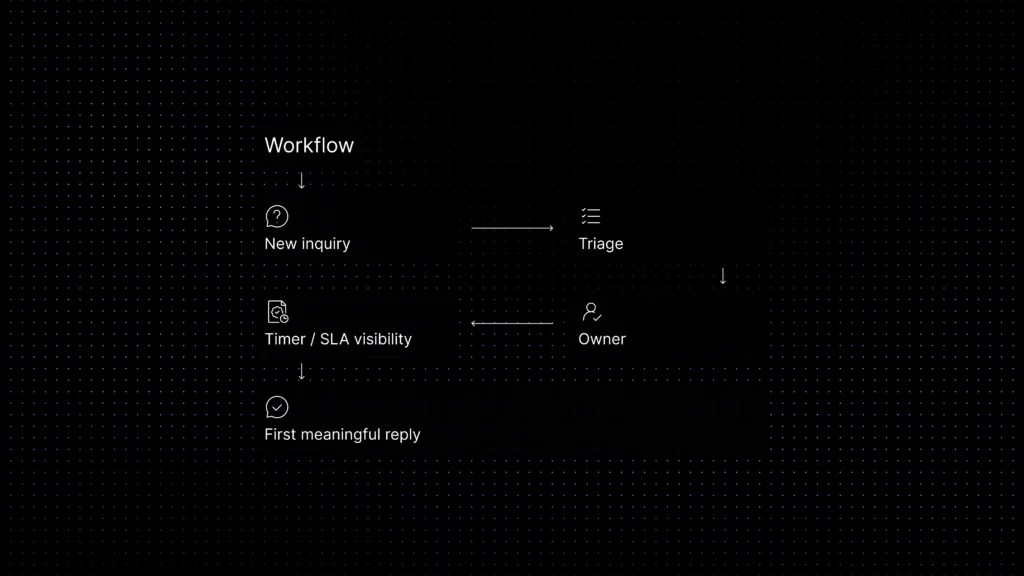
If you want to improve first response time quickly, start with system fixes, not agent pressure. The biggest gains usually come from a short sequence: assign clearer ownership, tighten routing, add lightweight automation, and set realistic response targets by channel and priority.
Ownership comes first because a queue without a real owner always ages unevenly. Someone has to be accountable for watching incoming work and making sure new items do not sit untouched.
Routing comes next because bad queue design makes fast reply impossible. If billing issues, onboarding questions, bugs, and enterprise escalations all land in one pile, the team will waste time sorting before it can answer.
Automation then helps remove the obvious delays. That might mean auto-assignment, urgency tagging, business-hours logic, or rules that surface likely high-risk tickets faster. Good automation shortens waiting time without making the support experience feel robotic.
Finally, benchmark by support context. Set realistic first-response targets for each channel and ticket class. A team cannot improve a response-time metric consistently if every queue is judged by one generic target.
The biggest gains usually come from ownership, routing, SLA visibility, and lightweight automation working together.
Queue ownership, routing, and response automation
These three levers shape first response time more than most teams realize.
Queue ownership means someone is responsible for the first touch. That does not always mean one agent replies to everything. It means there is a clear operating model for who watches the queue, who catches overflow, and who acts when items are aging.
Routing means new work should reach the right owner early. The more accurately a case is categorized at intake, the less time the team spends re-reading, reassigning, and recovering from handoff mistakes.
Response automation should support that flow, not replace judgment. The best use cases are operational: assign by team, tag likely urgency, surface account context, apply business-hours rules, and alert the team before first response SLA risk becomes a breach.
If the first reply still depends on someone manually checking three tools, guessing priority, and deciding ownership from scratch, response time will stay high even with a talented team.
What first response time does not solve on its own
A fast first reply does not automatically mean good support. It does not guarantee accurate answers, fast resolution, or thoughtful escalation.
Teams sometimes over-optimize first response time by sending low-value replies just to stop the timer. That can make the metric look healthier while the actual experience gets worse. A customer would rather receive a slightly slower but clearly useful first reply than a fast message that only says, “We are looking into it,” without any next step.
That is why first response time should be improved alongside routing quality, knowledge access, ownership clarity, and escalation logic. The goal is not just speed. The goal is fast forward motion.
Common mistakes that keep response times high
The first is measuring without changing the workflow. Teams track first response time, but they never redesign the queue that produces it.
The second is treating every channel the same. Live chat, email, in-product support, and high-touch enterprise accounts should not all run on identical timing assumptions.
The third is ignoring queue ownership. If the inbox is “everyone’s responsibility,” it is often nobody’s responsibility at the moments that matter most.
The fourth is relying on manual triage for too long. Once volume rises, slow classification becomes a hidden tax on the first reply.
The fifth is separating response speed from context. A fast answer is useful only when the agent can see the ticket history, account state, and likely issue without rebuilding the story from zero.
Where Inquirly fits
Improving first response time gets easier when the team can work from one shared support layer instead of stitching together an answer from multiple disconnected tools.
That is where Inquirly fits. Inquirly brings conversations, routing, ticketing, workflow automation, and knowledge into one workspace, so teams can assign faster, surface context earlier, and reduce the hidden delays that slow first replies.
For teams trying to reduce response time, the win is not just faster typing. It is better queue ownership, clearer routing, and a support workspace that helps the first right person answer sooner.
First response time vs first response SLA vs average response time
These metrics are related, but they answer different questions. Teams usually improve faster when they stop mixing them together.
| Metric | What it measures | Why it matters | Common mistake |
|---|---|---|---|
| First response time | Time until the first meaningful reply | Shows how quickly customers stop waiting in the dark | Improving it with low-value replies that do not move the issue forward |
| First response SLA | The threshold you promise or target for that first reply | Aligns staffing, priority, and escalation expectations | Assuming hitting the SLA always means the experience feels fast |
| Average response time | Typical reply speed across the queue or period | Helps you understand overall responsiveness trends | Letting an average hide urgent tickets that age too long |
Response-time improvement checklist
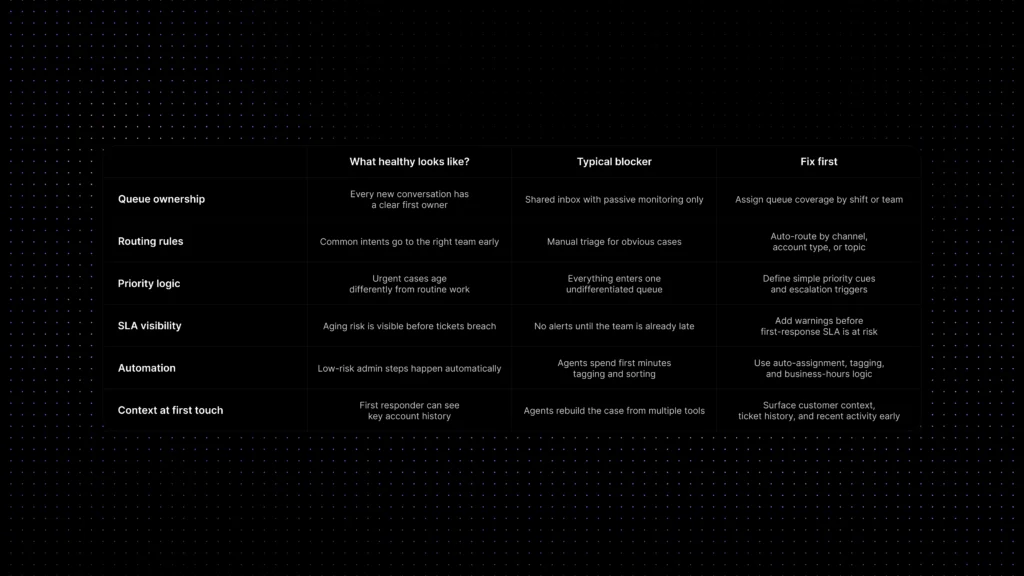
The quickest gains usually come from fixing the system around the queue, not from simply pushing for more urgency.
| What to review first | What healthy looks like | Typical blocker | Fix first |
|---|---|---|---|
| Queue ownership | Every new conversation has a clear first owner | Shared inbox with passive monitoring only | Assign queue coverage by shift or team |
| Routing rules | Common intents go to the right team early | Manual triage for obvious cases | Auto-route by channel, account type, or topic |
| Priority logic | Urgent cases age differently from routine work | Everything enters one undifferentiated queue | Define simple priority cues and escalation triggers |
| SLA visibility | Aging risk is visible before tickets breach | No alerts until the team is already late | Add warnings before the first-response SLA is at risk |
| Automation | Low-risk admin steps happen automatically | Agents spend first minutes tagging and sorting | Use auto-assignment, tagging, and business-hours logic |
| Context at first touch | The first responder can see key account history | Agents rebuild the case from multiple tools | Surface customer context, ticket history, and recent activity early |
Related reading inside the support-ops cluster
- AI Customer Support Automation: The Complete Guide for SaaS Companies
- Support Ticket Automation for SaaS: How AI Routing and Ticketing Workflows Improve Support
- Customer Self-Service for SaaS: How to Reduce Repetitive Support Requests
- The Hidden Cost of Fragmented Customer Communication (Tool Sprawl)
- Prevent SLA Breaches with Ownership + Escalation Rules
- Customer Support Benchmarks 2026: AI Resolution, Deflection, CSAT & Cost
Conclusion
First response time is one of the earliest signals customers get about how your support team operates. When it is healthy, customers feel seen quickly and the rest of the workflow gets easier to manage. When it is slow, the queue gets louder, trust drops earlier, and the team spends more energy recovering from delay than solving the original issue.
The fastest path to improvement is usually not “reply faster.” It is simpler than that: own the queue, route better, surface context early, and use automation to remove avoidable waiting.