Compare direct AI chatbot replacements and full support platforms by pricing, helpdesk depth, human handoff, setup model, and best use case.
The best Chatbase alternative is not automatically the cheapest chatbot. It is the product whose billing model, support workflow, and deployment depth match what your team actually needs. Chatbase now includes a native Helpdesk on its Standard plan, so the useful comparison is no longer “chatbot versus helpdesk.” The real questions are how much capacity you get, how many teammates can work in the system, how human handoff operates, and whether you need a focused bot builder or a broader support platform.
This guide compares eight Chatbase alternatives, including close website-trained chatbot substitutes and full customer support platforms. Pricing and product details were checked against official vendor pages on August 2, 2026.
Disclosure: This comparison is published by Inquirly, one of the products evaluated. We applied the same criteria to every platform and link to official vendor documentation. Prices and plan limits change frequently, so verify the final quote before purchasing.
Quick answer: the best Chatbase alternative by use case
- Choose Inquirly if you want AI answers, ticketing, shared inboxes, automation, and human workflows in one platform.
- Choose Chatling if you want a close no-code replacement with a free tier, visual builder, live chat, and human handoff.
- Choose SiteGPT if you want a straightforward bot trained on website content with minimal workflow complexity.
- Choose Tidio if a small team wants live chat and ticketing alongside an approachable AI layer.
- Choose Fin if you want an outcome-priced AI agent connected to your current helpdesk.
- Choose Zendesk AI Agents if your support operation already runs on Zendesk.
- Choose Voiceflow if you need a design-first environment for complex chat and voice agents.
- Choose Botpress Cloud if developers need more control over workflows, integrations, and agent behavior.
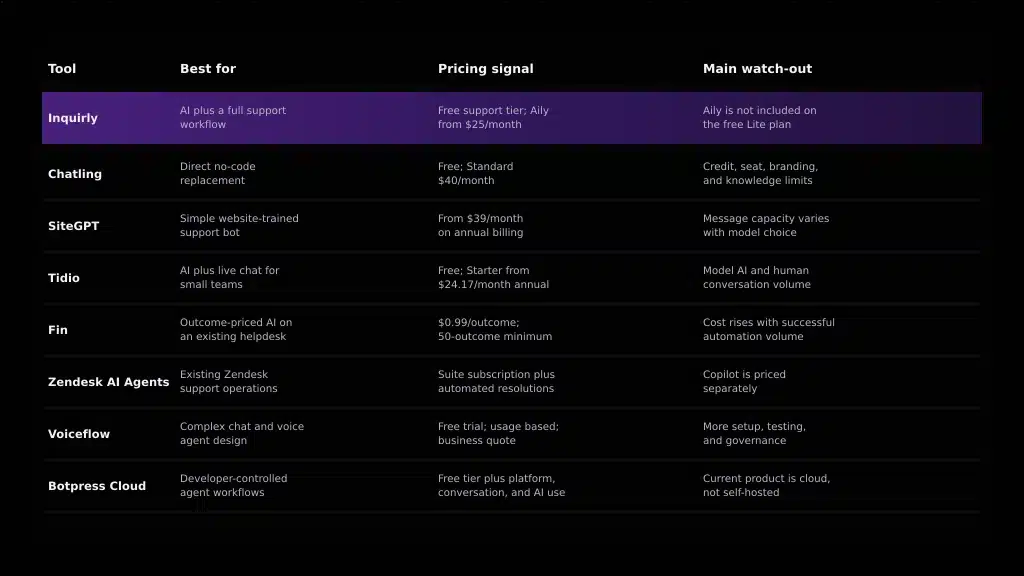
Chatbase alternatives at a glance
| Tool | Best for | Pricing signal | Main watch-out |
|---|---|---|---|
| Inquirly
|
Teams that want AI plus ticketing, inboxes, and human workflows | Free Lite support tier; Aily on paid plans from $25/month; unlimited agents | The free plan does not include Aily or knowledge-base management |
| Chatling | A direct no-code chatbot replacement with live handoff | Free tier; Standard $40/month; model-dependent AI credits | Seat, credit, branding, and knowledge limits vary by plan |
| SiteGPT | A simple website-trained support bot | Starter shown from $39/month on annual billing; message-based limits | Real message capacity changes with the model mix |
| Tidio | Small teams wanting live chat, ticketing, and AI | Free tier; Starter from $24.17/month on annual billing; AI limits vary | Lyro usage and human conversation limits must be modeled together |
| Fin (formerly Intercom) | Teams adding an AI agent to an existing helpdesk | $0.99 per outcome with a 50-outcome monthly minimum; helpdesk seats optional | Outcome-based costs rise with successful automation volume; Salesforce’s pending acquisition adds a roadmap and vendor-continuity consideration. |
| Zendesk AI Agents | Teams already running Zendesk support operations | Support and Suite subscriptions plus automated-resolution usage | Copilot’s per-agent fee is separate from AI Agent resolution charges |
| Voiceflow | Design-first teams building complex chat and voice agents | Free trial; usage-based agency billing; business pricing by request | More setup and governance than a plug-and-play FAQ widget |
| Botpress Cloud | Technical teams building custom agent workflows | Free tier plus platform, conversation, and AI usage costs | The current platform is cloud-based; Botpress v12 is a separate legacy project |
Pricing note: figures are public list-price signals checked August 2, 2026. Temporary promotions, taxes, enterprise contracts, overages, and add-ons are excluded. Follow each linked product name for the vendor’s current pricing.
| Tool | G2 rating | Reviews |
|---|---|---|
| Chatbase — reference point | 4.8/5 | 24 |
| Inquirly | 4.3/5 | 6 |
| Chatling | 4.7/5 | 72 |
| SiteGPT | 4.8/5 | 12 |
| Tidio | 4.6/5 | 1,954 |
| Fin | 4.5/5 | 3,893 |
| Zendesk for Customer Service | 4.3/5 | 6,841 |
| Voiceflow | 4.6/5 | 111 |
| Botpress | 4.5/5 | 507 |
Ratings note: G2 ratings and review counts were checked on August 2, 2026 and may change. Review volume matters: a score based on six reviews should not be interpreted with the same confidence as one based on several thousand. Zendesk’s rating covers the broader Zendesk for Customer Service product, not AI Agents alone.
How we evaluated these Chatbase alternatives
We reviewed official pricing pages and product documentation using five criteria: similarity to Chatbase’s website-trained AI agent, knowledge-source management, human handoff and helpdesk depth, billing predictability, and the operational effort required after launch. We prioritized direct Chatbase substitutes for teams that only need a bot, while retaining broader platforms for teams that need ticketing, routing, reporting, or multi-agent workflows.
This is a documented product comparison, not a standardized hands-on benchmark. We therefore do not assign answer-quality or setup-time scores that we could not reproduce across all eight tools. Before switching, test finalists with the same knowledge base, the same 15 to 20 customer questions, and the same escalation scenario.
What we verified directly
On August 2, 2026, we opened the current pricing and setup documentation for the products in this comparison and recorded the visible entry price, billing unit, plan limits, helpdesk availability, and published setup guidance.
- Chatbase: Standard was listed at $120 per month on annual billing and was the first plan showing Helpdesk. Free and Hobby did not list Helpdesk.
- Inquirly: Lite was listed as free with unlimited agents. Aily and knowledge-base management first appeared on Elite at a $25 monthly list price, before temporary promotional discounts.
- Chatling: Free listed 100 monthly AI credits and one seat. Standard listed 3,000 credits and two seats at $40 per month, or $32 per month billed annually.
These are direct pricing-page and documentation observations, not product-performance scores. We did not deploy all eight products or assign answer-quality scores without running the same reproducible test across every platform.

1. Inquirly, best for AI support that grows into a full workflow
Inquirly combines Aily, ticketing, omnichannel inboxes, workflow automation, reporting, and human support operations in one product. Its current pricing page lists a free Lite plan with unlimited agents and core support workflows. Aily and knowledge-base management begin on the Elite plan, listed at $25 per month on monthly billing, while Pro is listed at $40 per month. The public pricing page does not list a per-resolution AI fee.
Best for: Teams that have outgrown a standalone FAQ widget and want AI, ticketing, inboxes, routing, and human handoff together.
Watch out for: Inquirly Lite is a free support-workflow tier, not a free AI chatbot tier. Aily and knowledge-base management require an eligible paid plan.
Setup signal: Inquirly states that most teams can complete basic setup in minutes and begin handling conversations on the same day.
2. Chatling, best direct no-code Chatbase replacement
Chatling is one of the closest substitutes in this list: teams can train AI agents on their content, deploy a web chatbot, build flows visually, and use live chat with human handoff. Its free plan includes 100 monthly AI credits, one seat, two AI agents, and limited customization. Standard is listed at $40 per month, or $32 per month billed annually, with 3,000 credits and two seats.
Best for: Teams that want a close Chatbase-style tool with no-code setup, a usable free test tier, and the option for a human to enter the conversation.
Watch out for: AI credit consumption changes by model. Extra seats, branding removal, custom domains, and additional credits may add to the monthly cost.
Setup signal: Chatling states that most teams can connect their website and go live the same day; its published customer example reports approximately 20 minutes for a basic setup.
3. SiteGPT, best for a simple website-trained support bot
SiteGPT focuses on turning website content into an embedded AI support agent. Its Starter plan is shown from $39 per month on annual billing and includes one chatbot, one member, up to 1,000 pages, and a model-dependent message allowance. Growth adds team members, API access, integrations, and scheduled content refreshes.
Best for: Small teams that want to train a bot on a website quickly without adopting a full helpdesk.
Watch out for: The effective message quota changes with the selected model mix, and removing SiteGPT branding is a separate add-on.
Setup signal: SiteGPT’s quickstart targets approximately 10 minutes from a new account to a working website chatbot.
4. Tidio, best for small teams wanting AI plus live chat
Tidio combines live chat, ticketing, automation, and the Lyro AI Agent in a package aimed at small and midsize teams. The current pricing page lists a free tier and Starter from $24.17 per month on annual billing. Human conversation quotas, Lyro conversations, and proactive automation limits scale separately, so the real monthly price depends on both human and AI volume.
Best for: Small ecommerce or SaaS teams that want approachable live chat and ticketing alongside AI answers.
Watch out for: The starting plan price does not describe the full AI cost. Model your Lyro conversation allowance and human conversation volume together.
Setup signal: Tidio’s Lyro setup guide states that a basic operational AI agent can be prepared in approximately 10 minutes.
5. Fin (formerly Intercom), best for outcome-priced AI on an existing helpdesk
Fin can now operate with Intercom’s helpdesk or connect to another supported helpdesk. Its public pricing lists $0.99 per outcome with a 50-outcome monthly minimum when used with a current helpdesk. When combined with the Intercom helpdesk, pricing starts at $29 per helpdesk seat plus Fin outcomes. This makes Fin more flexible than the old description of an Intercom-only add-on.
On June 15, 2026, Salesforce signed a definitive agreement to acquire Fin for approximately $3.6 billion. The transaction is expected to close in Salesforce’s fiscal fourth quarter of 2027, subject to regulatory approval and customary closing conditions. Teams shortlisting Fin should include the pending ownership change in their roadmap, integration, and vendor-continuity review.
Best for: Teams that already have a helpdesk and prefer to pay when the AI produces a defined outcome.
Watch out for: Outcome-based pricing is variable. Resolutions, configured procedure handoffs, and disqualifications can be billable outcomes under Fin’s published rules. Salesforce’s pending acquisition also introduces a near-term roadmap and vendor-continuity consideration for procurement teams.
Setup signal: Fin states that pre-built integrations generally take two to five minutes, while custom API integrations can take 30 minutes to several hours. Knowledge validation and procedure testing require additional time.
6. Zendesk AI Agents, best for existing Zendesk teams
Zendesk AI Agents are part of Zendesk’s broader support stack. Zendesk’s pricing information distinguishes AI Agents from Copilot: AI Agent usage is measured in automated resolutions, while Copilot is a separate per-agent add-on for human-agent assistance. Suite plans provide the channels, ticketing, routing, and knowledge layer around those AI capabilities.
Best for: Organizations already invested in Zendesk that want autonomous resolution inside a mature ticketing and reporting environment.
Watch out for: Do not treat the Copilot add-on price as the cost of Zendesk AI Agents. Total cost combines the support subscription, automated-resolution usage, and any separate add-ons.
Setup signal: Zendesk states that a basic knowledge-backed AI agent can begin automating in minutes; advanced dialogues, actions, and API integrations require more configuration.
7. Voiceflow, best for complex chat and voice agent design
Voiceflow is a design and production platform for teams building sophisticated AI agents across chat and voice. It supports visual workflows, integrations, model choice, collaboration, testing, and observability. Voiceflow’s current pricing page advertises a free trial and usage-based billing for agencies, while business pricing is provided on request.
Best for: Conversation design and engineering teams that need controlled flows, voice channels, integrations, and production governance.
Watch out for: Voiceflow is more configurable than a simple documentation bot, which also means more design, testing, and maintenance work.
Setup signal: Voiceflow’s quickstart targets three minutes or less for a basic chat agent. Production workflows, integrations, testing, and governance take longer.
8. Botpress Cloud, best for developer-controlled agent workflows
Botpress Cloud provides a hosted studio, workflows, integrations, knowledge bases, APIs, and AI components for custom agents. Its pricing model combines a free tier with platform, conversation, and AI usage costs. The current open repository contains Botpress Cloud integrations, developer tools, plugins, and examples; on-premise Botpress v12 is maintained as a separate legacy project.
Best for: Technical teams that want to customize agent logic, code integrations, and manage AI spend at a detailed level.
Watch out for: The current Botpress product is cloud-based. Do not select it on the assumption that the modern platform can be self-hosted like the older v12 product.
Setup signal: Botpress’s quickstart says a generated first agent can be ready to test and deploy within minutes. Custom workflows and integrations require additional build and testing time.
Why teams look for an alternative to Chatbase
Chatbase is no longer just a standalone widget. Its Standard plan includes Helpdesk, voice, telephony, outbound campaigns, API access, and advanced integrations. Teams usually compare alternatives because the limits or economics do not fit, not because Chatbase lacks support workflows.
- Message-credit limits can be difficult to forecast. Chatbase plans include fixed monthly credits, and additional credits are sold as an add-on.
- Member limits may constrain collaboration. The public plans list one member on Free, two on Hobby, three on Standard, and five on Pro.
- The usable Helpdesk entry point is a higher tier. Helpdesk appears on Standard, listed at $120 per month on annual billing.
- Branding removal is expensive relative to entry plans. Chatbase lists removal of “Powered by Chatbase” at $1,188 per year.
- Different teams need different product depth. A direct bot substitute can be simpler, while a full support platform may offer deeper ticketing, reporting, or workforce controls.
None of these points makes Chatbase a poor product. Its current plans suit teams that want a fast documentation-trained agent and are comfortable with the listed credit, member, and add-on structure.
How to compare pricing and total cost of ownership
Do not compare the lowest advertised prices alone. For a broader explanation of billing models, use Inquirly’s guide to customer support software pricing, then model each finalist using the same assumptions.
- Define the billing unit: message credit, conversation, automated resolution, outcome, seat, or flat plan.
- Calculate cost at normal volume, peak volume, and your 18-month forecast.
- Add required human-agent seats, AI usage, channels, integrations, branding removal, and overages.
- Confirm whether ticketing, shared inboxes, routing, analytics, and human handoff are included at the selected tier.
- Price the operational work: knowledge cleanup, bot testing, workflow design, migration, and ongoing maintenance.
Free Chatbase alternatives: what “free” really means
- Chatbase Free: 50 message credits, one member, one AI agent, limited models, and deletion after 14 days of inactivity.
- Chatling Free: 100 AI credits, one seat, two AI agents, live chat, and limited customization; model choice changes credit consumption.
- Inquirly Lite: unlimited agents plus ticketing, inboxes, automation, and reporting, but no Aily or knowledge-base management.
- Tidio Free: a low-volume starting point for human support; AI and automation capacity remain limited.
- Botpress Free: a testing and small-project entry point before conversation, storage, and AI usage grow.
A free support tier is not always a free AI tier. Compare the exact features you need, especially knowledge-base training, recurring AI capacity, human handoff, branding, and team access.
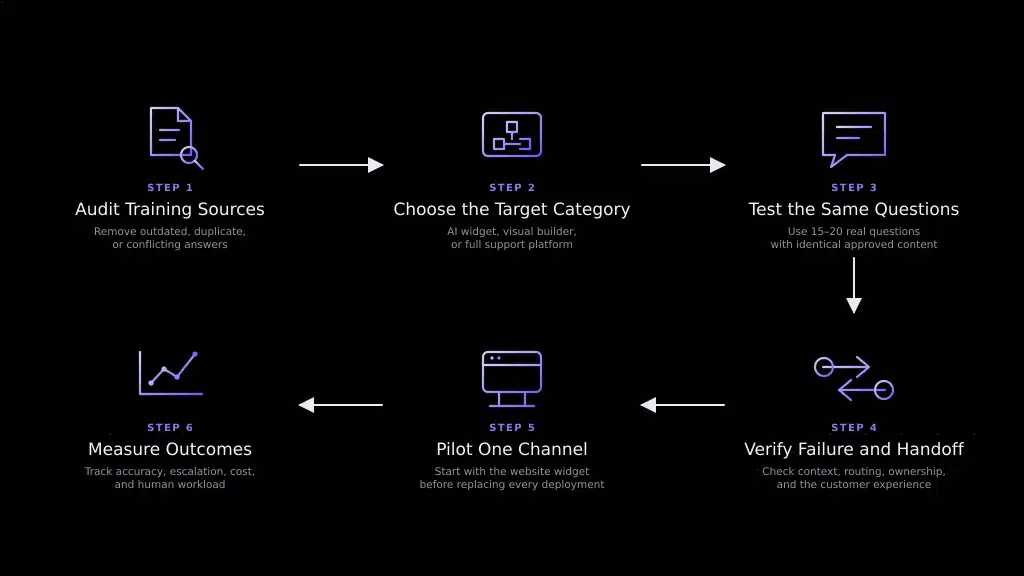
Migrating from Chatbase: a practical checklist
- Export or inventory every training source, then remove outdated, duplicate, or conflicting answers.
- Choose the target category: direct AI widget, visual agent builder, or full support platform.
- Load the same approved content into each finalist and test the same 15 to 20 real customer questions.
- Run at least one failure and handoff scenario to verify context, routing, ownership, and customer experience.
- Pilot on one channel first, normally the website widget, before replacing every deployment.
- Track resolved conversations, escalation quality, response accuracy, cost per resolved issue, and human workload.
Which Chatbase alternative should you choose?
For the closest feature category, shortlist Chatling and SiteGPT. For a small team that wants live support in the same tool, add Tidio. If the chatbot must become part of a broader support operation, compare Inquirly, Fin, and Zendesk. Voiceflow and Botpress are stronger candidates when agent design and engineering control matter more than plug-and-play setup.
If you are still deciding whether you need a focused bot or a complete support platform, compare the best customer support software and the best AI knowledge-base tools before committing to a category.
Choosing the right Chatbase alternative for your team
Start with category fit, then price. A team that only needs a documentation-trained web agent should not buy an enterprise helpdesk by default. A team that already needs routing, ownership, reporting, and human handoff should not optimize only for the cheapest bot credit plan.
If your priority is AI support that can grow into ticketing, shared inboxes, automation, and human workflows without per-agent limits, compare Inquirly’s current plans. Then test it against the same content, questions, and escalation scenario you use for every finalist.