A normal knowledge base is useful until a customer has to search six articles, three release notes, and one ancient FAQ written during the Bronze Age of your product. Then it becomes less of a help center and more of a puzzle room with billing implications.
AI knowledge base tools fix the boring part. Instead of forcing customers or agents to hunt through documentation, they let people ask a question in natural language and get the most relevant answer from approved company content.
That sounds simple. It is not. The difference between a good AI knowledge base and a confident nonsense machine is grounding: where the answer comes from, how fresh the source is, what the AI is allowed to say, and what happens when the answer is not available.
This guide compares the best AI knowledge base tools for customer support teams in 2026. The focus is practical: customer self-service, agent assist, live chat, ticketing, handoff, privacy, content quality, and whether the tool actually fits support workflows instead of just looking futuristic in a demo.
Key takeaways
- The best AI knowledge base tool depends on your support model. A chatbot-first tool, documentation platform, internal wiki, and helpdesk knowledge base solve different problems. Human civilization continues to name everything similarly, because apparently that is how we suffer.
- For customer support, grounding matters more than flash. AI should answer from approved help content, not invent answers from vibes and statistical confidence.
- Workflow connection is the real separator. A strong tool connects knowledge to live chat, tickets, routing, human handoff, and reporting.
- Pricing needs scenario modeling. Check not only the starting plan, but also AI usage, seats, message credits, support channels, and add-ons.
What is an AI knowledge base tool?
An AI knowledge base tool is software that uses artificial intelligence to organize, retrieve, summarize, and answer questions from a company’s knowledge sources. Those sources can include public help articles, internal docs, PDFs, FAQs, product manuals, customer support macros, past tickets, policy pages, and sometimes external tools like Slack, Google Drive, Zendesk, or Confluence.
In plain English: it gives people answers without making them dig. Customers can ask, “Can I change my plan mid-cycle?” Agents can ask, “What is the troubleshooting flow for failed imports?” The AI searches trusted content and returns an answer. Good tools show where that answer came from. Bad tools sound like they read your docs once in a dream.
For customer support teams, an AI knowledge base is useful in three places:
- Customer self-service: customers ask questions on your site, help center, or chatbot and get instant answers.
- Agent assist: agents get suggested replies, article recommendations, summaries, and context while handling tickets.
- Support operations: leaders see content gaps, repeated questions, and topic trends that should become better documentation or product fixes.
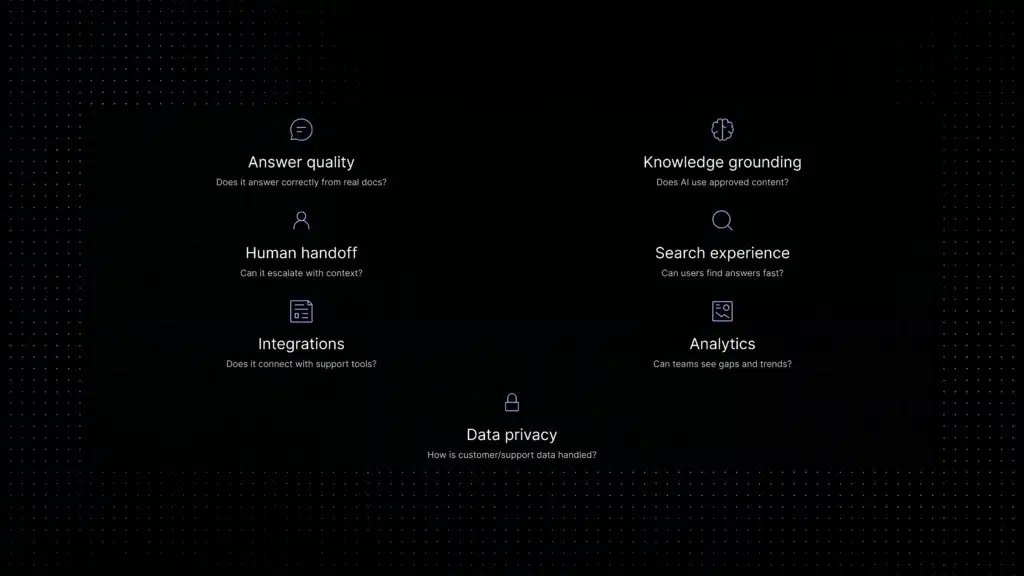
What makes a good AI knowledge base tool for customer support?
Most AI knowledge base tools can “answer questions.” That phrase is now about as specific as “our app uses the cloud.” Before choosing one, check the parts that actually determine whether it will help your support team or create a new clean-looking problem.
Best AI knowledge base tools compared
Here is the quick view before the deeper breakdown. Pricing and feature packaging change often, so verify official pricing pages before buying. Software vendors move prices around with the confidence of people rearranging furniture in the dark.
AI knowledge base tools built for customer support These five tools connect knowledge directly to live chat, ticketing, and agent workflows, the right starting point if support is your primary use case.
1. Inquirly, best for AI customer support workflows
Inquirly is best suited for support teams that do not want their knowledge base living in a separate corner of the internet, waving politely while agents keep copying answers manually. It connects support conversations, knowledge, AI assistance, ticketing, live chat, routing, and human handoff in one workflow.
The key difference is the support angle. Inquirly is not only about storing content. It is about making knowledge usable inside real customer conversations. That means AI can help answer repetitive questions, agents can work with better context, and unresolved issues can move cleanly to a human instead of falling into the classic “please re-explain your entire problem” hole.
- Best for: Growing support teams that want AI answers, ticketing, live chat, knowledge, and handoff connected.
- Strongest use case: AI customer support knowledge base and agent assist.
- Watch out for: Like any AI support system, quality depends on useful help content and clear escalation rules.
→ Learn about Inquirly AI customer support software
2. Chatbase, best for fast AI chatbot setup
Chatbase is a strong choice when the main goal is to build an AI chatbot from your existing content quickly. Its article on AI knowledge base tools frames the category around instant answers, uploaded content, and chatbot-style self-service, which is exactly the use case Chatbase is good at.
For teams that want to upload docs, connect website content, and launch a chatbot without building a full support system, Chatbase is easy to understand. It is especially attractive for small businesses, agencies, and teams that need a conversational knowledge layer before they need a complex helpdesk.
- Best for: Fast chatbot-style AI knowledge base deployment.
- Strongest use case: Website chatbot trained on docs, URLs, and files.
- Watch out for: It is more chatbot-first than full support-operations-first.
3. Zendesk, best for enterprise support teams
Zendesk is one of the biggest names in customer service software, and its AI knowledge base capabilities sit inside a much larger enterprise support platform. Its Suite plans include knowledge base, AI agents, omnichannel routing, messaging, live chat, telephony, and automation features depending on plan level.
Zendesk makes sense when your support operation is already complex: multiple teams, routing rules, enterprise accounts, SLAs, compliance expectations, and leadership dashboards. It is not the lightest option. It is not trying to be. Zendesk is the support equivalent of a very large toolbox; excellent when you need it, slightly dramatic if you only wanted a screwdriver.
- Best for: Enterprise and larger support organizations.
- Strongest use case: AI knowledge base inside a mature omnichannel helpdesk.
- Watch out for: Cost, implementation, and admin overhead can be heavy for smaller teams.
4. Intercom, best for product-led support and messaging
Intercom is built around customer conversations, messaging, product-led support, and AI-assisted service. Its AI-first helpdesk positioning makes it a strong fit for SaaS and app-based teams that care about in-product support as much as traditional tickets.
The main reason to consider Intercom is the combination of messenger, help center, AI agent, customer context, and proactive engagement. If support and customer engagement are tightly connected in your business, Intercom deserves a serious look.
- Best for: Product-led teams that want support, messaging, and AI in one customer communication layer.
- Strongest use case: AI support connected to in-app conversations and help center content.
- Watch out for: Pricing can depend on seats, plan level, AI usage, and expected Fin outcomes.
5. Guru, best for internal verified knowledge
Guru is strongest as an internal AI knowledge management platform. It helps teams keep knowledge verified and accessible inside the tools they already use. For support teams, this can be valuable when agents need quick, trusted internal answers while working tickets.
Guru is less of a public help center tool and more of a governed internal knowledge layer. That makes it a good fit for support, sales, and success teams that need current answers across policies, product details, competitive notes, and operating procedures.
- Best for: Internal knowledge used by customer-facing teams.
- Strongest use case: Verified internal answers and AI-powered search across team knowledge.
- Watch out for: Not primarily a customer-facing help center or full support platform.
6. Document360, best for structured documentation and help centers
Document360 is built for documentation-heavy teams that need a serious knowledge base for customers, employees, or both. It supports AI search, AI chatbot capabilities, AI writing tools, analytics, permissions, custom domains, versioning, and documentation workflows.
If your company has a lot of product documentation, public help content, developer docs, or internal manuals, Document360 belongs on the shortlist. It is especially useful when documentation quality is a strategic requirement, not an afterthought created after support tickets begin multiplying like badly supervised rabbits.
- Best for: Documentation-heavy teams and structured help centers.
- Strongest use case: AI search and chatbot over well-managed documentation.
- Watch out for: It is documentation-first, so support workflow depth depends on your wider stack.
7. Helpjuice, best for customizable knowledge bases
Helpjuice is a knowledge base platform with a strong emphasis on customization, design, analytics, and AI features. Its official pricing page highlights AI writer, AI search, AI chatbot, tutorial builder, customization, and unlimited-user options on higher plans.
This is a good fit for companies that want a polished, highly branded knowledge base experience and are willing to pay for that level of presentation and customization. If the knowledge base is part of your customer experience, not just a support utility, Helpjuice has an argument.
- Best for: Custom-branded knowledge bases and teams that want design flexibility.
- Strongest use case: AI-enhanced public or private help centers.
- Watch out for: Pricing may be more than lean teams need early on.
8. Slite, best for self-maintaining internal team knowledge
Slite positions itself as a self-maintaining AI knowledge base that stays accurate, synced with tools, and verified by the team. That matters because most internal docs do not fail because people hate documentation. They fail because everyone assumes someone else is updating the page. This is how stale knowledge is born.
For internal team knowledge, Slite is a strong option. It is useful for teams that want a cleaner source of truth, better async documentation, and AI answers grounded in maintained internal docs.
- Best for: Internal documentation and self-maintaining team knowledge.
- Strongest use case: AI answers from verified internal docs.
- Watch out for: Less focused on public customer support workflows than support platforms.
9. Tettra, best for Slack-first internal Q&A
Tettra is an AI internal knowledge base built for teams that answer the same questions in Slack again and again. Its AI bot, Kai, can answer from Tettra pages, Google Docs, PDFs, and other knowledge sources, and can help find the right person when the answer is missing.
This is especially useful for teams where internal support happens inside Slack channels and DMs. It turns repeated internal questions into reusable knowledge instead of making one unlucky person become the company search engine.
- Best for: Slack-first internal knowledge and repetitive team questions.
- Strongest use case: Internal Q&A and knowledge verification.
- Watch out for: Not the main choice for external customer-facing help centers.
10. ProProfs Knowledge Base, best for simple help sites and manuals
ProProfs Knowledge Base is a practical option for teams that want to build help centers, manuals, FAQs, and internal wikis without making the project feel like a software migration written by a committee. Its AI knowledge base positioning emphasizes writing, translating, improving content, and reducing support tickets through self-service.
It is a good fit for smaller teams and businesses that need an easier starting point for customer-facing documentation.
- Best for: Simple public help centers, FAQs, manuals, and internal wikis.
- Strongest use case: AI-assisted content creation and customer self-service.
- Watch out for: Teams needing advanced support workflow automation may need a broader support platform.
→ Check ProProfs Knowledge Base
11. Freshdesk, best for traditional helpdesk teams that also need a knowledge base
Freshdesk is a practical helpdesk option for teams that want ticketing, knowledge base, reporting, and the ability to add AI features through Freddy AI. Freshworks’ official pricing page lists a free program for very small teams and paid plans starting at $15 per agent per month, depending on billing and plan.
Freshdesk is not only an AI knowledge base tool. It is a helpdesk with knowledge base and AI capabilities. That makes it useful when the knowledge base must live alongside tickets, agent workflows, and traditional support operations.
- Best for: Small and mid-market helpdesk teams.
- Strongest use case: Knowledge base connected to ticketing and customer support operations.
- Watch out for: Map Freddy AI add-ons and expected AI usage before buying.
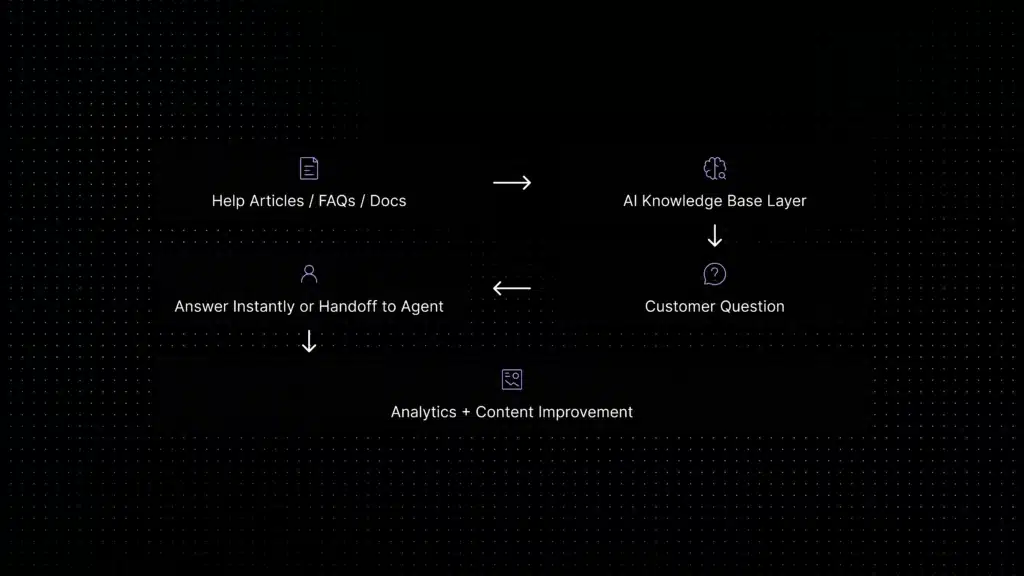
Workflow showing help articles and FAQs feeding an AI knowledge base tool that answers customer questions or hands them off to a support agent.
How to choose the right AI knowledge base tool
Do not start with the longest feature list. That is how teams buy software that technically does everything and practically makes everyone tired. Use these questions instead.
- Is it customer-facing, internal, or both? A customer support chatbot, an internal wiki, and a documentation platform are different animals. Related, yes. Same? No. Please do not put all animals in one software budget.
- Are answers grounded in approved sources? Ask whether the AI retrieves from your own docs, whether it shows sources, and how it behaves when no source exists.
- Does it connect to support workflows? For customer support teams, knowledge needs to connect to live chat, ticketing, routing, agent assist, and reporting.
- Can humans take over cleanly? If the AI fails, the handoff should include conversation history, customer context, and what the AI already attempted.
- How does content stay fresh? Outdated documentation creates outdated AI answers. Look for verification, content gap detection, analytics, and ownership workflows.
- What happens to your data? Check SSO, permissions, audit logs, retention, data processing, model-training policies, and whether sensitive support data is protected.
- What does pricing look like at scale? Model costs at today’s volume, peak volume, and expected volume in 12 months. Your future self would like fewer invoice surprises, apparently.
Red flags before buying AI knowledge base software
Where Inquirly fits
Inquirly fits support teams that want an AI knowledge base to do more than sit beside the support workflow looking decorative. The strongest use case is customer support: answering from trusted content, helping agents, routing conversations, supporting live chat, and keeping human handoff clean.
If you mainly need an internal wiki, tools like Guru, Slite, or Tettra may be a better fit. If you mainly need a documentation hub, Document360 or Helpjuice may be stronger. If you need a fast chatbot trained on content, Chatbase is a clear option.
But if your real problem is support volume, repetitive questions, scattered conversations, slow replies, and agents switching between tools, Inquirly belongs near the top of the shortlist. It treats knowledge as part of the support operating system, not as a library people are supposed to visit when all else fails.
For related Inquirly guides, see AI customer support software, knowledge base AI chatbot, and customer support software pricing.