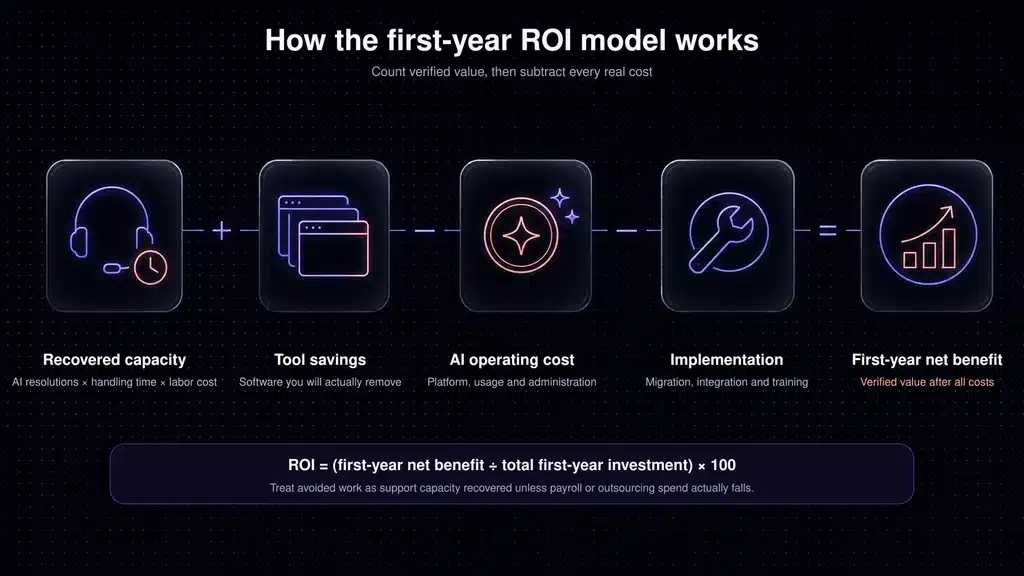
AI customer support ROI is the financial value of support capacity, software savings, and other measurable benefits created by AI, minus implementation and ongoing costs, divided by the total investment.
The arithmetic is simple. The assumptions are where most ROI estimates go wrong.
If 5,000 monthly conversations produce 1,500 successful AI resolutions, each would otherwise take nine minutes, and support time is worth $34.78 per hour, the modeled capacity value is $7,825.50 per month. With $1,417.36 in recurring monthly costs and a $5,000 implementation cost, the model produces a 326.7% first-year ROI and a 0.8-month payback period.
That is a worked example, not a promise. Your result will change with your conversation mix, actual resolution quality, labor cost, pricing model, and ability to put the recovered time to useful work.
Quick answer: Calculate AI support ROI from successful AI resolutions, not bot replies or attempted conversations. Convert the handling time genuinely avoided into a capacity value, add measurable software savings, subtract implementation and recurring costs, then divide the first-year net benefit by the first-year investment.
Key takeaways
- Count a resolution only when the issue is solved without a human taking over and without an avoidable reopen.
- Call the result recovered support capacity unless it produces a measurable payroll reduction, avoided hire, overtime reduction, or additional productive output.
- Include implementation, knowledge preparation, integrations, AI usage fees, human review, and ongoing administration.
- Model conservative, expected, and optimistic cases instead of relying on one resolution-rate assumption.
- Track CSAT, reopen rate, escalation rate, and answer quality alongside ROI. A lower-cost support operation is not a win if customers receive worse answers.
AI customer support ROI calculator
This manual calculator works in any spreadsheet. Enter your own data in the second column, then apply the formulas that follow. If a value is unknown, use a conservative estimate and replace it after a 30-day pilot.
Enter your support data
Use your own support data where possible. If a number is unavailable, begin with a clearly documented estimate and update it after your first 30 days.
| Calculator input | Your value | How to measure it |
|---|---|---|
Monthly support conversations Support volume |
conversations/month |
Count genuine inbound support conversations. Exclude spam, internal tests, and outbound messages. |
Conversations eligible for AI Automation potential |
percent (%) |
Review a tagged sample and calculate the share of repetitive, documented, and low-risk issues. |
Successful AI resolution rate AI effectiveness |
percent (%) |
Count conversations resolved without human takeover or an avoidable reopen within your chosen measurement window. |
Average human handling time Time per conversation |
minutes/conversation |
Use active handling time for the same issue types—not the average across every support ticket. |
Fully loaded hourly support cost Labor cost |
USD/hour |
Include wages, employer taxes, benefits, equipment, and other directly attributable employment costs. |
Current monthly software cost removed Tool consolidation |
USD/month |
Include only tools or add-ons that you will genuinely cancel after implementation. |
New monthly platform cost Recurring investment |
USD/month |
Include the subscription, seats, AI outcomes or sessions, channels, and required add-ons. |
Monthly AI administration hours Ongoing management |
hours/month |
Include knowledge updates, conversation reviews, testing, analytics, and workflow maintenance. |
One-time implementation cost Initial investment |
USD one time |
Include internal labor, migration, integration, consulting, training, and knowledge-base cleanup. |
Use data from the same issue types and measurement period. Combining unrelated support categories can make the ROI estimate misleading.
Core formulas
- Eligible conversations
Monthly conversations × Eligibility rate
- Successful AI resolutions
Eligible conversations × Successful AI resolution rate
- Monthly capacity recovered
Successful AI resolutions × Average handling time ÷ 60
- Monthly capacity value
Recovered hours × Fully loaded hourly support cost
- Monthly recurring AI cost
Platform, seat, usage, channel, and add-on costs + (AI administration hours × Hourly cost)
- First-year gross benefit
(Monthly capacity value + Monthly tool savings) × 12
- First-year investment
One-time implementation cost + (Monthly recurring AI cost × 12)
- First-year net benefit
First-year gross benefit − First-year investment
- First-year ROI
First-year net benefit ÷ First-year investment × 100
- Payback period
One-time implementation cost ÷ (Monthly capacity value + Monthly tool savings − Monthly recurring AI cost)
If the monthly net benefit is zero or negative, the project does not pay back under the current assumptions.
A complete worked example for a growing SaaS company
Consider a SaaS company receiving 5,000 support conversations per month. A review of the previous 90 days shows that 60% concern documented, repeatable issues such as password resets, invoice questions, plan limits, and basic configuration.
The company models a 50% successful AI resolution rate for those eligible conversations. It does not apply 50% to the entire queue.
Expected scenario
Inputs used in this ROI model
These are modeled assumptions, not guaranteed results. Replace them with your own support data for a decision-ready estimate.
5,000
conversations/month
60%
eligible for AI
50%
of eligible conversations resolved
9 min
average handling time
$34.78
fully loaded hourly cost
$1,000
platform and usage/month
12 hrs
AI administration/month
$5,000
one-time implementation
$0
tool savings assumed
We use $34.78 per hour as an external fallback because the U.S. Bureau of Labor Statistics reported that figure as the median total employer compensation cost for private-industry workers in March 2026. It is not a SaaS-support benchmark; your finance data is better. The same BLS release reported an average of $46.60 per hour, including $32.60 in wages and $14.01 in benefits. See the BLS Employer Costs for Employee Compensation release.
Calculation
- Eligible conversations: 5,000 × 60% = 3,000
- Successful AI resolutions: 3,000 × 50% = 1,500
- Capacity recovered: 1,500 × 9 ÷ 60 = 225 hours/month
- Monthly capacity value: 225 × $34.78 = $7,825.50
- Monthly administration cost: 12 × $34.78 = $417.36
- Total recurring cost: $1,000 + $417.36 = $1,417.36/month
- First-year gross benefit: $7,825.50 × 12 = $93,906.00
- First-year investment: $5,000 + ($1,417.36 × 12) = $22,008.32
- First-year net benefit: $93,906.00 − $22,008.32 = $71,897.68
- First-year ROI: $71,897.68 ÷ $22,008.32 × 100 = 326.7%
- Payback: $5,000 ÷ ($7,825.50 − $1,417.36) = 0.78 months
The model also recovers 2,700 hours per year, equal to roughly 1.30 full-time-equivalent years of capacity at 2,080 hours per year. That does not mean the company can automatically remove 1.3 employees. It means the team has modeled that amount of time for handling growth, reducing backlog, improving documentation, working on complex cases, or avoiding future hiring.
Conservative, expected, and optimistic scenarios
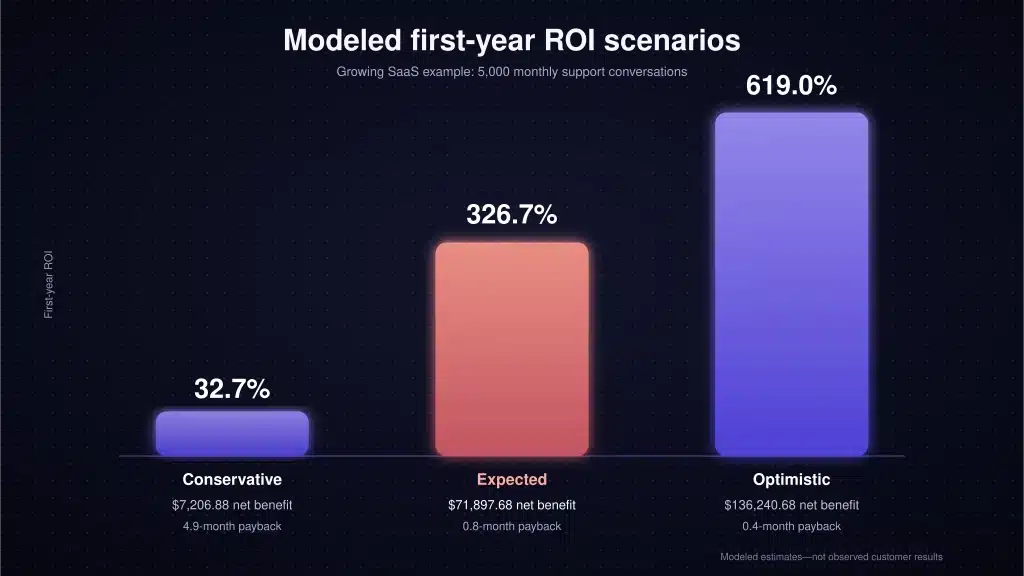
A single forecast hides how sensitive ROI is to automation eligibility and resolution quality. The table below keeps the same 5,000 monthly conversations, $34.78 hourly cost, $1,000 monthly platform cost, 12 monthly administration hours, and $5,000 implementation cost. Only eligibility, resolution rate, and handling time change.
How the forecast changes by scenario
The expected case is highlighted. Use the conservative case for budget approval and the optimistic case only when pilot data supports it.
Conservative
600
$7,206.88
Expected
1,500
$71,897.68
Optimistic
2,275
$136,240.68
These are mathematical scenarios, not Inquirly customer results. The optimistic result is useful as an upper bound, not as a budget forecast. A decision should still make sense in the conservative case.
Three examples by support volume
The next table shows how volume changes the business case. Each company uses different assumptions because issue mix, implementation effort, and administration normally change with scale.
ROI model by SaaS support volume
Compare the same ROI framework at three levels of monthly support demand. Scroll horizontally on smaller screens.
| Model input or result | Small SaaS | Growing SaaS Expected model | High-volume SaaS |
|---|---|---|---|
| Conversations/month | 1,000 | 5,000 | 25,000 |
| Eligible for AI | 50% | 60% | 65% |
| Successful AI resolution rate | 40% | 50% | 55% |
| Average handling time | 8 min | 9 min | 10 min |
| Successful AI resolutions/month | 200 | 1,500 | 8,937.5 |
| Capacity recovered/month | 26.7 hrs | 225.0 hrs | 1,489.6 hrs |
| Platform and usage cost/month | $300 | $1,000 | $6,000 |
| Administration/month | 4 hrs | 12 hrs | 40 hrs |
| One-time implementation | $1,500 | $5,000 | $25,000 |
| First-year net benefit | $4,360.16 | $71,897.68 | $507,998.10 |
| First-year ROI | 64.4% | 326.7% | 446.8% |
| Payback | 3.1 months | 0.8 months | 0.6 months |
Decimal resolutions are shown in the high-volume model because it is an expected monthly average. Actual monthly results will be whole conversations and will vary.
The lesson is not that every high-volume team will generate a 446.8% return. It is that fixed implementation costs are easier to absorb at higher volume, while usage-based AI fees can grow quickly. Run the model with the exact quote you receive.
Real-world results: what published case studies show
Public examples can help you choose a plausible range, but they should not be copied directly into your budget.
- Anthropic reported a 8% Fin resolution rate and 1,700 hours saved in the first month, according to an Intercom customer story. Read the Anthropic case study.
- Synthesia reported a 55% Fin resolution rate. It also said overall resolution time fell from five days and five hours to four hours and 37 minutes, a 96% decrease. Read the Synthesia case study.
- Lightspeed reported AI resolution rates of up to 65% and said agents using Copilot closed 31% more conversations per day. Read the Lightspeed case study.
These are vendor-published customer stories, not independent benchmarks. They show what specific teams reported after implementation; they do not establish the rate your knowledge base, customers, or issue mix will produce.
Start lower if you have inconsistent documentation, many account-specific questions, strict approval requirements, or complex troubleshooting. Raise the assumption only after a measured pilot.
What counts as a successful AI resolution?
This definition can change the entire business case.
A bot response is not a resolution. An answer is not necessarily a resolution. Even a conversation that ends after an AI response may not be a successful resolution if the customer gives up, opens a new ticket, or contacts another channel.
For ROI modeling, count a successful AI resolution when:
- the customer’s issue was solved without a human taking over;
- the answer was grounded in approved company knowledge or completed an authorized action;
- the customer did not reopen the issue within your defined window;
- no duplicate ticket appeared through another channel; and
- the outcome met your quality, compliance, and customer-experience rules.
Keep four metrics separate:
Measure what remains resolved
Four AI support metrics that are not interchangeable
Participation and answers show activity. Resolution and reopen rates reveal whether that activity created durable customer value.
Involvement rate
Share of conversations in which AI participated.
Answer rate
Share of conversations for which AI produced an answer.
Resolution rate
Share resolved without human takeover.
Reopen rate
Share that returned after an apparent resolution.
Ask every vendor exactly how it defines a billable outcome, resolution, session, and conversation. Similar words can represent different events.
Current AI support pricing models in 2026
AI support products are priced by seats, outcomes, sessions, ticket volume, flat plans, or combinations of these. That makes a simple price comparison misleading.
The following public prices were verified on August 3, 2026. They exclude taxes, temporary promotions, negotiated contracts, implementation work, and channel fees.
Pricing snapshot
What to enter in your ROI model
Public list prices are only a starting point. Include usage, seats, required add-ons, channels, and implementation costs that apply to your actual configuration.
Inquirly
Lite is free. Elite is $25/month on monthly billing or $20/month annually; Pro is $40/month or $32/month annually. Plans list unlimited agents, and Aily is included from Elite.
Intercom
Essential starts at $29 per full seat/month on annual billing. Fin is $0.99 per outcome.
Zendesk
Suite Team is $55 per agent/month on annual billing; Suite Professional is $115. The public page lists AI Agents in Suite plans.
Freshdesk
Growth starts at $19 per agent/month on annual billing and includes the first 500 Freddy AI Agent sessions. Additional sessions are $49 per 100.
Pricing changes over time. Keep the article’s visible “last verified” date next to this section and recheck the linked vendor pages before future updates.
The units are not equivalent. An Intercom outcome is not the same as a Freshdesk session, an Inquirly plan, or a Zendesk seat. Convert each quote into an estimated total monthly cost at your own volume before comparing ROI.
Example: why the pricing unit matters
Suppose a five-agent team expects 1,500 billable AI outcomes per month.
Using Intercom’s publicly listed annual-billing prices as a simple example:
- Five Essential full seats: 5 × $29 = $145/month
- Fin outcomes: 1,500 × $0.99 = $1,485/month
- Modeled total: $145 + $1,485 = $1,630/month
That figure excludes other usage, add-ons, tax, implementation, and any contractual minimum or discount. It is not a quote. It does show why a buyer should model usage instead of comparing only the $29 seat price.
For Inquirly, the standard Elite list price is $25/month with unlimited agents, but the public pricing page does not provide enough information to calculate the total cost at 1,500 AI resolutions. A credible comparison should request the applicable usage terms instead of assuming the list price is the entire bill.
Costs that AI ROI calculators often miss
1. Knowledge-base preparation
AI cannot reliably answer questions that your company has not answered clearly. Budget time to remove contradictions, define source ownership, update old screenshots, document policies, and create missing articles.
2. Integration and action design
Answering “Where is my invoice?” is different from securely retrieving an invoice. Account-specific actions may require APIs, permissions, identity checks, error handling, and audit logs.
3. Human review and ongoing administration
Someone must review failures, improve sources, test changes, monitor trends, and decide which topics are safe to automate. Include those hours every month.
4. Failed resolutions and repeat contacts
Do not award savings for a conversation that returns as a reopened ticket or moves from chat to email. A 7- or 14-day repeat-contact window can reveal hidden failure.
5. Seats, channels, and add-ons
The headline AI rate may exclude helpdesk seats, phone minutes, WhatsApp fees, outbound messages, Copilot, reporting, sandbox environments, or premium support.
6. Change management
Agents need clear escalation rules and a way to report bad answers. Support leaders need new quality-review routines. Customers may need a clear route to a person.
7. Opportunity cost
Implementation time has a cost even when employees complete the work as part of their normal jobs. Multiply internal hours by the appropriate loaded cost.
Capacity recovered is not automatically cash saved
This distinction is the difference between a useful ROI model and an inflated one.
If AI recovers 225 support hours per month but staffing and spending remain unchanged, the company has not saved $7,825.50 in cash. It has created capacity with an estimated value of $7,825.50.
That capacity becomes financially measurable when the business can show one or more of the following:
- fewer overtime hours;
- avoided contractor spend;
- an avoided or delayed hire;
- fewer outsourced tickets;
- canceled software;
- more customers supported without increasing headcount;
- measurable retention or expansion work completed with the recovered time; or
- reduced refunds, service credits, or churn linked to support delays.
Report cash savings and capacity value separately. Finance teams will trust the model more, and support teams will not be forced into a false “AI equals layoffs” narrative.
How to identify conversations that are realistically automatable
Review a representative 60- to 90-day sample and tag conversations by topic, risk, documentation quality, and required action.
Good first candidates usually include:
- account-access instructions that do not bypass security;
- billing-date, invoice-location, and plan-feature questions;
- documented setup and configuration steps;
- basic troubleshooting with clear decision paths;
- product availability, limits, and policy explanations; and
- status or process questions backed by reliable data.
Keep a human closely involved for:
- security incidents or identity disputes;
- refunds or credits above defined limits;
- legal, medical, or regulated advice;
- emotionally sensitive complaints;
- unclear product bugs;
- complex account-specific investigations; and
- any topic with incomplete or conflicting source material.
Do not estimate eligibility in a meeting. Tag real conversations and calculate it.
Metrics to track after launch
ROI should sit beside quality and operational measures.
Metrics to monitor after launch
Do not judge AI support on resolution volume alone. Pair every efficiency metric with a customer-quality signal.
| Metric | Calculation | Warning sign |
|---|---|---|
| Successful AI resolution rate | Successful AI resolutions ÷ eligible conversations | Rate rises while CSAT falls or reopens increase. |
| Escalation rate | AI conversations handed to humans ÷ AI-involved conversations | High escalation on supposedly simple topics. |
| Reopen rate | Reopened AI resolutions ÷ apparent AI resolutions | “Resolved” conversations are not staying resolved. |
| Cost per successful AI resolution | Total AI cost ÷ successful AI resolutions | Cost approaches or exceeds human cost for the same issue type. |
| Capacity recovered | Successful resolutions × avoided handling time | Uses average queue time instead of topic-specific handling time. |
| First-response time | Time from customer message to first meaningful response | Faster responses but no improvement in resolution. |
| CSAT by resolver | CSAT for AI-resolved vs human-resolved conversations | Aggregate CSAT hides a weak AI experience. |
| Knowledge coverage | Eligible topics with approved, current sources ÷ eligible topics | AI volume grows faster than governed knowledge. |
Customer expectations are also rising. Zendesk’s 2026 CX Trends research, based on 6,182 consumers and 5,115 CX professionals across 22 countries, reports that 74% of consumers expect customer service to be available 24/7 because of AI, while 63% say their demand for transparency has increased. See the study methodology and 2026 findings. Availability therefore matters, but so does making it clear when customers are speaking with AI and how they can reach a person.
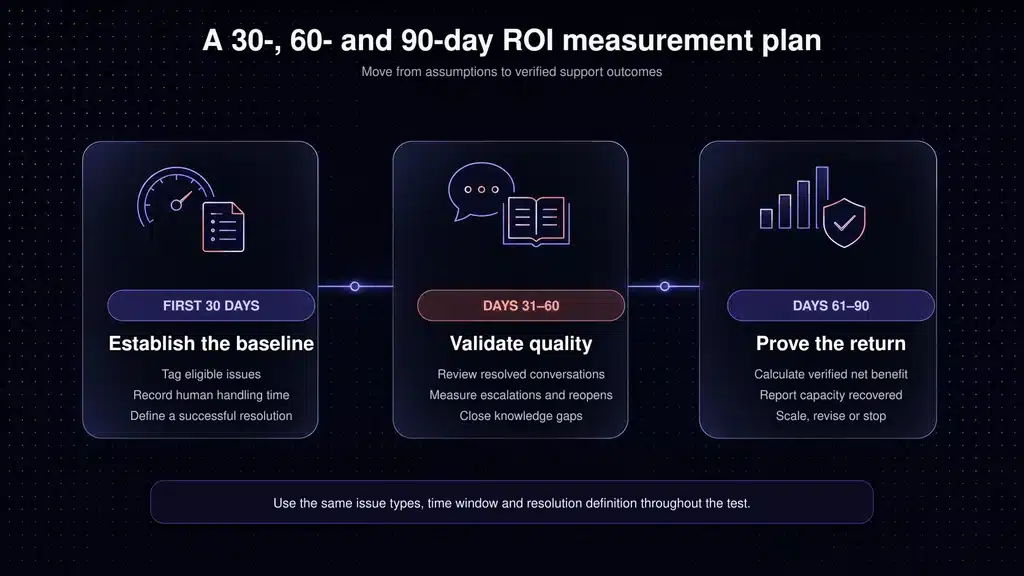
A practical 30-, 60-, and 90-day measurement plan
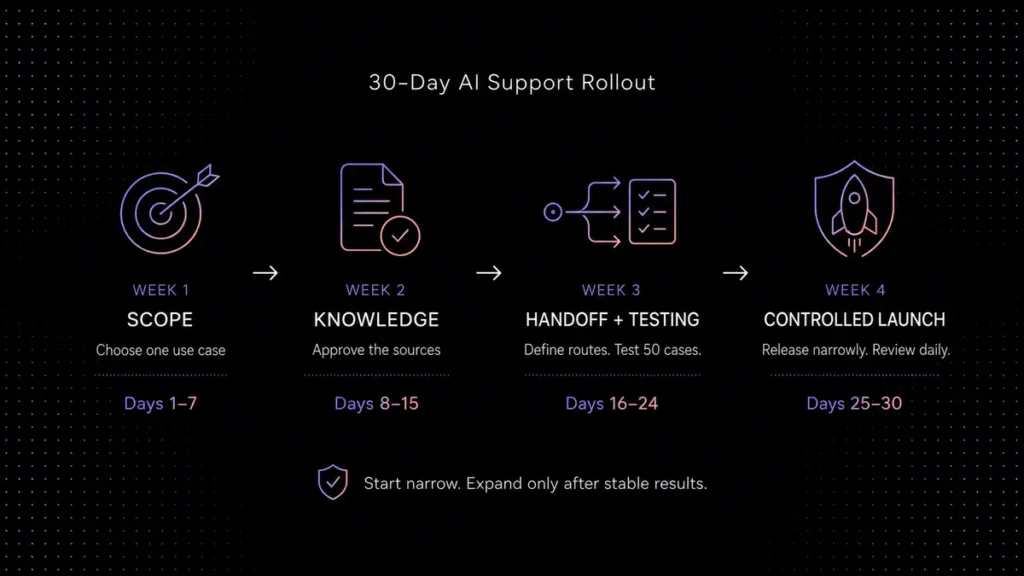
Days 1–30: establish the baseline
- Export 60–90 days of conversations.
- Remove spam and duplicates.
- Tag topic, handling time, escalation, repeat contact, and risk.
- Record current CSAT, first-response time, resolution time, cost per conversation, backlog, and staffing. Use our customer support benchmarks to define these metrics consistently before you compare AI performance with your baseline.
- Define a successful resolution and a reopen window.
- Estimate implementation and ongoing administration hours.
Days 31–60: run a controlled pilot
- Start with a narrow group of well-documented topics.
- Review a sample of both successful and failed conversations each week.
- Compare AI and human outcomes for the same topics.
- Track escalations, reopens, incorrect answers, and customer requests for a human.
- Update the conservative, expected, and optimistic models with observed data.
Days 61–90: validate the business case
- Calculate successful resolutions and topic-specific handling time avoided.
- Reconcile platform, usage, channel, and administration costs against invoices and time records.
- Identify whether capacity produced cash savings, avoided hiring, backlog reduction, or another measurable result.
- Check CSAT, repeat contacts, and compliance before expanding coverage.
- Approve, revise, or stop each use case separately.
When AI customer support ROI is likely to be weak
AI is not automatically the right investment. ROI may be poor when conversation volume is low, most issues require expert investigation, documentation is unreliable, or the product changes faster than the knowledge base can be maintained.
The project may also fail financially when:
- per-resolution fees are high relative to handling time avoided;
- the tool duplicates existing software instead of replacing it;
- the team cannot use the recovered capacity;
- customers repeatedly bypass AI to reach a person;
- implementation requires extensive custom engineering; or
- the company measures attempts as resolutions.
A negative result is useful. It may show that the team should improve documentation, automate workflows without generative AI, choose a different pricing model, or postpone the project.
How Inquirly fits into the calculation
Inquirly combines an omnichannel inbox, ticket management, workflow automation, knowledge-base management, and the Aily AI Support Assistant. Its public plans list unlimited agents, which can make team growth easier to model than conventional per-agent pricing.
As of August 3, 2026, Aily is listed from the Elite plan at a standard price of $25 per month on monthly billing or $20 per month on annual billing. Before using that number in a final ROI calculation, confirm any AI usage terms, required integrations, channel fees, and plan limits for your expected volume.
Inquirly is not the right fit for every buyer. Teams that require highly specialized enterprise integrations, a particular marketplace app, or a long-established global contact-center stack should verify those requirements during evaluation.
Calculate ROI with your real support data
Model your monthly volume, eligible topics, successful resolution rate, handling cost, implementation work, and ongoing AI cost. Then compare the result with Inquirly’s unlimited-agent plans.
View Inquirly pricing or request a personalized estimate.
Methodology and disclosure: Inquirly publishes this guide and is included in the pricing discussion. Public product prices and external statistics were checked on August 3, 2026. Vendor pricing can change and customer case studies may not be independently audited. All SaaS scenarios in this article are transparent mathematical models, not Inquirly customer claims or guaranteed results. Use invoices, finance data, and measured pilot outcomes for an investment decision.