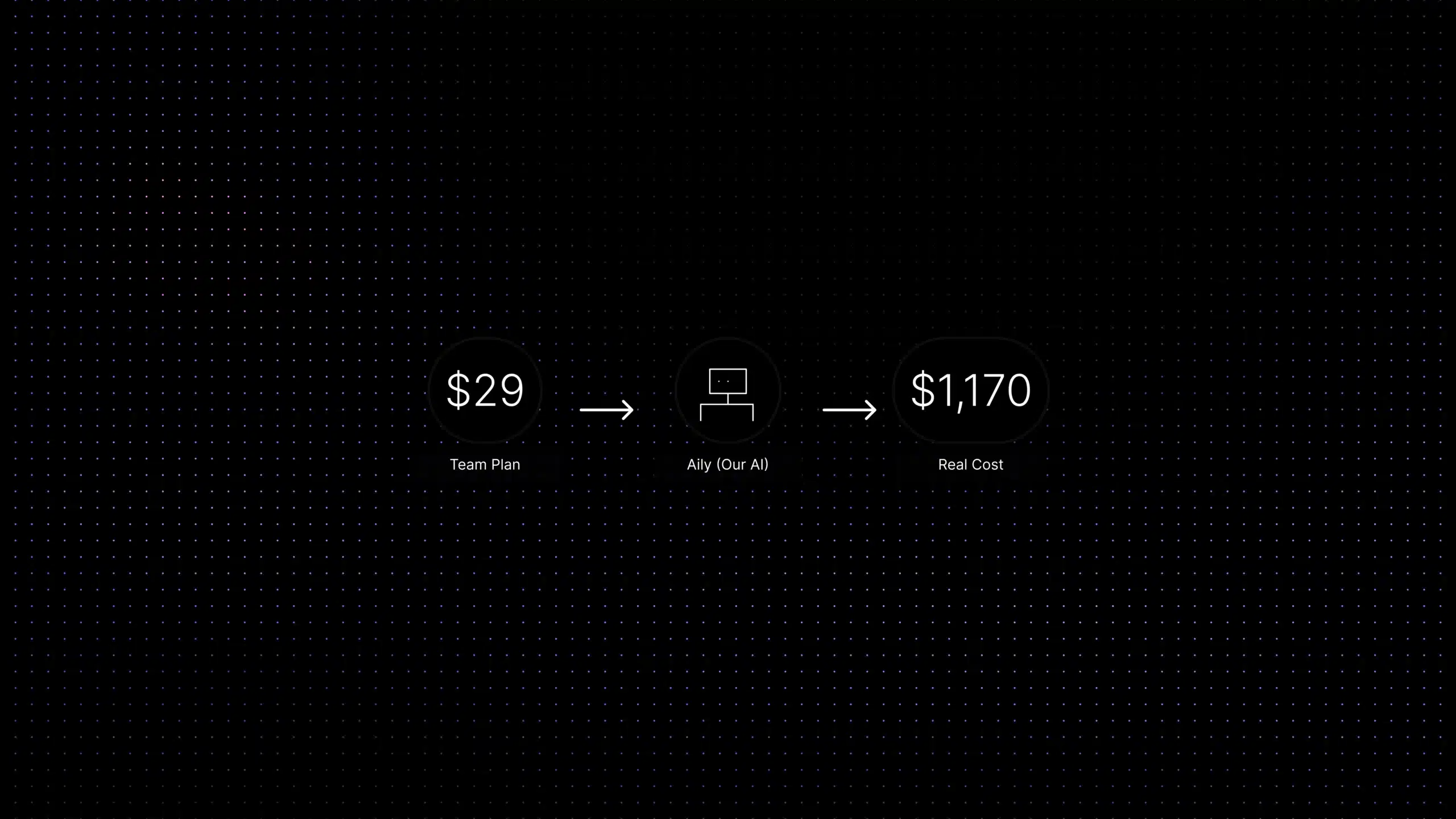
There is a particular kind of pain that happens when a CFO opens a support software invoice and the number is visibly different from the number in the original sales deck. It happens more often than vendors would like you to think. Not because they lied, but because pricing pages show you the floor, not the ceiling.
This guide explains how customer support software pricing actually works in 2026, what makes the total cost predictable or unpredictable, which pricing models exist and what each one means for a growing SaaS team, and where Inquirly sits in that picture.
Prices change. Every platform listed here has public pricing we have referenced from their official pages at time of writing, but you should verify before buying. That disclaimer is not filler. Support software pricing changes more often than most people expect.
Want to skip the comparison and see what Inquirly costs for your team size?
→ View Inquirly pricing → Start free trial
What affects customer support software pricing?
Ask this question before you look at any pricing page. The number in the top-left corner of the pricing table is designed to look as low as possible. The real number you pay is determined by a combination of the following:
Number of agents (seats)
Most platforms charge per agent per month. Ten agents at $40/agent is $400/month. Simple enough, until the team grows and you discover that the pricing tier changes at 10 agents, 25 agents, or 50 agents. Always map pricing across your expected headcount for the next 18 months, not just your current team size.
Channels included vs channels billed separately
Email support is almost always included. Live chat may be a higher tier. WhatsApp, SMS, voice, and social channels are often add-ons. A platform that looks affordable at email-only may cost significantly more once you add the channels your customers actually use.
AI features, the fastest-growing cost variable
This is the one that generates the most invoice surprises in 2026. There are two fundamentally different ways platforms charge for AI:
- Per seat (AI included): AI assistance, answer suggestions, and chatbot capabilities are included in the agent pricing. Your AI cost moves with headcount, not with how many questions the bot answers.
- Per automated resolution (usage-based): The platform charges for each conversation the AI fully resolves without human involvement. At low ticket volume this is economical. During a product launch, an incident, or a viral moment — when AI resolves thousands of conversations in a week, this number can spike hard and fast.
Automation, reporting, and workflow depth
Advanced automation rules, SLA management, custom reporting, and team permission structures are often gated behind higher-tier plans. The entry plan usually does what it says. The plan your team actually needs is usually one or two tiers up.
Onboarding, setup, and support
Enterprise implementations include professional services fees that can equal several months of subscription cost. Mid-market platforms usually include setup support in higher tiers. For smaller SaaS teams, onboarding cost is often zero, but the time your team spends configuring the platform is a real cost that rarely appears in a pricing comparison.
Annual vs monthly billing
Most platforms offer a meaningful discount, typically 15–20% for annual commitments. The tradeoff is flexibility: if the platform is not working at month four, you are committed until month twelve. For a platform you are uncertain about, paying monthly for the first three months before committing annually is usually worth the premium.
Customer support software pricing models explained
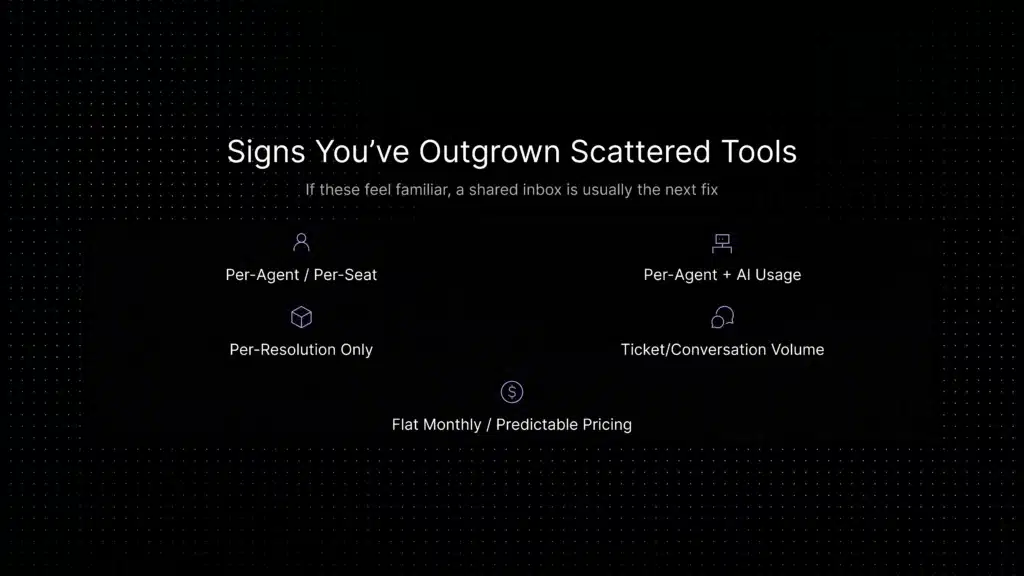
Before comparing tools, understand what category of pricing you are looking at. These are the five main models:
Customer Support Software Price Comparison: Popular Tools in 2026
Quick price comparison: Customer support software can be billed per agent, per conversation, per automated resolution, by usage, or through a flat monthly plan. Starting prices are useful for comparison, but the total cost depends on seats, AI usage, channels, automation and add-ons.
Prices below are directional based on publicly available information at time of writing. Verify each vendor’s official pricing page before purchasing. Pay close attention to AI fees, channel add-ons, and tier thresholds.
Pricing for the original comparison was sourced from official vendor pages in June 2026; Corebee pricing was checked in October 2026. Prices change frequently, so verify before purchasing. Enterprise plans are negotiated and may differ from published rates.
AI customer support software pricing: what actually changes
AI is where customer support software pricing gets complicated. Most major platforms in this category now mention AI somewhere in the product or pricing experience. What differs is what that AI does, how it is charged, and how accurate the output is.
The architecture difference that drives pricing
Support AI platforms in 2026 use one of two approaches:
- Retrieval-augmented AI: the AI pulls answers from your approved documentation before generating a response. Answers are accurate to your product. When the answer is not in the knowledge base, the AI escalates cleanly rather than improvising.
- General-model AI: the AI generates responses from broad model knowledge. It sounds confident. It may be wrong on the specifics that matter in support, your plans, your feature names, your policies.
This distinction affects both quality and pricing. Retrieval-based systems require you to maintain good documentation, the content quality determines the AI quality. Systems that are not clearly grounded in approved support content may be faster to deploy, but they are harder to trust for product-specific answers.
Inquirly’s AI layer (Aily) is retrieval-first by design. See how that works in the knowledge base AI chatbot guide.
Per-resolution billing, the variable you need to model
Several platforms charge per AI-resolved conversation, meaning each ticket the AI fully resolves without human involvement has a unit cost. Help Scout charges approximately $0.75 per AI resolution. Gorgias charges per resolved interaction. Zendesk’s automated resolutions are billed in tiers. Intercom’s Fin AI outcomes are priced separately from seat billing.
At 500 AI-resolved conversations per month, these costs are manageable. At 5,000 conversations, after a product launch, a pricing change announcement, or a service incident, they become a significant line item that nobody budgeted for.
What “AI included” actually means
When a platform says AI is included, check what specifically is included. Common inclusions: reply suggestions for agents, conversation summarisation, ticket classification, knowledge base search. Common exclusions that cost extra: autonomous AI that resolves conversations without an agent, AI quality assurance, advanced analytics on AI performance.
Inquirly includes Aily in its paid support workflow plans and does not use per-resolution AI billing. Check the pricing page for current plan limits and feature availability. For a full breakdown, see the AI customer support automation guide and the AI live chat software page.
Hidden costs to check before you sign
The invoice that surprises you is usually not the seat count you agreed to. It is the line items you did not think to ask about. Here are the ones that come up most often:
Channel add-ons
Email is typically included. Live chat, WhatsApp, SMS, social media, and voice are often separate add-ons, separately priced per channel or per messaging volume. Build your quote with every channel your team actually uses, not just the ones in the demo.
Advanced reporting and analytics
Basic ticket counts and response time reports are usually included. Custom dashboards, AI performance analytics, agent productivity reports, and SLA compliance reporting are often on higher tiers. If your support lead needs to report weekly to a VP, verify what tier includes the report you will actually need.
Integrations and API access
Most platforms include standard integrations (Slack, Jira, HubSpot, Salesforce) at no extra cost. Custom API access, webhooks with high request volumes, and deeper CRM syncs sometimes require a higher tier or a separate integration fee.
Per-automated-resolution AI billing
Covered above, but worth repeating as a hidden cost: if the platform uses per-resolution AI billing and your sales contact modelled cost at your average volume, ask them to also model cost at your peak volume. Those are different numbers.
Onboarding and professional services
Enterprise platforms often require paid onboarding. Some mid-market platforms include onboarding support at higher tiers. For SaaS teams under 50 agents, you usually self-configure, but if your team is time-constrained, check whether support is included or billed separately.
Annual contract lock-in
Annual billing saves 15–20% but locks you in. If you switch platforms at month five of a twelve-month contract, the cost of switching (migration, retraining, configuration, and the unused subscription) is real. Starting monthly and committing annually after you are confident is almost always worth the premium in the first year.
Competitor pricing context
Evaluating pricing on its own does not tell you enough, what you get for the price matters as much as the number itself. Here is where the major platforms fit:
Zendesk pricing
Zendesk Support plans start from around $19/agent/month; Suite plans covering all channels start higher. AI Agents (automated resolutions) are charged separately in usage-based tiers. Zendesk is a strong choice for enterprise teams that need the full feature depth. For SaaS teams at early and growth stage, the total cost and configuration overhead often outweigh the capability. For a full comparison, see the Zendesk alternative guide.
Intercom pricing
Intercom’s Essential plan starts at approximately $29/seat/month; Advanced and Expert plans are higher. Fin AI outcomes and advanced automation are priced separately on most plans. Intercom is strong for product-led SaaS teams that need proactive messaging alongside support, but total cost can increase quickly with AI usage and seat count. For a detailed comparison, see the Intercom alternative guide.
Freshdesk pricing
Freshdesk has a free tier for small teams, with paid plans starting around $15/agent/month. AI features (Freddy AI) are available at higher tiers. Freshdesk is a strong, affordable option for teams that want a traditional helpdesk structure without enterprise-level pricing complexity.
Help Scout pricing
Help Scout’s Standard plan is approximately $25/user/month, with Plus at $45 and Pro at $75. AI Answers are charged at approximately $0.75 per resolution with monthly caps available. Help Scout is transparent about its AI pricing, the per-resolution model is clearly documented, which makes it easier to forecast than platforms where AI costs are buried in tier descriptions.
Gorgias pricing
Gorgias charges by ticket volume with unlimited users, Starter at approximately $10/month, Basic $50, Pro $300, Advanced $750. AI Agent pricing is per resolved conversation. Gorgias is built for ecommerce; for SaaS support workflows, the ticket-volume model may not fit as naturally.
Corebee pricing
Corebee prices per workspace rather than per seat. The Free plan includes 50 AI conversations per month. Pro costs $99/month ($79/month billed annually), while Business costs $199/month ($159/month billed annually). Both paid plans include unlimited team members and AI conversations, subject to fair use. There are no per-resolution charges, so AI conversation volume does not directly increase the subscription price. Phone usage is metered separately: Pro includes 500 minutes a month, Business includes 2,000 minutes, and extra minutes on monthly plans cost $0.20/minute. This makes Corebee’s pricing model an option for teams seeking predictable seat and AI costs while forecasting voice usage separately.
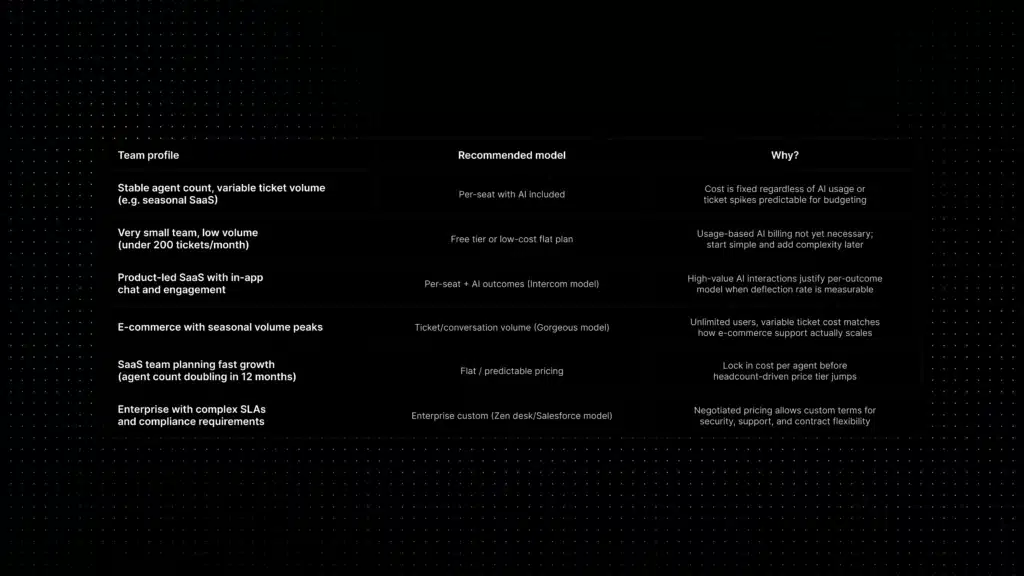
Which pricing model fits your support team?
The right pricing model is the one that stays predictable as your team grows. Here is a practical guide by team profile:
How to calculate the real cost of customer support software
Here is the framework for building an honest total cost comparison between any two platforms:
- Start with your baseline: current agent count × base monthly price per agent. This is the floor, not the ceiling.
- Add the channels you actually need: email, live chat, WhatsApp, SMS, check which are included vs separately priced.
- Price out AI at three volume points: your current monthly AI interactions, your peak month (last 12 months), and your estimated volume in 18 months. For per-resolution pricing, apply the per-resolution rate at each.
- Add reporting, automation, and integration requirements: check whether the features your team actually needs are on the base plan or require a higher tier.
- Account for annual commitment savings vs flexibility cost: if you are confident, annual saves 15–20%. If you are not, monthly is worth the premium.
- Add the invisible costs: configuration time, onboarding, and the migration cost if this does not work and you switch again in 18 months.
Software price is only one part of support economics. Track your cost per resolution benchmark alongside CSAT, resolution quality, automation, and escalation so lower software spend does not hide weaker support outcomes.
Most teams that do this calculation discover the platforms that looked similar in the demo differ by 40–60% in total cost when AI, channels, and add-ons are included.
For the full buying framework beyond pricing, see the guide to how to choose the right customer support software, and how ticket deflection affects the economic argument for AI-first support.
Related reading
- Best Customer Support Software for 2026: Features & Pricing Guide
- Best Zendesk Alternative for SaaS Teams
- Intercom Alternative for AI-First SaaS Support
- AI Live Chat Software for SaaS Support Teams
- AI Customer Support Automation: Implementation Guide & Use Cases
- Support Ticket Automation: How AI Routing Works
- Ticket Deflection for SaaS: Reduce Support Volume Without Hurting CX
- Knowledge Base AI Chatbot for SaaS Support