A practical guide to deciding when AI should stop, routing the conversation to the right person, and transferring enough context for the agent to continue without making the customer start again.
A chatbot can answer a product question in seconds and still create a bad support experience one minute later. The failure usually happens at the boundary: the AI cannot complete the request, the customer asks for a person, and the conversation reaches an agent without the information already collected.
That restart is not a small annoyance. In Zendesk’s 2026 CX Trends research, 74% of customers said it is frustrating to tell their story repeatedly to different agents. At the same time, customers do not want automation removed altogether: the same research reports that 74% expect customer service to be available around the clock because of AI. The operational goal is therefore not “bot or human.” It is a joined workflow in which each does the work it can handle safely.
This guide explains how to build that workflow, including exact escalation triggers, a context-transfer checklist, realistic SaaS examples, measurement formulas and a modeled financial example.
What is chatbot-to-human handoff?
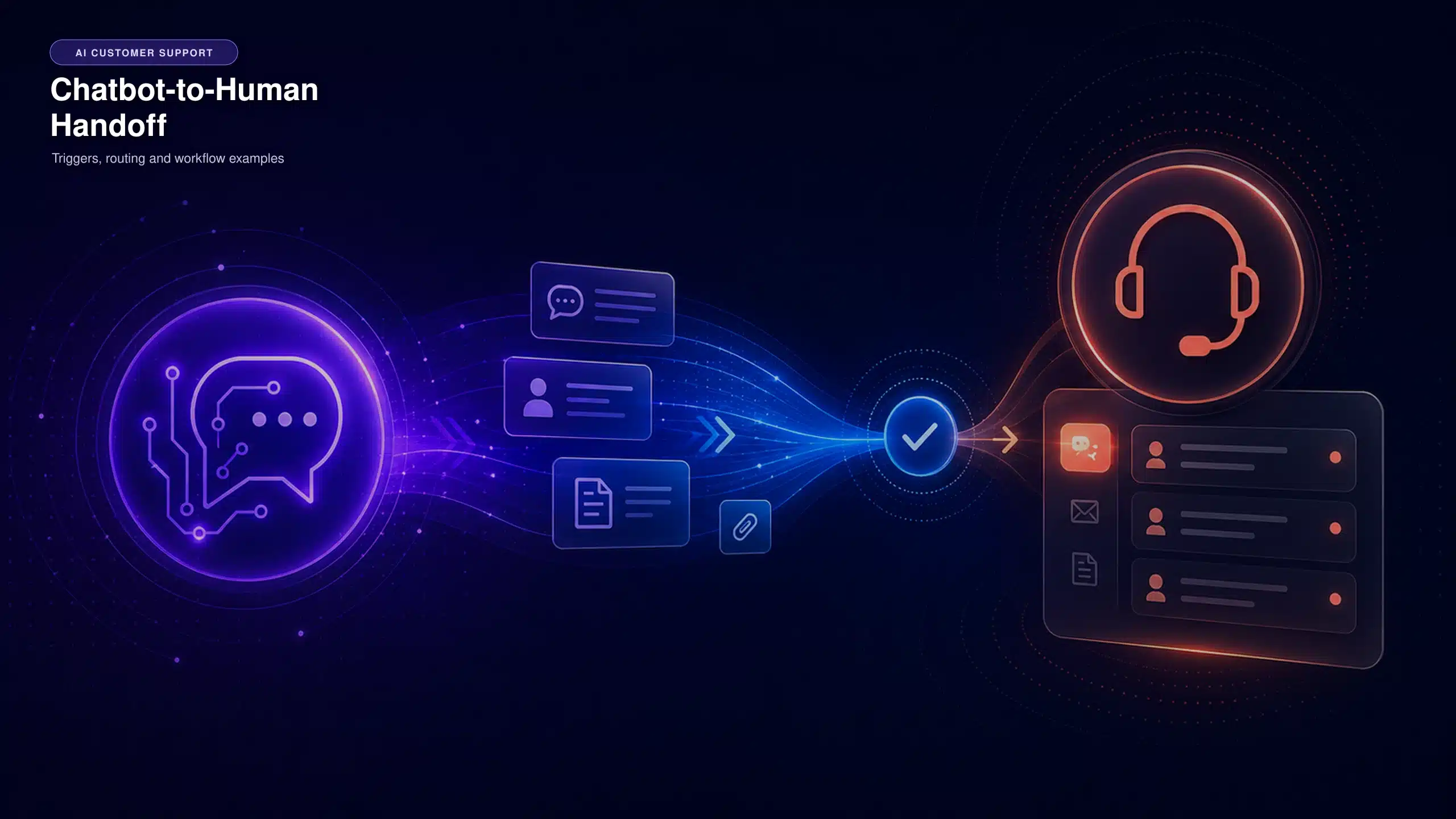
Chatbot-to-human handoff—also called chatbot escalation, AI-to-agent handoff or live-agent transfer—is the point at which an automated support system stops leading the conversation and assigns it to a human agent or team.
The transfer can happen in real time, such as moving a live chat into an available billing queue, or asynchronously, such as creating a technical-support ticket for the next business day. In both cases, the customer should know what happened, who owns the request and when to expect the next response.
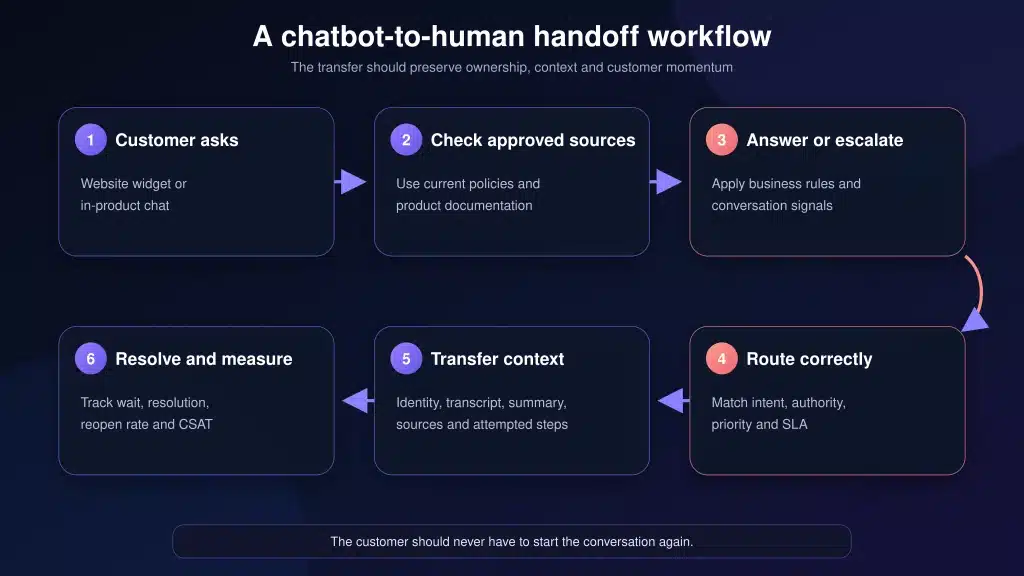
A handoff is not complete merely because a ticket was created. It is complete when these four conditions are met:
- The AI stops appropriately. It does not keep answering after a hard escalation trigger.
- The customer receives a clear expectation. They know whether the transfer is live or asynchronous and what happens next.
- The issue reaches the right owner. Routing considers intent, account, language, priority, business hours and agent authority.
- The context survives the transfer. The agent can continue the work rather than reconstructing it.
Why human handoff still matters in AI support
are frustrated by having to repeat their story to different agents.
worry about privacy when customer support uses AI.
higher agent productivity with generative-AI assistance.
These findings come from different studies and should not be combined as one benchmark.
These figures describe different studies and should not be combined into one benchmark. They point to the same design requirement from three directions: customers value speed, but they also value continuity, privacy and human judgment.
Qualtrics’ 2026 consumer research surveyed more than 20,000 people across 14 countries. It found that 53% worry that AI-enabled customer support creates privacy risks, while half miss the human touch it replaces. A handoff policy is one way to turn those concerns into an operational boundary: the AI handles low-risk, well-documented work, while a person takes control when identity, discretion, empathy or authority is needed.
Human agents can also become more effective when AI supports them instead of simply disappearing at transfer. A 2025 peer-reviewed field study in The Quarterly Journal of Economics analyzed 5,172 customer-support agents at a Fortune 500 software company. Access to an AI conversational assistant increased issues resolved per hour by 15% on average. The result came from one firm and one tool, so it is evidence of potential—not a guaranteed outcome for every support team.
How an AI-to-human handoff works
- Receive the request. The customer starts a conversation through live chat, email, WhatsApp, social messaging or another connected channel.
- Identify the customer and intent. The system detects the topic and uses available account, plan, language and page context.
- Check approved knowledge and actions. The AI looks for a supported answer or an allowed workflow. It should not improvise policy.
- Evaluate escalation rules. Hard rules, confidence, repeated failure, sentiment, risk and the customer’s request determine whether automation should continue.
- Collect only the missing information. Before transferring, the AI asks for details the receiving team genuinely needs, such as an order number, workspace URL or error code.
- Route and set expectations. The conversation goes to the correct queue or owner, and the customer receives a realistic response-time message.
- Transfer the context. The agent receives the raw conversation, a concise summary, fields, attempted steps, cited sources and the reason for escalation.
- Resolve and record the outcome. The system records whether the first route was correct, whether the customer repeated information, how long resolution took and whether the issue reopened.
10 chatbot escalation triggers to define before launch
Do not rely on a single confidence score. Use a combination of hard business rules, conversation signals and agent-availability logic.
10 chatbot escalation triggers to define before launch
Do not rely on a single confidence score. Combine hard business rules, conversation signals and agent-availability logic.
| Trigger | Why AI should stop or pause | Recommended action |
|---|---|---|
| 01Customer asks for a person | Continuing to block access damages trust. | Honor the request; collect only essential routing details. |
| 02No approved answer | The knowledge source is missing, outdated or contradictory. | Escalate and tag the conversation as a knowledge gap. |
| 03Repeated failure or loop | A second failed attempt is a strong sign that the workflow is not progressing. | Stop after the configured attempt limit and transfer. |
| 04Account-specific action | The request needs permission, identity checks or system access the bot lacks. | Authenticate through the approved process and route to an authorized team. |
| 05Security or privacy issue | Potential account takeover, data exposure or privacy requests require controlled handling. | Priority route: avoid requesting secrets in chat. |
| 06Billing dispute or exception | The knowledge base may explain policy, but it cannot authorize an exception. | Pass invoice, plan and relevant dates to billing. |
| 07High-risk advice | Legal, medical, financial or safety-sensitive issues require qualified judgment. | Escalate immediately under the organization’s risk policy. |
| 08Strong frustration or distress | Automation can intensify an emotional conversation. | Acknowledge the issue once, then transfer with priority. |
| 09Churn risk, VIP or SLA | The account may have contractual or commercial handling rules. | Apply account tier and SLA routing before queue assignment. |
| 10Investigation requires evidence | A bug may require logs, screenshots, reproduction or engineering review. | Collect the minimum diagnostic package and create a technical ticket. |
Current vendor products implement parts of this pattern in different ways. For example, Intercom’s documentation says Fin automatically escalates when a customer clearly requests a human, shows strong frustration or becomes stuck in a repetitive loop. Zendesk’s escalation guidance recommends collecting information, updating fields and identifying a suitable agent before transfer. These are useful design references, but your own rules must reflect your permissions, risks and service commitments. See the official Intercom procedure guidance and Zendesk escalation guidance.
What information should transfer to the human agent?
The receiving agent needs enough context to act, not a data dump. Use a consistent handoff packet.
What should reach the human agent?
| Context field | What the agent should receive | Quality check |
|---|---|---|
| Customer and account | Verified identity status, company, plan, language and relevant account tier | ✓ No unnecessary sensitive data |
| Intent and desired outcome | A one-line statement of what the customer wants | ✓ Specific enough to route |
| Full transcript | Original customer and AI messages in sequence | ✓ Available alongside the summary |
| AI summary | Issue, relevant facts, status and unresolved question | ✓ Neutral and fact-based |
| What was attempted | Troubleshooting steps, answers given and customer results | ✓ Prevents repeated steps |
| Sources used | Help article, policy or product documentation referenced by the AI | ✓ Current and approved |
| Collected fields | Order ID, workspace URL, error code, invoice date or other issue-specific data | ✓ Only fields the next team uses |
| Escalation reason | Human requested, policy exception, security risk, knowledge gap, loop or another controlled reason | ✓ Uses a reportable taxonomy |
| Owner, priority and SLA | Assigned team, priority, due time and next expected action | ✓ Matches the customer message |
Four realistic chatbot handoff examples
1. Billing plan limit becomes a policy exception
Customer: “Why can’t I add another workspace? I need it today.”
The AI identifies a plan-limit question, retrieves the approved plan documentation and explains the current limit. The customer then asks for a one-time exception. At that point, the answer is no longer informational; it requires commercial authority. The AI transfers the account plan, workspace count, requested exception, cited plan page and conversation transcript to billing.
Good handoff message: “Your current plan supports three workspaces, and you are asking for a temporary fourth workspace. I can’t approve an exception, so I’ve sent this to our billing team with your plan details and this conversation. You won’t need to repeat the request.”
2. A webhook problem needs technical investigation
Customer: “Our invoice-paid webhook stopped arriving after yesterday’s update.”
The AI checks current documentation and status information, then asks for the workspace URL, event type, approximate failure time, request ID and whether retries appear in the log. It does not ask the customer to paste API secrets. The handoff creates a technical ticket with the diagnostic fields, troubleshooting already attempted and the relevant documentation link.
3. A possible account takeover bypasses normal automation
Customer: “Someone changed the admin email and I can’t log in.”
This should be a hard security trigger. The AI provides no account-specific information and does not attempt an improvised identity check. It moves the conversation to the security or account-recovery route, marks it urgent and tells the customer which approved verification channel will be used.
4. Frustration signals churn risk
Customer: “This is the third time I’ve reported the same export bug. Cancel the account.”
The combination of repeated contact, strong frustration and cancellation intent should trigger a person. The receiving agent needs the prior ticket links, account tier, current incident status, export error, actions already tried and the exact customer request. Routing to a generic queue without that history turns a retention conversation into another restart.
Bad handoff versus effective handoff
Bad handoff vs. effective handoff
Bad handoff
- Hides or delays access to a person
- Creates a ticket with only “customer needs help”
- Drops the original transcript
- Routes to the first available queue
- Promises “someone will reply soon” without a time
- Counts the transfer as a successful resolution
Effective handoff
- Honors explicit human requests
- Explains the transfer and response expectation
- Passes summary and full transcript
- Routes by intent, authority, SLA and availability
- Shows attempted steps and approved sources
- Measures the post-transfer outcome
How to route escalated conversations to the right team
Start with intent, then apply constraints. A simple routing order is:
- Risk override: security, safety, legal, privacy or fraud routes first.
- Customer entitlement: account tier, SLA, region and language.
- Issue ownership: billing, technical support, customer success, sales or another functional queue.
- Agent capability: permissions, product expertise and escalation authority.
- Availability: business hours, current workload and live-agent capacity.
- Fallback: create an owned asynchronous ticket instead of leaving the chat in an unmonitored queue.
Do not let sentiment alone determine high-priority access. Sentiment classification can be wrong. Use it as one signal alongside explicit language, repeated contact, account context and the issue type.
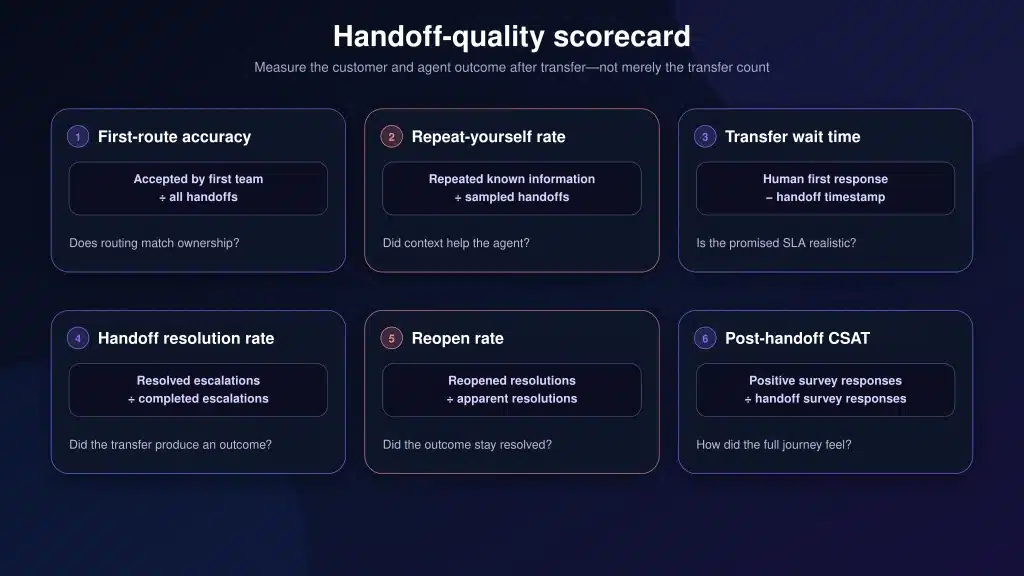
How to measure chatbot handoff quality
Escalation rate by itself cannot tell you whether a handoff system is working. A low rate may mean the AI resolves many issues—or that customers cannot reach a person. Measure the transition and the final outcome together.
Metrics that reveal handoff quality
| Metric | Formula | What it reveals |
|---|---|---|
| Escalation rate | Handoffs ÷ AI-involved conversations |
How often AI-involved work reaches a person |
| First-route accuracy | First-team acceptances ÷ all handoffs |
Whether routing logic matches real ownership |
| Repeat-yourself rate | Repeat cases ÷ sampled handoffs |
Whether context actually reaches and helps the agent |
| Transfer wait time | Human first response − handoff time |
Whether the promised service level is realistic |
| Post-handoff handling time | Agent work time ÷ completed handoffs |
Whether pre-collection and summaries reduce reconstruction work |
| Handoff resolution rate | Resolved escalations ÷ completed escalations |
Whether transferred work reaches a useful outcome |
| Reopen rate | Reopened resolutions ÷ apparent resolutions |
Whether “resolved” issues stay resolved |
| Post-handoff CSAT | Positive responses ÷ handoff survey responses |
Customer perception of the combined AI-human journey |
There is no universal “good” escalation rate
A password-reset FAQ and a security incident should not have the same target. Measure escalation by intent, risk and channel. For a documented how-to topic, a rising escalation rate may reveal a content gap. For refund exceptions or account recovery, a high escalation rate may be exactly what the policy requires.
Escalation rate should not be evaluated alone. Compare it with AI resolution, CSAT, repeat contacts, and other customer support benchmarks to understand whether automation is genuinely improving support.
Modeled example: the value of preserving context
Consider a SaaS support team with the following monthly assumptions:
- 5,000 total support conversations
- 60% eligible for AI participation: 3,000 conversations
- 50% of eligible conversations resolved by AI: 1,500 resolutions
- The remaining 1,500 AI-involved conversations escalate to a human
- A poor handoff requires four minutes of agent reconstruction and repeated questions
- A contextual handoff reduces that work to two minutes
- Modeled fully loaded labor cost: $34.78 per hour
This is a planning model, not a promised customer result or immediate payroll saving. It values recovered capacity only. To verify the benefit, measure actual post-handoff handling time before and after the workflow change, using the same issue categories and comparable periods. For escalated conversations, also measure how long the customer waits for the first meaningful human reply. See our guide to reducing first response time for queue ownership, routing, SLA, and prioritization practices. For a complete model that also includes AI resolutions, platform cost, administration and implementation, use Inquirly’s AI customer support ROI calculator when published.
Chatbot handoff implementation checklist
Before configuration
- List the top conversation intents by volume and risk.
- Assign a business owner to each intent.
- Separate informational answers from actions requiring authority.
- Define hard escalation rules for security, privacy, billing exceptions and explicit human requests.
- Document business hours, SLAs, languages and fallback ownership.
During configuration
- Create a short escalation-reason taxonomy.
- Map every reason to a team, priority and fallback.
- Define the minimum fields required for each route.
- Pass both the summary and original transcript.
- Write different customer messages for live transfer, after-hours tickets and failed transfer.
- Prevent the AI from resuming after a human has taken ownership unless handback is intentional.
Before full launch
- Test real customer phrasing, misspellings, incomplete messages and follow-up questions.
- Test every hard escalation rule and every fallback route.
- Verify that agents can see the summary, transcript, fields and cited sources.
- Review a sample of handoffs for unnecessary data collection.
- Compare the customer’s promised wait time with the actual queue behavior.
Do not expand until these controls pass
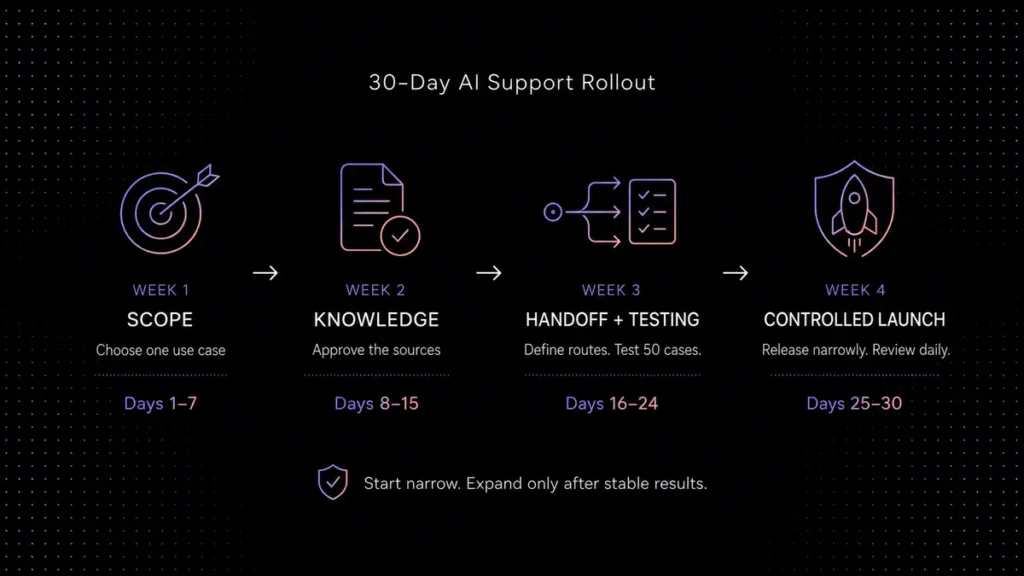
A practical 30/60/90-day rollout
A practical 90-day handoff pilot
Baseline
Measure escalation reasons, routing accuracy, repeat-yourself rate, post-handoff handling time and customer wait. Launch one channel and three low-risk intents.
Improve
Fix knowledge gaps and misroutes. Compare performance by intent and business hours. Train agents on summaries, source links and feedback tags.
Validate and expand
Expand only workflows that pass quality gates. Add another channel or intent, verify privacy controls and calculate capacity using observed—not assumed—time savings.
How Inquirly supports AI-to-human escalation
Inquirly connects Aily, knowledge-base management, an omnichannel inbox, ticketing and workflow automation in one support environment. That structure is useful for handoff because the AI answer, conversation history, ticket ownership and human follow-up do not need to live in separate tools.
A typical Inquirly workflow can use approved knowledge for routine answers, collect context for unresolved requests and move the conversation into a trackable human workflow. Teams can then review escalations alongside conversation, ticket and customer information. For a broader view of the system, read the guides to AI live chat software, AI customer support automation and knowledge-base AI chatbots.
As of August 4, 2026, Inquirly’s public pricing page lists a free Lite support plan with unlimited agents. Aily and knowledge-base management begin on the Elite plan, listed at $25 per month on monthly billing or $20 per month on annual billing before temporary promotions. Feature scope, usage terms and prices can change, so verify current Inquirly pricing before publishing a comparison or purchasing.
Sources and methodology
This article uses public information checked on August 4, 2026. Survey findings are attributed to their publishers and are not presented as Inquirly customer results. The financial example is explicitly modeled from stated assumptions. Product features and pricing can change.
- Zendesk CX Trends 2026: customer expectations, repeated-story frustration and 24/7 availability.
- Qualtrics 2026 Consumer Experience Trends: research based on more than 20,000 consumers worldwide.
- Qualtrics global trends analysis: privacy concern and missing human touch in AI-enabled support.
- Brynjolfsson, Li and Raymond, “Generative AI at Work,” QJE (2025): field evidence from 5,172 support agents.
- Zendesk escalation-flow documentation: collecting information, updating fields and identifying an agent before handoff.
- Intercom Fin procedure documentation: automatic escalation for human requests, frustration and repetitive loops.
- Inquirly pricing: current plan, agent and feature information.
About the author
Adam Smith works with the Inquirly team on AI customer support automation, knowledge-base workflows and Aily, Inquirly’s AI support assistant. This article combines public research with practical workflow-design principles for SaaS support teams.