The evidence points in both directions. In a Gartner survey of 5,728 customers conducted in December 2023, only 14% of customer service issues were fully resolved through self-service, and 43% of self-service failures occurred because customers could not find relevant content. That is a warning about weak knowledge and broken journeys—not proof that automation cannot work. Meanwhile, Deloitte Digital’s 2026 research found that 64% of surveyed service leaders reported higher agent productivity from AI and 39% reported a lower cost per contact. Those are reported organizational outcomes, not a promise that every deployment will produce the same result.
This guide turns that tension into a practical 30-day AI customer support implementation plan. It is designed for SaaS and growth-stage support teams that already have customer conversations, some usable documentation and a human team that will remain available when automation is not appropriate. If you are still defining the broader strategy, start with Inquirly’s guide to AI customer support automation; this article focuses on the implementation work that follows.
Key takeaways from current AI support research
14%, Issues fully resolved through self-service in Gartner’s customer survey. Lesson: design the assisted journey too.
64%, Service leaders in Deloitte Digital’s 2026 survey who reported higher agent productivity from AI. Lesson: measure the human-plus-AI workflow.
15%, Average productivity increase in a peer-reviewed field study of 5,172 support agents. Lesson: results vary by worker and context.
These figures come from different studies with different populations and methods. They should not be combined into one performance benchmark.
What AI customer support implementation actually includes
AI customer support implementation is the operational process of choosing an automation use case, preparing the knowledge and data it may use, configuring answer and routing behavior, testing likely failures, releasing the workflow to customers and monitoring the result.
It is broader than installing a chatbot. A chatbot can be live while the support operation around it is still unfinished. A complete implementation answers seven questions:
- Purpose: Which customer problem should the AI help solve?
- Scope: Which requests may it handle, and which are excluded?
- Knowledge: Which approved sources may support an answer?
- Action: Can it only explain, or may it also update, route or create work?
- Handoff: When and how does a person take over?
- Evaluation: What constitutes a correct answer or a correct escalation?
- Ownership: Who reviews failures and maintains the workflow after launch?
If you have not yet selected a platform, complete a structured review of channels, knowledge, routing, security and total cost first. Inquirly’s seven-step customer support software evaluation guide provides that buying framework.
Real-world example: AI assistance across 5,172 support agents
A peer-reviewed 2025 study in The Quarterly Journal of Economics examined the staggered introduction of a generative-AI conversational assistant at a Fortune 500 software company. The system supported human agents with suggested responses rather than replacing the complete service workflow. Across 5,172 customer-support agents, access to the assistant increased issues resolved per hour by 15% on average.
The average hides an important implementation lesson. Less-skilled and less-experienced agents improved by about 30%, while the most experienced agents saw little productivity benefit; the researchers also found evidence of a small decline in conversation quality for the highest-skilled group. This was one firm using one system, so the result is not a universal AI benchmark. It shows why rollout analysis should be segmented by agent experience, issue type and quality, not reduced to one company-wide average. Read the published field study.
Before day 1: complete an AI support readiness check
A team is ready for a limited pilot when it can identify repetitive demand, name a trustworthy source for the answers, route exceptions to a real owner and compare results with a pre-launch baseline. “We have a lot of tickets” is not enough.
Readiness rule: if the team cannot identify the current source, the human owner or the pre-launch baseline, do not automate that topic yet. Fixing the operating gap is part of implementation.
The 30-day AI customer support implementation plan
The timeline below assumes the company already has customer-support software and at least a basic help center. A regulated deployment, a workflow that can change customer data or a migration across several channels will usually require more time and review.
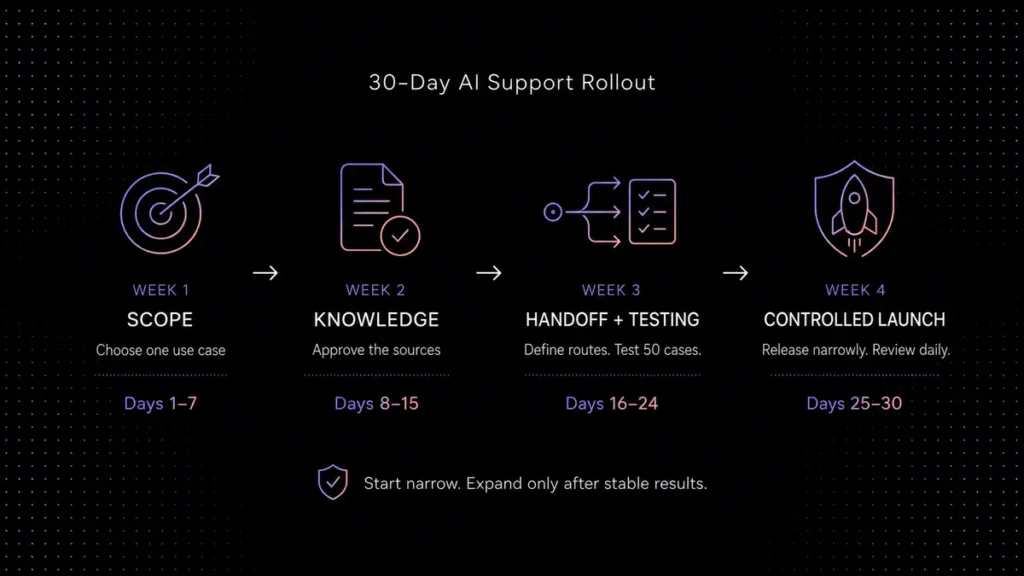
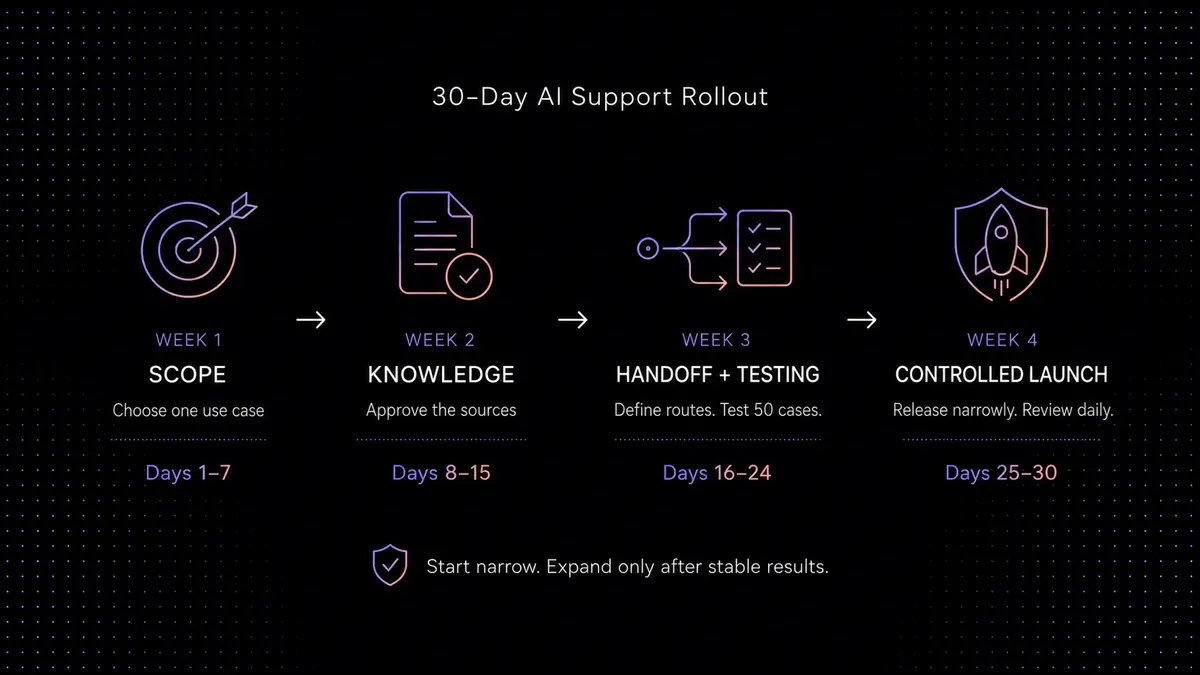
Days 1–7
Scope and baseline
Choose one use case, record current performance and define exclusions.
Days 8–15
Knowledge and controls
Approve sources, remove conflicts and configure answer boundaries.
Days 16–24
Handoff and testing
Build routing, create 50 tests and correct every critical failure.
Days 25–30
Controlled launch
Release narrowly, review daily and expand only after stable results.
Week 1: choose the first use case and record the baseline
Start with a problem that is common enough to matter, documented well enough to answer and low-risk enough to test safely. Good first use cases often include setup instructions, feature-location questions, plan limits, basic troubleshooting and status explanations. Poor first use cases include suspected account takeover, refund exceptions, legal complaints, safety issues and anything that requires a person to make an account-specific judgment.
Days 1–3: analyze demand. Export or sample the previous 60–90 days of customer conversations. Group them by intent, not by channel. “Password reset” is one intent whether it arrived by chat or email. Record monthly volume, the share of conversations that match each intent, average handling time, transfers, reopenings and repeat contacts.
Days 4–5: select one scope. Write the use case as a bounded sentence: “The AI may explain published workspace limits and show customers where to manage workspaces; requests for exceptions or account changes go to billing.” This is stronger than “automate billing questions” because the permission boundary is visible.
Days 6–7: establish the baseline. For the selected intent, record:
- Monthly conversation volume
- Median and average first response time
- Average handling time
- First-contact resolution rate
- Escalation or transfer rate
- Repeat-contact or reopening rate
- CSAT response count and score, if available
Without a baseline, a fast answer can look like success even when customers return later because the answer did not solve the issue.
Week 2: prepare the knowledge base and answer boundaries
AI cannot repair contradictory policy by sounding confident. The system should retrieve from a small set of current sources that have owners and review dates. If the same plan limit is described differently in the help center, an old onboarding PDF and an internal macro, resolve the conflict before connecting those sources.
Use this five-part knowledge audit:
Days 8–10: inventory and remove duplicate, obsolete or conflicting content. Days 11–12: rewrite gaps as task-complete articles. Days 13–15: connect only the approved set and define three possible AI behaviors:
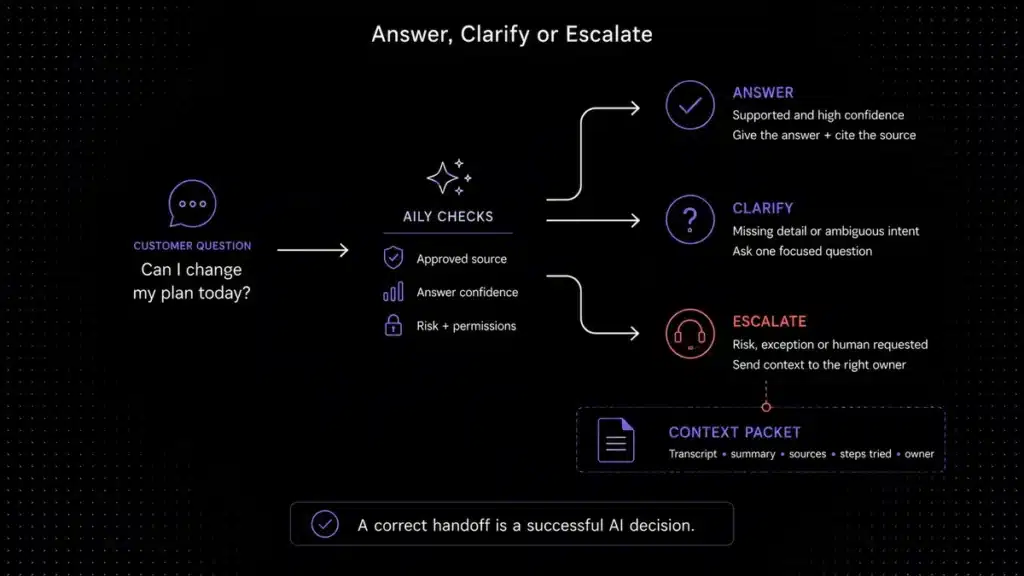
- Answer: the request is in scope and supported by current knowledge.
- Clarify: one missing detail determines which approved answer applies.
- Escalate: the request is excluded, sensitive, unsupported, repeatedly unsuccessful or explicitly asks for a person.
For a deeper content-preparation workflow, see Inquirly’s guide to building a knowledge base AI chatbot.
Week 3: configure routing and human handoff
A correct escalation is a successful AI decision. Do not punish the system for transferring a billing exception or security concern that it should never resolve autonomously.
Days 16–18: create hard triggers. At minimum, transfer when the customer requests a person; no approved source supports the answer; the conversation repeats without progress; an account-specific action needs authorization; or the request involves security, privacy, fraud, legal, high-risk advice, a billing exception or strong frustration.
Human access is also a customer-experience requirement. A Gartner survey published August 4, 2026 found that 87% of 3,566 B2B and B2C customers considered it essential for companies using generative AI in service to provide a human option. Half said GenAI had made service interactions easier. The implementation lesson is practical: let AI attempt resolution when confidence is high, but do not force customers through repeated failed attempts before they can reach a person.
Days 19–20: define the context packet that reaches the agent:
- Customer identity status, company, plan and language
- The customer’s desired outcome in one sentence
- The full transcript plus a concise factual summary
- What the AI already tried and how the customer responded
- The sources used
- Relevant fields such as workspace URL, error code or invoice date
- The escalation reason, owner, priority and response expectation
Keep both the summary and the original transcript. A summary helps an agent scan the issue, but it can omit a detail that later matters. The full operational pattern is covered in the guide to chatbot-to-human handoff.
If requests must be classified, tagged and assigned before an agent sees them, connect the design to your support ticket automation rules. Every route needs a fallback owner; an unmonitored queue is not a handoff.
Week 3: build and run a 50-question test set
Do not write the entire test set from memory. Pull most questions from real support conversations, anonymize personal data and preserve the way customers actually write, including vague wording, misspellings and frustration.
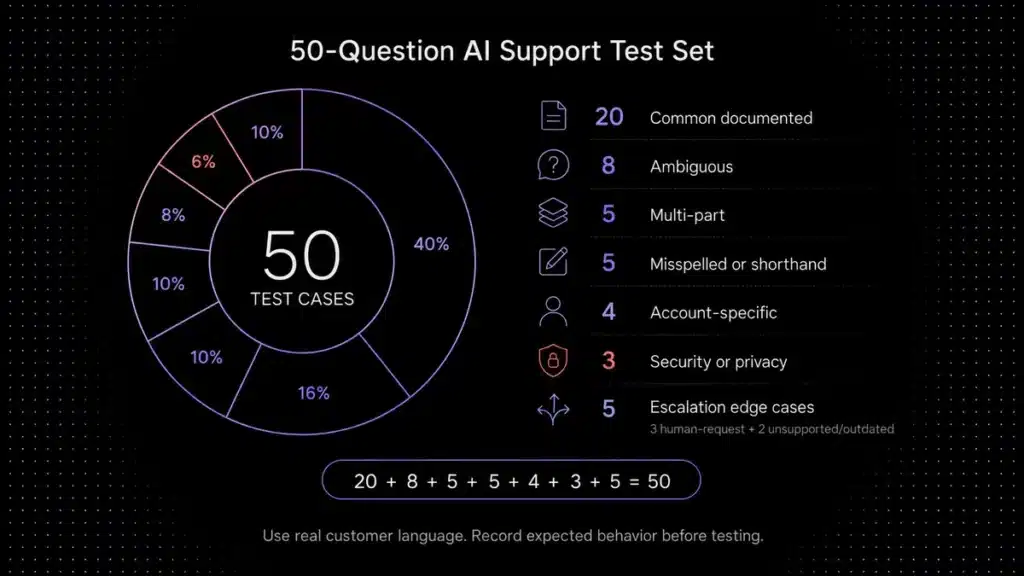
A balanced first test set can contain exactly 50 cases:
20 common documented questions
8 ambiguous questions
5 multi-part questions
5 misspelled or shorthand questions
4 account-specific requests
3 security or privacy cases
3 frustrated or human-request cases
2 unsupported or outdated terms
Days 21–22: build the set and record the expected behavior before testing. Days 23–24: run every case, save the response and score five dimensions:
The maximum score is 5. Do not hide a critical failure inside a high average. One confident but incorrect security instruction matters more than several perfect answers about navigation.
Use a risk-based go/no-go gate
NIST’s Generative AI Profile is a voluntary, cross-sectoral companion to the AI Risk Management Framework. It is intended to help organizations incorporate trustworthiness into the design, development, use and evaluation of AI systems, and it centers suggested actions on governance, content provenance, pre-deployment testing and incident disclosure. In practical support terms, make the launch decision traceable: document the reviewers, test cases, critical failures, fixes, approval, monitoring owner and rollback steps.
Example launch criteria for a low-risk first use case
- Zero unsupported answers in security, privacy, billing-exception or other hard-stop tests
- 100% of hard-escalation test cases reach the correct human route
- The complete context packet appears in every test handoff
- At least 90% of in-scope routine cases score 4 or 5 out of 5
- Documentation owners approve every connected source
- The team has tested how to pause the workflow
This is a modeled gate for a low-risk pilot, not a universal standard. Higher-risk use cases need stricter criteria, specialist review or no autonomous answer at all.
Week 4: launch to a controlled audience
Day 25: train the support team. Show them the allowed scope, the escalation reasons, where sources appear, how to correct a knowledge gap and how to disable the workflow. Agents should not learn the system from customers reporting failures.
Day 26: run an internal or employee pilot. Use realistic accounts and confirm that routing, permissions, notifications and reporting work, not just the text of the answer.
Day 27: release the workflow to one channel, customer segment, language or narrow topic. Keep the human option visible. Do not activate every support topic because the first 50 tests looked good.
Days 28–30: review conversations daily. Tag failures as knowledge gap, retrieval mismatch, incomplete answer, wrong route, missing context, unsupported action, tone problem or customer-interface issue. Fix the source or workflow before trying to “prompt around” a policy problem.
A real-number implementation example
Consider a modeled B2B SaaS support team handling 5,000 conversations per month. An analysis of recent tickets finds that 60% are repetitive and potentially eligible for AI assistance. The team expects 50% of eligible conversations to be successfully resolved without immediate human follow-up. The average eligible conversation previously required nine minutes of agent time, and the fully loaded support-time value is $34.78 per hour.
This is an illustration, not a forecast. The 225 hours are recovered capacity, not automatically $7,825.50 in cash savings. The financial result depends on what the company does with the time: absorb growth without hiring, reduce overtime, shorten queues, improve documentation or take on higher-value work. One-time implementation cost, taxes, add-ons and unsuccessful AI conversations would also change the result. Use the AI customer support ROI calculator to model your own inputs.
Metrics to measure after launch
Measure the outcome of the customer problem and the quality of the transition to a person. A high answer rate may simply mean the AI talks often. A high containment rate may include customers who abandoned the interaction. Neither proves successful resolution.
Review the first week daily, then choose a cadence based on support volume and risk. In March 2026, NIST described post-deployment monitoring as crucial because AI behavior can vary in unpredictable ways in real-world use. The report also identified gaps such as limited trusted guidance, immature information sharing and difficulty detecting performance drift. That is a strong reason to connect every monitored metric to an owner and a response, not to rely on a dashboard that nobody acts on.
Common AI customer service implementation mistakes
Automating every topic first
A broad launch hides which knowledge source, rule or route caused a failure. Begin with one bounded use case.
Using outdated documentation
A fluent answer based on an old policy is still wrong. Give every connected source an owner and review trigger.
Hiding the human option
Containment is not success when customers are trapped. Honor explicit requests for a person.
Treating escalation as failure
A correct transfer protects customers and the business. Measure whether it reached the right owner with context.
Optimizing answer rate
More AI replies can increase noise. Optimize verified resolution, repeat contact and customer experience.
Having no operational owner
Models, products and policies change. Someone must review failures, sources and routing after launch.
The complete AI customer support implementation checklist
Scope and ownership
- One high-volume, low-risk use case is defined.
- Allowed answers and prohibited actions are documented.
- A business owner, knowledge owner and routing owner are named.
- A pre-launch performance baseline is saved.
Knowledge and controls
- Connected content is accurate, complete and non-conflicting.
- Every source has an owner and review trigger.
- Answer, clarify and escalate behaviors are defined.
- Security, privacy, billing exceptions and other hard stops are configured.
Testing and approval
- A 50-question test set includes normal and adversarial cases.
- Expected outcomes were recorded before the tests ran.
- Every critical failure was corrected and retested.
- Human handoffs preserve transcript, summary, sources, attempted steps and owner.
- A risk-based go/no-go decision is documented.
Launch and monitoring
- The team knows how to inspect, correct and pause the workflow.
- The first release is limited by topic, channel, segment or language.
- Human support remains clearly accessible.
- Failures are reviewed daily during the first week.
- Successful resolution, repeat contact, handoff quality and CSAT are measured.
- Expansion requires stable results—not simply more AI activity.
When Inquirly fits this rollout
Inquirly is most relevant to small and growth-stage SaaS teams that want knowledge-based AI answers, ticketing, a shared inbox, workflow automation and human handoff in one support operation. It is less suitable for a buyer whose main requirement is highly specialized enterprise contact-center infrastructure or a large legacy integration marketplace. Those teams should compare several products using the same implementation test cases; the best customer support software comparison is a useful starting point.
Because Inquirly publishes this guide, evaluate the product with your own documentation, escalation rules and customer questions. As reviewed on August 5, 2026, Inquirly’s public pricing lists Lite at $0, Elite at $25 per month on monthly billing or $20 per month billed annually, and Pro at $40 per month monthly or $32 per month annually. All three plans list unlimited agents; Aily and knowledge-base management begin on Elite. Verify current plan allowances, discounts and any usage-based charges before calculating total cost.
Start with one workflow
Test your first AI support workflow
Bring one high-volume question, the approved documentation and one case that must reach a human. See what Aily answers, what it escalates and which context reaches your team.
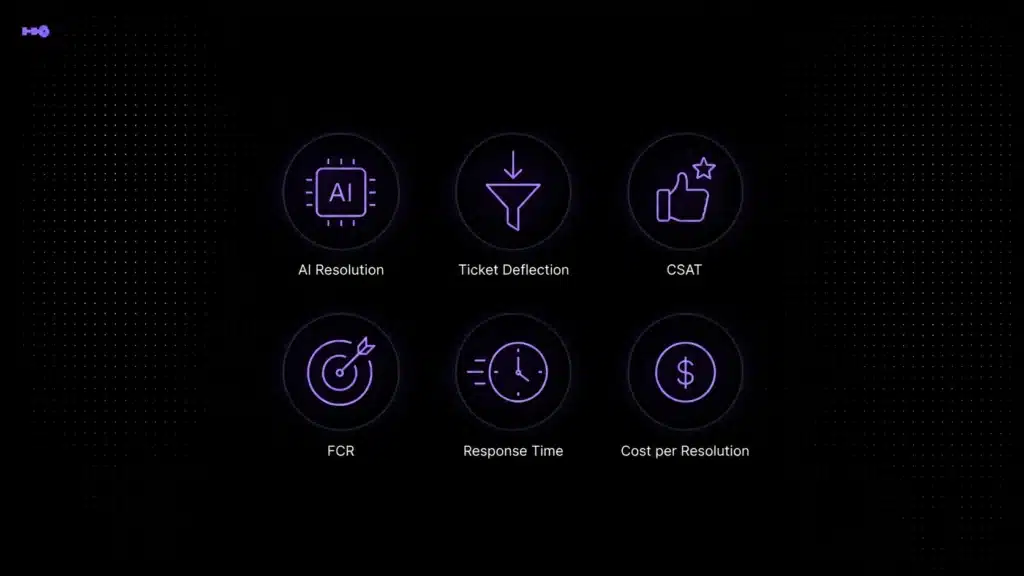
No setup fee · Unlimited agents listed · Human handoff supported
Your first test
01 Ask a documented question
02 Trigger a routing rule
03 Inspect the human handoff
Conclusion: launch narrow, learn quickly and expand carefully
The strongest AI customer support implementation does not begin with the most impressive demo. It begins with a bounded customer problem, trustworthy knowledge, explicit limits and a human path that works when automation should stop.
Use the first 30 days to create evidence: a saved baseline, approved sources, clear routing rules, a realistic test set and measurable launch criteria. Then expand only when successful resolutions remain stable and customers can still reach the right person without repeating the entire story.